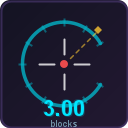
Fgrp’s Reach DIsplay
Displays your hit distance on the HUD — see exactly how far your attacks reached.
截图

介绍
Reach Display
A lightweight client-side Fabric mod that shows the distance of your hits right on the HUD.
What it does
Every time you hit a player or mob, the mod displays the exact distance (in blocks) between you and the target. Useful for PvP practice, understanding combat mechanics, or just satisfying your curiosity.
Features
- Hit distance on HUD — see how far each attack reached
- Fully customizable — change color, position, text scale, label, decimal places
- GUI settings — configure everything through Mod Menu (press N in-game)
- Drag to move — drag the display anywhere on your screen with your cursor
- Commands —
/reachdisplay toggle,/reachdisplay reset,/reachdisplay reload - Config file —
config/reach_display.jsonfor manual editing - Client-side only — no server mod needed, works on any server
- Press “N” for settings
Supported Versions
Fabric: 1.21 — 1.21.11, 26.1
Requirements
- Fabric Loader
- Fabric API
Optional
- Mod Menu (for GUI settings)
常见问题
Fgrp’s Reach DIsplay 支持哪些 Minecraft 版本?
Fgrp’s Reach DIsplay 支持 Minecraft Java 版 1.21–26.1.1,共 14 个版本,可用的加载器:Fabric。下载时注意选择和你游戏版本一致的文件。
Fgrp’s Reach DIsplay 怎么安装?
先用 PCL2 或 HMCL 启动器安装对应版本的 Fabric,再把下载的 .jar 文件放进游戏目录的 mods 文件夹,重新启动游戏即可。开启了版本隔离的,mods 文件夹在 versions/版本名 下面。运行环境:仅客户端。
FGRP 的其他作品
查看全部 →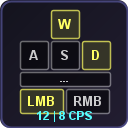
Beatiful Keystrokes
Displays pressed keys (WASD, Space, Shift) and mouse buttons with live CPS counter on a fully customizable HUD.
Beatiful Keystrokes
Displays pressed keys (WASD, Space, Shift) and mouse buttons with live CPS counter on a fully customizable HUD.
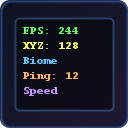
InfoHUD+
A beautiful F3 replacement — shows FPS, coordinates, GPU, CPU, RAM, biome, speed, ping and more on a clean customizable HUD.

EasySprint
Always sprint automatically — toggle with one key. Clean HUD indicator shows sprint status
评论
登录后评论和评分