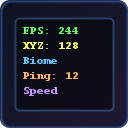
InfoHUD+
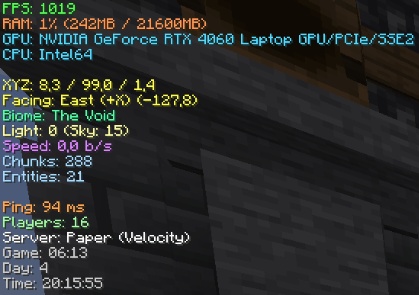
A beautiful F3 replacement — shows FPS, coordinates, GPU, CPU, RAM, biome, speed, ping and more on a clean customizable HUD.
截图
介绍
InfoHUD+
A lightweight, optimized F3 replacement that displays all the information you need on a clean, color-coded HUD.
Why InfoHUD+?
The default F3 screen is ugly and cluttered. InfoHUD+ replaces it with a minimal, beautiful overlay that shows only what you want.
Information Displayed
Performance
- FPS counter
- RAM usage (percentage + MB)
- GPU name
- CPU name
- Java version
World
- XYZ coordinates
- Facing direction + degrees
- Biome name
- Light level (block + sky)
- Movement speed (blocks/sec)
- Loaded chunks
- Entity count
Server
- Ping (ms)
- Player count
- Server brand
Time
- In-game time
- Day counter
- Real-world clock
Features
- Replaces F3 — press F3 to see your clean HUD instead of the vanilla debug screen
- Color-coded lines — each info type has its own color for easy reading
- Every element toggleable — show only what you need
- Dark background — semi-transparent panel for readability
- 4 anchor positions — top-left, top-right, bottom-left, bottom-right
- Optimized — data updates every 500ms, not every frame. Zero FPS impact
- GUI settings — press Right Shift or use Mod Menu
Keybinds
| Key | Action |
|—–|——–|
| F3 | Show/hide InfoHUD+ (replaces vanilla F3) |
| F6 | Toggle HUD on/off |
| Right Shift | Open settings |
All keybinds are rebindable in Controls settings.
Supported Versions
Fabric: 1.20 — 1.21.11, 26.1
Requirements
- Fabric Loader
- Fabric API
Optional
- Mod Menu (for settings button)
Client-Side Only
No server mod needed. Works on any server.
常见问题
InfoHUD+ 支持哪些 Minecraft 版本?
InfoHUD+ 支持 Minecraft Java 版 1.20–26.1,共 20 个版本,可用的加载器:Fabric。下载时注意选择和你游戏版本一致的文件。
InfoHUD+ 怎么安装?
先用 PCL2 或 HMCL 启动器安装对应版本的 Fabric,再把下载的 .jar 文件放进游戏目录的 mods 文件夹,重新启动游戏即可。开启了版本隔离的,mods 文件夹在 versions/版本名 下面。运行环境:仅客户端。
FGRP 的其他作品
查看全部 →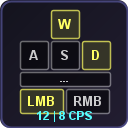
Beatiful Keystrokes
Displays pressed keys (WASD, Space, Shift) and mouse buttons with live CPS counter on a fully customizable HUD.
Beatiful Keystrokes
Displays pressed keys (WASD, Space, Shift) and mouse buttons with live CPS counter on a fully customizable HUD.
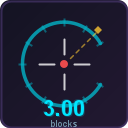
Fgrp’s Reach DIsplay
Displays your hit distance on the HUD — see exactly how far your attacks reached.

EasySprint
Always sprint automatically — toggle with one key. Clean HUD indicator shows sprint status
评论
登录后评论和评分