
截图
介绍

ABOUT
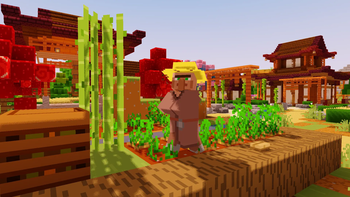
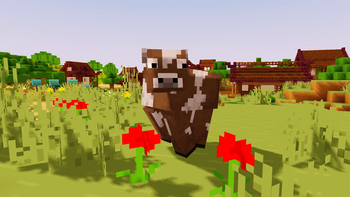
Trailer Shaders is a lightweight shader pack inspired by the visuals seen in official Minecraft trailers. While many high-end players combine Complementary Shaders with BareBones texture packs to achieve that clean, cinematic look, BareBone Shaders delivers the same trailer-like aesthetic with higher FPS. It’s designed to give you vibrant lighting, smooth shadows, and a true “Minecraft trailer vibe” — all optimized for performance on low to mid- end PCs.
Features
Trailer Shaders comes with simple yet powerful features designed to give your game a clean, trailer-like look with smooth performance.
Bloom Effect: Adds a soft glow to lighting for a cinematic feel. You can easily turn it on or off in the shader settings.
Custom Color Control: Adjust the red, green, and blue levels in settings to fine-tune the overall tone and mood of your game.

How to report BUGS!!
Our GlacierDevelopment Discord server is Live you can report bugs and Chat with other GlacierShaders users, report bugs, get help with issues, and join exciting giveaways — all in one place!

常见问题
Trailer Shaders 支持哪些 Minecraft 版本?
Trailer Shaders 支持 Minecraft Java 版 1.21–26.2,共 15 个版本,可用的加载器:Iris。下载时注意选择和你游戏版本一致的文件。
Trailer Shaders 怎么安装?
光影需要先装 Iris。把下载的 .zip 文件(不用解压)放进游戏目录的 shaderpacks 文件夹,进游戏后在「选项 → 视频设置 → 光影包」里选中它。光影对显卡要求较高,卡顿可以调低光影设置或渲染距离。
GamesofDev 的其他作品
查看全部 →
Eclipse
EclipseLite 的重制版,与 Gamer Ben 合作打造

Trailer Shaders
让你的游戏画面像 Minecraft 宣传片一样——但帧率更高。

AstralCore
Astral Core 是 Complementary Unbound 的粉色主题改版,拥有柔和的粉色云朵、带色调的水面和梦幻的色彩氛围。

EclipseLite
A low-end shader for Minecraft: Java Edition. It provides good lighting while maintaining high performance, perfect for low-end PCs. 🌟
评论
登录后评论和评分