
截图


介绍
Pixel Shades
by Dark_PixelForge | v1.0.0
“Where every sunrise feels like a painting, and every shadow tells a story.”
✨ What Makes PixelShades Stand Out
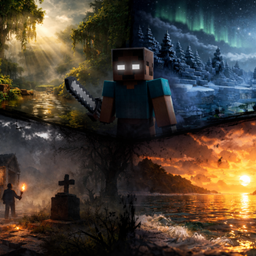
PixelShades isn’t just a shader — it’s a complete visual overhaul built around one goal: making Minecraft feel cinematic. Every system was crafted from scratch with atmosphere and drama in mind.
🌅 Sky & Atmosphere
A multi-layered sky that breathes with the time of day. Watch warm amber bleed into violet at dusk, deep navy swallow the horizon at midnight, and a crisp golden haze announce the dawn. A procedural star field with twinkle animation and a faint Milky Way band make nights genuinely beautiful.
☁️ Cloud System
Choose between stylized flat clouds or full volumetric raymarched clouds with real self-shadowing. They drift, darken in rain, and catch the sunset light in deep orange and rose.
💧 Water
Animated Gerstner wave geometry, multi-layer FBM surface normals, physically-based Fresnel reflections, depth-based color absorption, caustics, and shore foam — the most visually rich system in the pack.
🌒 Lighting & Shadows
PCF soft shadows with a rotated Poisson disc, smooth SSAO for ambient depth, GGX specular highlights, and a dual sun/moon light model that shifts color temperature from cool blue moonlight to deep orange dusk.
🍃 Foliage & Life
Leaves and grass wave in the wind with layered Gerstner animation. Thin foliage gets subsurface scattering — backlit leaves glow with that soft green translucency you’d see in a real forest.
🎞️ Post-Processing
A full cinematic pipeline: ACES Filmic tonemapping, contrast, saturation, bloom, sharpening, vignette, chromatic aberration, and animated film grain — all individually toggleable.
⚙️ Performance Profiles
Old or integrated GPUs
🟢 LOW:- Budget dedicated GPUs
🟡 MEDIUM:- Mid-range GPUs
🔵 HIGH (default):- Modern dedicated GPUs
🔴 ULTRA:- Flagship GPUs
Works in the Overworld, Nether, and The End. Install like any OptiFine/Iris shader pack.
常见问题
Pixel Shades 支持哪些 Minecraft 版本?
Pixel Shades 支持 Minecraft Java 版 1.16–26.3,共 40 个版本,可用的加载器:Iris / OptiFine。下载时注意选择和你游戏版本一致的文件。
Pixel Shades 怎么安装?
光影需要先装 Iris / OptiFine。把下载的 .zip 文件(不用解压)放进游戏目录的 shaderpacks 文件夹,进游戏后在「选项 → 视频设置 → 光影包」里选中它。光影对显卡要求较高,卡顿可以调低光影设置或渲染距离。
Dark_PixelForge 的其他作品
查看全部 →
Aurora Enhanced
Experience Minecraft like never before with this cinematic yet performance-friendly shader. This shader brings a perfect balance between stunning

Cinematic Vanilla
Cinematic Vanilla is a lightweight cinematic shader pack designed to enhance Minecraft visuals while maintaining smooth performance on low- to mid-end PCs.

Phero Visuals
Phero Visuals Minecraft shader pack featuring vibrant lighting, realistic water, dynamic skies, soft shadows, cinematic atmosphere, and optimized performance for an immersive, smooth, and visually stunning gameplay experience.
Lumeric bedrock visuals
A lightweight cinematic shaders-pack for Minecraft Bedrock Edition that enhances lighting, fog, water, and biome atmosphere to deliver a more immersive and realistic visual experience, Here is full details 👇
评论
登录后评论和评分