
截图
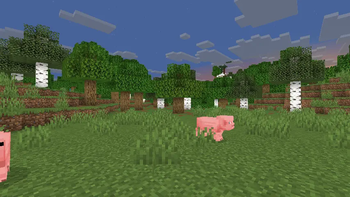
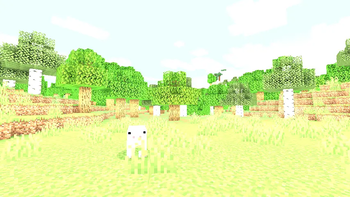
介绍
EzExposure
EzExposure is an ultra-lightweight shader pack for Iris Shaders that adds a configurable Exposure Slider, allowing you to adjust the overall brightness and exposure of Minecraft without affecting lighting, shadows, or overall performance.
Designed to be simple and efficient, EzExposure only modifies the game’s exposure, making it ideal for players who want a brighter or darker visual experience while preserving Minecraft’s original lighting and art style.

<details>
<summary>Features</summary>
- Adjustable exposure slider
- Extremely lightweight with minimal performance impact
- Does not modify lighting, shadows, reflections, or other visual effects
- Compatible with Iris Shaders
- Simple plug-and-play installation
</details>
Exposure Showcase
The exposure slider supports the following values:
0.0 0.05 0.10 0.15 0.20 0.25 0.30 0.35 0.40 0.45
0.50 0.55 0.60 0.65 0.70 0.75 0.80 0.85 0.90 0.95
1.00 1.05 1.10 1.15 1.20 1.25 1.30 1.35 1.40 1.45
1.50 1.55 1.60 1.65 1.70 1.75 1.80 1.85 1.90 1.95
2.00 3.00 100
Slider Reference
| Value | Result |
|---|---|
| 0.0 | Completely dark (minimum exposure) |
| 1.0 | Default Minecraft exposure |
| 2.0 | Twice the default exposure |
| 3.0 | Very bright exposure |
| 100 | Maximum exposure for experimentation |
Supported Versions
- Minecraft 1.17 through 1.21.8
- Iris Shaders v1.7.0+ (including Iris 1.8.x)
- GLSL Version 120 and above
Note: Version support may expand with future updates.
常见问题
EzExposure 支持哪些 Minecraft 版本?
EzExposure 支持 Minecraft Java 版 1.19–26.2,共 27 个版本,可用的加载器:Iris / OptiFine。下载时注意选择和你游戏版本一致的文件。
EzExposure 怎么安装?
光影需要先装 Iris / OptiFine。把下载的 .zip 文件(不用解压)放进游戏目录的 shaderpacks 文件夹,进游戏后在「选项 → 视频设置 → 光影包」里选中它。光影对显卡要求较高,卡顿可以调低光影设置或渲染距离。
GamesofDev 的其他作品
查看全部 →
Eclipse
EclipseLite 的重制版,与 Gamer Ben 合作打造

Trailer Shaders
让你的游戏画面像 Minecraft 宣传片一样——但帧率更高。

AstralCore
Astral Core 是 Complementary Unbound 的粉色主题改版,拥有柔和的粉色云朵、带色调的水面和梦幻的色彩氛围。

EclipseLite
A low-end shader for Minecraft: Java Edition. It provides good lighting while maintaining high performance, perfect for low-end PCs. 🌟
评论
登录后评论和评分