
CRT-Monitor Shader
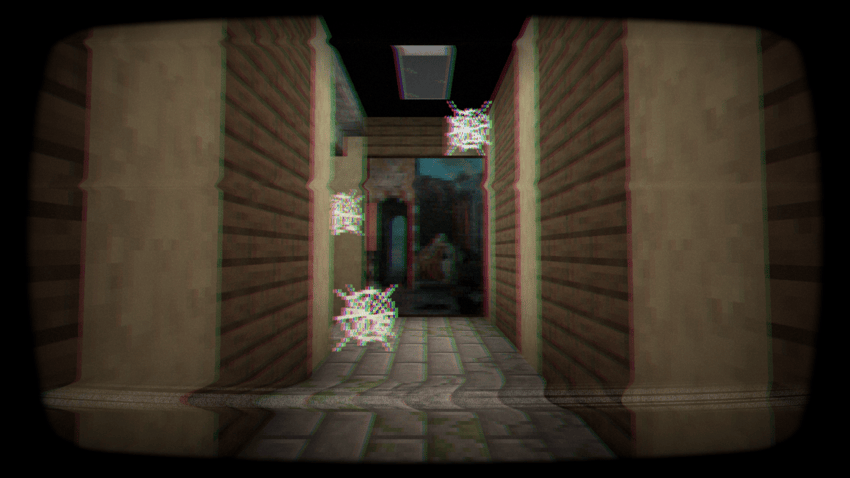
A shader that simulates retro CRT monitors with curved distortion, scanlines, flicker, and glow. Perfect for terminals, arcades, and sci-fi builds in Minecraft.
截图


介绍
中文介绍正在准备中,下面暂时显示原文。
CRT-Monitor Shader
Add a touch of vintage tech to your Minecraft world with the CRT-Monitor Shader – a visual enhancement designed to replicate the look and feel of classic CRT displays.
Featuring:
- Curved screen distortion for that authentic old-school display vibe
- Scanlines and subtle flicker, just like vintage TVs and monitors
- Phosphor glow that brings retro screens to life
- Perfect for labs, terminals, arcades, and sci-fi builds
_Whether you’re recreating a retro computer lab or building a high-tech base with analog flavor, this shader brings your screens to life with a nostalgic, immersive touch._
Compatibility
- OptiFine: Fully compatible with _all_ OptiFine shader versions (MC 1.7.10 → latest).
- Iris: Fully compatible with Iris/Sodium on Minecraft 1.16.5 and newer.
- Uses GLSL 1.20, so it works on all systems supported by OptiFine and Iris.
常见问题
CRT-Monitor Shader 支持哪些 Minecraft 版本?
CRT-Monitor Shader 支持 Minecraft Java 版 1.16.5–26.1.2,共 33 个版本,可用的加载器:Iris / OptiFine。下载时注意选择和你游戏版本一致的文件。
CRT-Monitor Shader 怎么安装?
光影需要先装 Iris / OptiFine。把下载的 .zip 文件(不用解压)放进游戏目录的 shaderpacks 文件夹,进游戏后在「选项 → 视频设置 → 光影包」里选中它。光影对显卡要求较高,卡顿可以调低光影设置或渲染距离。
评论
登录后评论和评分