
No Fog
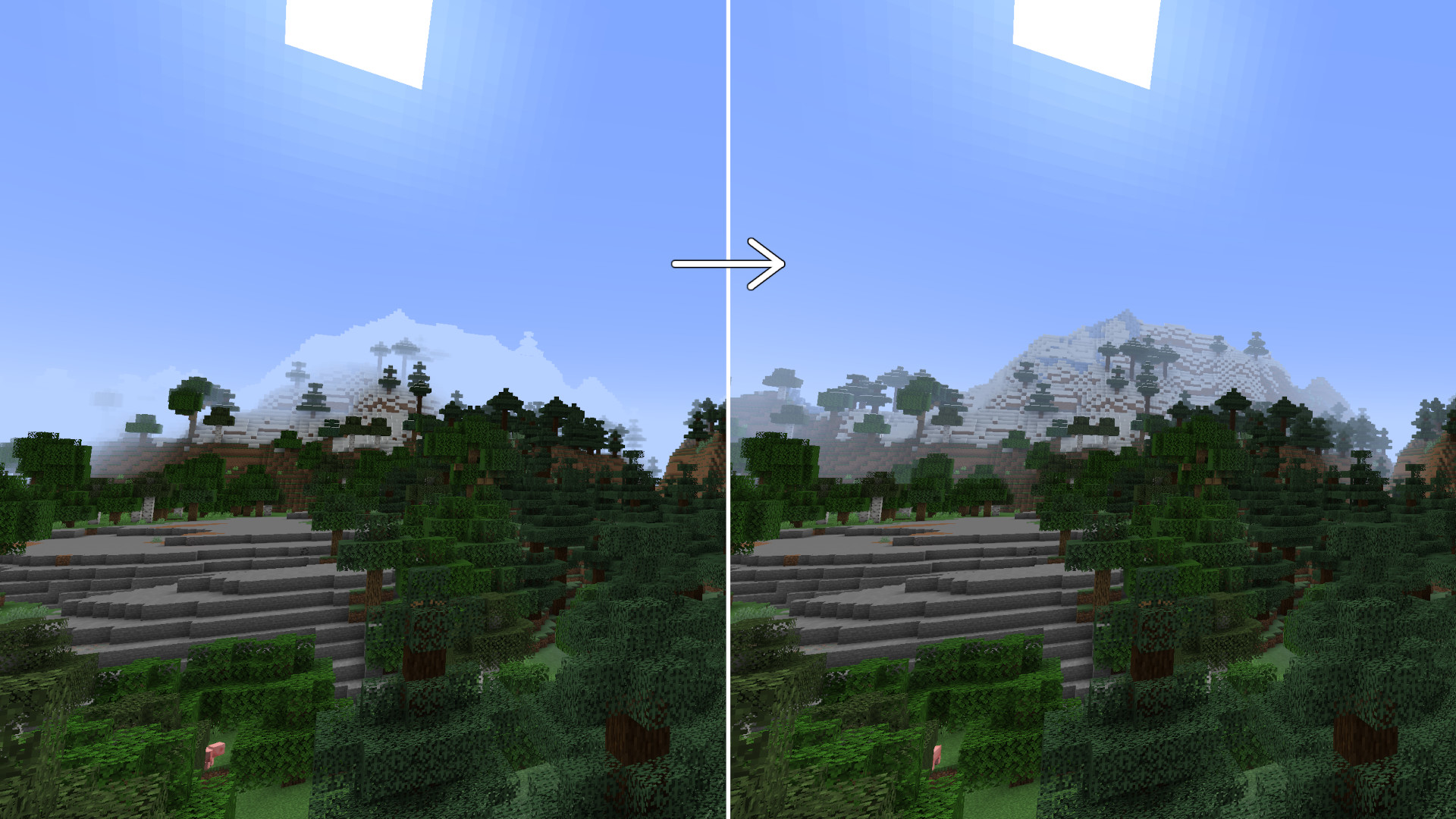
A Minecraft resource pack that removes fog in the Nether, End, and caves while preserving the vanilla visual style.
截图

介绍
ZeroxFog
See more of your Minecraft world.
ZeroXFog is a lightweight resource pack designed to remove distracting fog and improve visibility across Minecraft’s dimensions.
Explore the Nether, travel through the End, and navigate caves with a clearer view of your surroundings while retaining the familiar Minecraft aesthetic.
Features
Removes dimensional fog.
Removes distance fog.
Improves visibility in the Overworld.
Improves visibility in the Nether.
Improves visibility in the End.
Reduces cave fog.
Preserves the familiar vanilla visual style.
Simple and lightweight resource pack.
Why ZeroXFog?
Fog can make distant structures, terrain, and surroundings harder to see.
ZeroXFog provides a clearer visual experience without requiring complicated installation or gameplay changes.
Useful for:
Exploration.
Building.
PvP.
General survival gameplay.
Installation
Download ZeroXFog.
Open your Minecraft resource pack folder.
Place the downloaded ZIP file inside resourcepacks.
Open Minecraft.
Navigate to Options → Resource Packs.
Enable ZeroXFog.
Compatibility
Check the Versions tab for available Minecraft Java Edition builds.
This is a client-side resource pack. It changes visual presentation and does not modify server-side world data.
Feedback
Found an issue or have a suggestion?
Please report it with your Minecraft version and a screenshot showing the affected area on our discord.
Enjoy a clearer Minecraft experience with ZeroXFog.
常见问题
No Fog 支持哪些 Minecraft 版本?
No Fog 支持 Minecraft Java 版 1.12–26.3,共 54 个版本。下载时注意选择和你游戏版本一致的文件。
No Fog 怎么安装?
把下载的 .zip 文件(不用解压)放进游戏目录的 resourcepacks 文件夹,进游戏后在「选项 → 资源包」里把它移到右边启用。
ZynAyush 的其他作品
查看全部 →
Netherite Stones & Ores
A Minecraft resource pack that replaces stone and ore textures with Netherite Blocks for a uniform visual appearance.

Smooth Fonts 32x
A 32x Minecraft font pack that gives menus, chat, and interface text a smoother, cleaner look while keeping a familiar vanilla style.
评论
登录后评论和评分