
截图

介绍
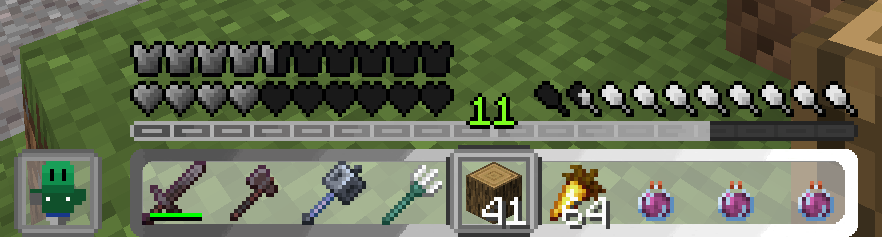
This resourcepack will change the color of your HUD to a nice Grey-White look. For everyone who uses Optifine, the color of the levels should be white too (you can also use this pack without Optifine). What textures were changed:
-Air bubbles
-Air bursting
-Hardcore Hearts
-Normal Hearts
-Container Hearts(basically empty hearts)
-All Blinking hearts(When you take damage or regenerate they shortly appear)
-Food
-Armor
-Experience bar
-Jump bar(the bar that appears when you ride a horse)
-Hotbar
-Offhand(left and right)
-Hotbar selection


How to Use?
Step 1: Download the pack from modrinth
Step 2: Open Minecraft and open Resource packs in the Options
Step 3: Drag and drop the File there
Step 4: Enjoy your new green HUD!
(Because there is only one specific version of minecraft in the packmc file it will probably inform you that this pack was made for an other version, but that is no problem beacause it should work in every minecraft version)
常见问题
White-Grey-HUD 支持哪些 Minecraft 版本?
White-Grey-HUD 支持 Minecraft Java 版 1.21–1.21.10,共 11 个版本。下载时注意选择和你游戏版本一致的文件。
White-Grey-HUD 怎么安装?
把下载的 .zip 文件(不用解压)放进游戏目录的 resourcepacks 文件夹,进游戏后在「选项 → 资源包」里把它移到右边启用。

评论
登录后评论和评分