截图
介绍
中文介绍正在准备中,下面暂时显示原文。
Visual Tooltips
Summary
See-through item tooltips with attribute icons and a decorative divider.
Description
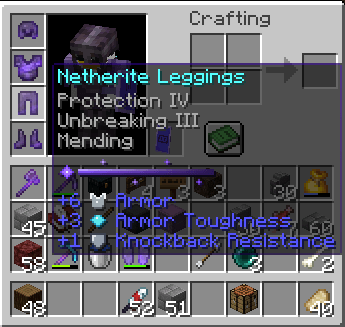
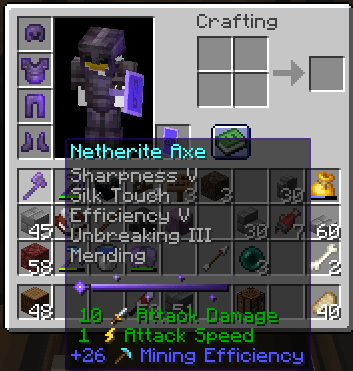
Visual Tooltips makes item tooltips easier on the eyes: the background is see-through so your inventory stays visible, attribute lines get small icons, and the empty header line is replaced by a decorative divider.
Features
- Semi-transparent pure black tooltip background (60% opacity), vanilla border untouched
- Icons next to attributes: Attack Damage, Attack Speed, Mining Efficiency, Armor, Armor Toughness, Knockback Resistance
- Decorative divider instead of the “When in Main Hand:” style header
- Text, colors and lore are unchanged
- Lightweight, no performance impact
Language
compatible with all languages
Installation
- Download the .zip (do not extract it).
- Minecraft > Options > Resource Packs > Open Pack Folder.
- Put the .zip in the folder and enable Visual Tooltips.
常见问题
Visual Tooltips 支持哪些 Minecraft 版本?
Visual Tooltips 支持 Minecraft Java 版 1.20.2–26.3,共 22 个版本。下载时注意选择和你游戏版本一致的文件。
Visual Tooltips 怎么安装?
把下载的 .zip 文件(不用解压)放进游戏目录的 resourcepacks 文件夹,进游戏后在「选项 → 资源包」里把它移到右边启用。
评论
登录后评论和评分