
截图


介绍
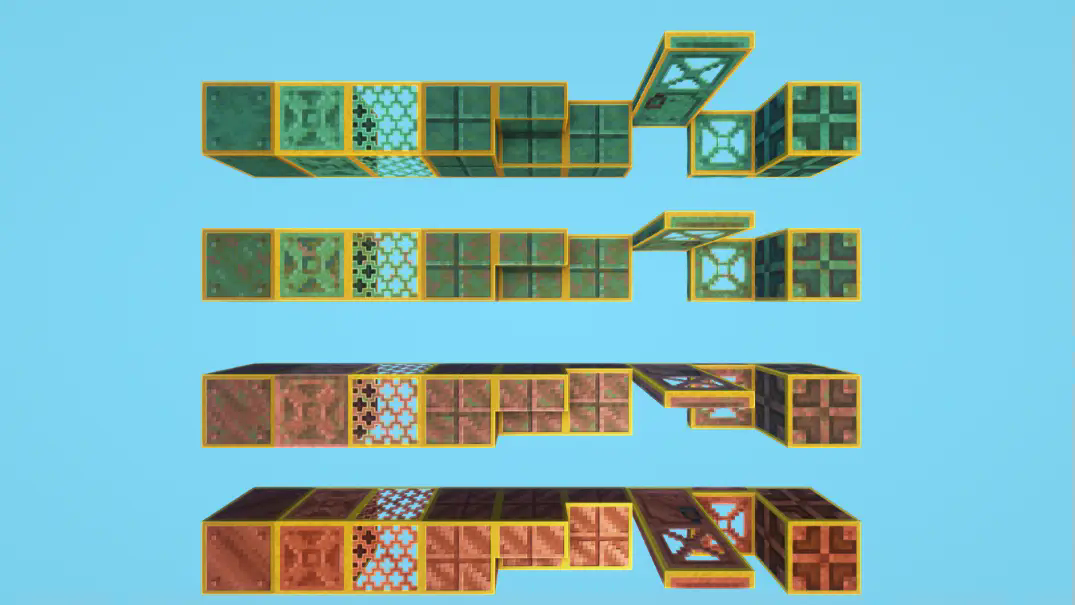
Indicate / Highlight which blocks are waxed with a clean yellow outline. No more need to use the f3 menu to distinguish the waxed blocks from the non-waxed ones!
Got an issue or a question? → Send me a message on Discord: enigmusse
By the way, I’m also on the Modrinth and CurseForge Discord servers.
How to use it?
- Copy it into the resource packs folder of your Minecraft instance.
- Open the escape menu, click Resource Packs, and select “Visible & Outlined Waxed Blocks”!
Compatibility Notice
The resource pack functions correctly despite the compatibility warning. Simply confirm by selecting Yes when prompted.
To suppress this notification completely, install the mod:
Without this solution, I’d need to create and upload a separate archive for nearly every minor Minecraft version — even though the textures remain unchanged — leading to unnecessary extra work.
常见问题
Visible & Outlined Waxed Blocks 支持哪些 Minecraft 版本?
Visible & Outlined Waxed Blocks 支持 Minecraft Java 版 1.19.4–26.1.2,共 23 个版本。下载时注意选择和你游戏版本一致的文件。
Visible & Outlined Waxed Blocks 怎么安装?
把下载的 .zip 文件(不用解压)放进游戏目录的 resourcepacks 文件夹,进游戏后在「选项 → 资源包」里把它移到右边启用。
Enigmusse 的其他作品
查看全部 →
Netherite & Ancient Debris Lava mining Full Setup
一款尽可能优化下界合金岩浆挖矿体验的资源包!

Full blue Netherite & Ancient Debris
一个资源包,可更改远古残骸和下界合金的材质,让你在经典挖矿或熔岩挖矿时更容易发现它们。

Netherite & Ancient Debris Lava Mining
一个资源包,可将沙砾、黑石、岩浆块和下界矿石的材质改成下界岩,方便你在熔岩中寻找并挖掘远古残骸,获取下界合金。

Purple Golden Apple / Gapple
一款将金苹果改为紫色的资源包。
评论
登录后评论和评分