
【MTR3】TX-3000系|TX-3000 Series
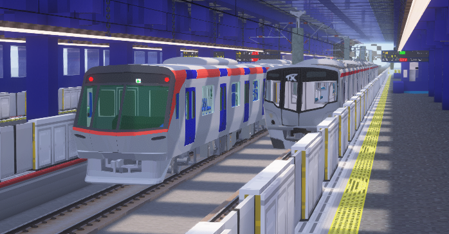
MTR(Minecraft Transit Railway)にTX-3000系を追加します。 This resource pack adds the TX-3000 Series to the MTR (Minecraft Transit Railway)!
截图

介绍
このリソースパックは、日本のTX-3000系を追加します。
Wikipediaリンク/Wikipedia Link:首都圏新都市鉄道TX-3000系電車
よろしければ、Pinu様製作のTX-1000系とTX-2000系も合わせてご利用ください!
https://modrinth.com/resourcepack/tsukuba-express-tx-1000-and-tx-2000-series
注意
このリソースパックはつくばエクスプレスと何ら関係がなく、つくばエクスプレスの公式製品でもありません。
ご注意下さい。
objファイルを使用しているので、NTE(Nemo’s Transit Expansion)も導入してください。
リンク: https://modrinth.com/mod/mtr-nte
[インストール手順]
- 起動設定のresourcepacksフォルダにzipを入れ、マイクラの設定から「リソースパック…」を押し、選択して適応させます。
- ダッシュボードから車両基地の線路を選択すると、「TX-3000 10cars」「TX-3000 6cars」「TX-3000 free」から好きな車両をを選択します。
- 車両が見えたら成功です!
This resource pack adds the TX-3000 series in Japan.
Wikipedia Link: Metropolitan Intercity Railway Company TX-3000 series electric train
Feel free to use the TX-1000 Series and TX-2000 Series created by Pinu as well, if you’d like.
https://modrinth.com/resourcepack/tsukuba-express-tx-1000-and-tx-2000-series
Note
This resource pack is not affiliated with Tsukuba Express in any way and is not an official Tsukuba Express product.
Please note.
Since this uses obj files, please also install NTE (Nemo’s Transit Expansion).
Link: https://modrinth.com/mod/mtr-nte
[Installation Instructions]
- Place the zip file in the resourcepacks folder in the startup settings, then press “Resource Packs…” in Minecraft settings, select it, and apply.
- Select the vehicle depot tracks from the dashboard, then choose your preferred vehicle from “TX-3000 10cars,” “TX-3000 6cars,” or “TX-3000 free.”
- If the vehicle appears, installation was successful!
常见问题
【MTR3】TX-3000系|TX-3000 Series 支持哪些 Minecraft 版本?
【MTR3】TX-3000系|TX-3000 Series 支持 Minecraft Java 版 1.16.5–1.20.1,共 6 个版本。下载时注意选择和你游戏版本一致的文件。
【MTR3】TX-3000系|TX-3000 Series 怎么安装?
把下载的 .zip 文件(不用解压)放进游戏目录的 resourcepacks 文件夹,进游戏后在「选项 → 资源包」里把它移到右边启用。
botamochi129 的其他作品
查看全部 →
【MTR3/4】botamochi129 Rail&Structure Pack
MTRmodと(A)NTE向けの装飾レール/構造物パックです。 This is a decorative rail/structure pack for MTRmod and (A)NTE.

【MTR3/4】JR西日本207系1000番台|JR West 207-1000 Series
MTR(Minecraft Transit Railway)にJR西日本207系1000番台を追加します。 This resource pack adds the JR West 207-1000 Series to the MTR (Minecraft Transit Railway)!

【MTR3/4】Tokyo Metro 13000 Series|東京メトロ13000系
This resource pack adds the Tokyo Metro 13000 Series to the MTR (Minecraft Transit Railway)! MTR(Minecraft Transit Railway)に東京メトロ13000系を追加します。

【MTR3】東京メトロ16000系|Tokyo Metro 16000 Series
MTR(Minecraft Transit Railway)に東京メトロ16000系を追加します。 This resource pack adds the Tokyo Metro 16000 Series to the MTR (Minecraft Transit Railway)!
评论
登录后评论和评分