
Transparent Inventory Window
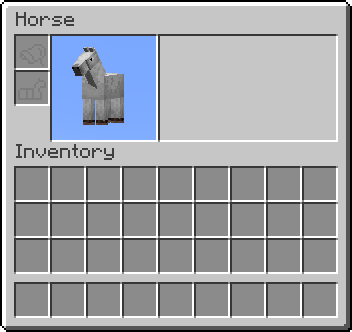
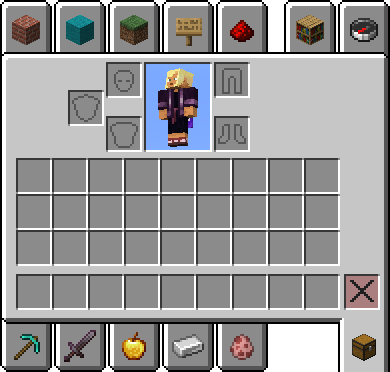
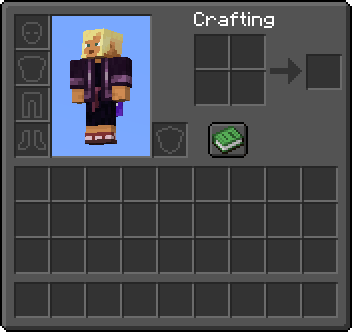
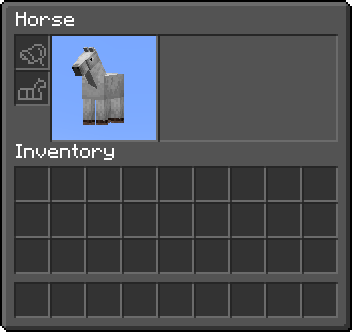
Changes the window of Player, Horse, Nautilus and Creative to transparent. Dark UI available. NEW! Support for Inventory Extended.
截图

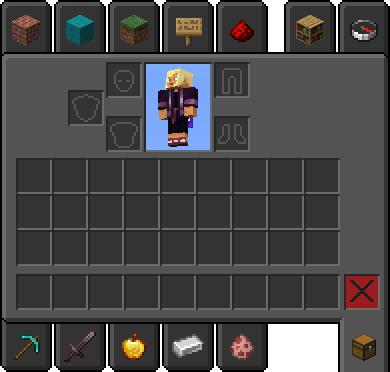
介绍
No Dark Inventory Overlay is now requiered for +26.2!
Get it here: https://modrinth.com/resourcepack/no-dark-inventory-overlay
~~~~
~~~~
Dark UI version is based on Vanilla Tweaks (c)
Get it here: https://vanillatweaks.net/picker/resource-packs/
(Put Dark UI below Dark Transparent Inventory Window in the Resource Pack screen)
~~~~
~~~~
Inventory Extended Dark UI version
Get it here: https://modrinth.com/resourcepack/inventory-extended-dark-ui
The Mod: https://modrinth.com/mod/inventory-extended
~~~~
~~~~
Extra Inventory version
Get it here: https://modrinth.com/resourcepack/extra-inventory-patch
The Mod: https://www.curseforge.com/minecraft/mc-mods/extra-inventory
~~~~
~~~~
Transparent Inventory Window changes the following 4 files:
assets\minecraft\textures\gui\container\horse.png
assets\minecraft\textures\gui\container\inventory.png
assets\minecraft\textures\gui\container\nautilus.png
assets\minecraft\textures\gui\container\creative_inventory\tab_inventory.png
Dark Transparent Inventory Window changes the following 4 files:
assets\minecraft\textures\gui\container\horse.png
assets\minecraft\textures\gui\container\inventory.png
assets\minecraft\textures\gui\container\nautilus.png
assets\minecraft\textures\gui\container\creative_inventory\tab_inventory.png
(Blue background from the gallery images comes from the sky)
~~~~
~~~~
常见问题
Transparent Inventory Window 支持哪些 Minecraft 版本?
Transparent Inventory Window 支持 Minecraft Java 版 1.21.4–26.2,共 3 个版本。下载时注意选择和你游戏版本一致的文件。
Transparent Inventory Window 怎么安装?
把下载的 .zip 文件(不用解压)放进游戏目录的 resourcepacks 文件夹,进游戏后在「选项 → 资源包」里把它移到右边启用。
Ghost 的其他作品
查看全部 →
Samurai Dynasty
This mod is inspired by the japanes folklore and samurai. It will add new 3D armors and weapons to the game.

Harvestable Flowers
Harvestable Flowers allows you to get flowers by using bone meal on it.

Epic Knights’n’Mages – Forge
This is an Ars Nouveau addon, focused on adding new armors and Source Gem's to the game.

Regions Unexplored: Expansion
Remodels vanilla biomes to match the look of Regions Unexplored biomes
评论
登录后评论和评分