Transparent GUI and HUD
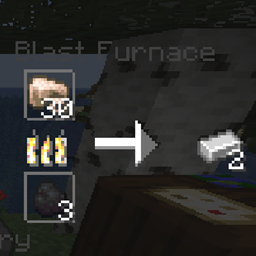
1.8.8+; Makes all of the GUI's and HUDs in the game transparent (clear; see-through) for a sleek and modern-looking minimal design! + Fire and Pumpkin overlay support.
截图


介绍
PLEASE NOTE: This texture pack supports ALL MINECRAFT VERSIONS from 1.8.8 to NOW. There are multiple files to support all of the versions, so you’re going to have to go to the files page to get the correct version.
26.2.X Release 1 and 1.8.8-9 Release 2.3 are now available!
This is a texture pack that makes all of the GUI’s (and HUD’s) in the game transparent (transparent GUI and HUD = clear GUI and HUD), so you can actually see the gameplay going on! The GUI’s are specifically designed so you can see both where items should go and so you can see in front of you.
NOTE: Some mods on all versions of this texture pack will be partially supported if they utilize the default Minecraft textures/supported mod textures. (Ask the mod owner if they use any.)
In 1.14-26.2.X, this texture pack these textures:
- The default Minecraft advancements GUI and GUI elements –
- Tabs
- Widgets
- Pumpkin Overlay
- The default Minecraft containers and container elements –
- Creative inventory, item search tab, item tab, and the tabs themselves
- Anvils
- Beacons
- Brewing stands
- Crafting tables
- Dispensers
- Droppers
- Enchanting tables
- Furnaces
- Generic chest GUI’s
- Hoppers
- Horse
- Survival Inventory and elements
- Recipe backgrounds
- Blast furnace
- Smoker
- Grindstone
- Barrel
- Stonecutter
- Cartography table
- New Villager interaction GUI’s
- Pumpkin Overlay
- Default Minecraft books
- The default Minecraft recipe book
- Smithing table (1.16.X & up only)
In 1.14.X & down, this texture pack also supports shields. Due to a change in 19w45a, the future versions can no longer support transparent shields.
In 1.14.X Ultimate, this texture pack supports these mods (plus the 1.14.X default Minecraft textures, below this section):
- JEI
- Tinkers Construct
- Baubles
- Chisel
- Iron Chests
- Decocraft
- Pam’s HarvestCraft
- Applied Energistics 2
- Immersive Engineering
- Bibliocraft
- Thermal Foundation
- Biomes O’ Plenty
- Twilight Forest
- Thermal Expansion
- Please note that Ender IO support will never be added, as the mod doesn’t support transparent textures.
In 1.12.X Ultimate, this texture pack supports these mods (plus the 1.12.X default Minecraft texture, below this section):
- JEI
- Tinkers Construct
- Baubles
- Chisel
- Iron Chests
- Decocraft
- Pam’s HarvestCraft
- Applied Energistics 2
- Immersive Engineering
- Bibliocraft
- Thermal Foundation
- Biomes O’ Plenty
- Twilight Forest
- Thermal Expansion
- Please note that Ender IO support will never be added, nor any mod that relies on Ender Core, as the core mod doesn’t support transparent textures being displayed.
This texture pack supports (as of 1.12.X – 1.15.X’s latest release):
- All of the new GUIs brought into the game during and after 1.14
- The default Minecraft advancements GUI and GUI elements –
- Tabs
- Widgets
- Windows
- Backgrounds
- Pumpkin Overlay
- The default Minecraft containers and container elements –
- Creative inventory, item search tab, item tab, and the tabs themselves
- Anvils
- Beacons
- Brewing stands
- Crafting tables
- Dispensers
- Droppers
- Enchanting tables
- Furnaces
- Generic chest GUI’s
- Hoppers
- Horse
- Survival Inventory and elements
- Recipe backgrounds
- Villager interaction GUI’s
- Pumpkin Overlay
- Default Minecraft books
- Shields (For before 1.15)
- The default Minecraft recipe book
Before 1.12, this mod supports:
- Partially transparent achievement menu.
- The default Minecraft containers and container elements –
- Creative inventory, item search tab, item tab, and the tabs themselves
- Anvils
- Beacons
- Brewing stands
- Crafting tables
- Dispensers
- Droppers
- Enchanting tables
- Furnaces
- Generic chest GUI’s
- Hoppers
- Horse
- Survival Inventory and elements
- Villager interaction GUI’s
- Pumpkin Overlay
- Default Minecraft books
- Shields (For after 1.8)
常见问题
Transparent GUI and HUD 支持哪些 Minecraft 版本?
Transparent GUI and HUD 支持 Minecraft Java 版 1.8.8–26.3,共 67 个版本。下载时注意选择和你游戏版本一致的文件。
Transparent GUI and HUD 怎么安装?
把下载的 .zip 文件(不用解压)放进游戏目录的 resourcepacks 文件夹,进游戏后在「选项 → 资源包」里把它移到右边启用。

评论
登录后评论和评分