
介绍
中文介绍正在准备中,下面暂时显示原文。
Totems Alive
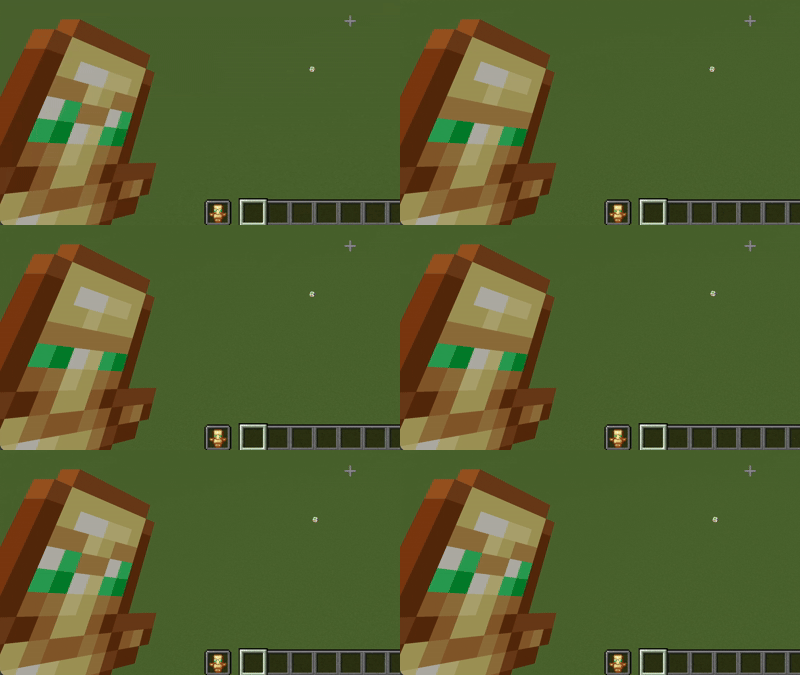
Totems Alive breathes subtle vitality into one of Minecraft’s most iconic survival items. Instead of remaining a static golden relic in your off-hand, the Totem of Undying now blinks, looks around, and quietly observes your adventures. It gives the ancient artifact a soul of its own before it makes the ultimate sacrifice to save yours.
Features
- Expressive Animations: Smooth, periodic blinking and subtle eye-darting frames that seamlessly fit the vanilla pixel art style.
- Vanilla Friendly: Retains standard item resolution and palettes so it integrates cleanly alongside other standard texture packs.
- Pure Resource Pack: Built entirely using vanilla item animation (.mcmeta) mechanics with no mods or external loaders required.
Installation Guide
- Download the Pack: Download the
Totems Alive.zipfile to your computer. Do not unzip the folder. - Open the Resource Pack Folder: Launch Minecraft, navigate to Options > Resource Packs, and click the Open Pack Folder button.
- Move the File: Drag and drop the downloaded
Totems Alive.zipfile directly into the folder that opened. - Activate the Pack: Return to the Minecraft menu, locate Totems Alive under the “Available” column, click the arrow to move it to “Selected”, and click Done.
常见问题
Totems Alive 支持哪些 Minecraft 版本?
Totems Alive 支持 Minecraft Java 版 26.1–26.3,共 5 个版本。下载时注意选择和你游戏版本一致的文件。
Totems Alive 怎么安装?
把下载的 .zip 文件(不用解压)放进游戏目录的 resourcepacks 文件夹,进游戏后在「选项 → 资源包」里把它移到右边启用。
qlttqb 的其他作品
查看全部 →
Amethyst Pickaxes
by qlttqb
添加紫水晶镐,一挥即可挖掘 3×3 区域,灵感来自 Donut SMP。
2.9万
5 个月前
Modrinth · CurseForge

InvisAlert+
by qlttqb
InvisAlert+ 会用清晰的屏幕提示取代几乎看不见的隐身粒子,让你立刻知道隐身效果何时生效。仅限客户端,可与任何资源包搭配使用。专为 PvP 和生存玩法打造。
2.4万
8 个月前
Modrinth · CurseForge

QuieterEating
by qlttqb
QuieterEating 可将玩家进食时发出的声音降低约 80%。
2万
1 个月前
CurseForge

Tiny Shields and Totems
by qlttqb
一款简洁且注重性能的资源包,可缩小第一人称视角中的不死图腾和盾牌,让视野更清爽,同时保留原版材质。
1.9万
6 个月前
Modrinth · CurseForge
评论
登录后评论和评分