截图

介绍
What Is This?
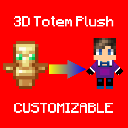
This Is a Resource Pack That Contains a Customizable 3D Totem Plush Orginally Inspired By styv14‘s Totem Plush. You Might Call This Project a Better & Improved Version Of His 3D Totem Plush
How To Change Skin?
First, Unzip The Resource Pack In Your resourcepacks Folder, Then Go Inside The Pack Folder & Go To assets\minecraft\textures\item Then, Copy The Name Of The Texture File & Delete It. Then Put Your Skin In The Directory & Replace The Name Of Your Skin With The Name You Copied (plush_totem_of_undying.png)\
Tada! Your Skin Should Appear On The Totem Plush & It Should Be Ready To Use!
FAQ
- Why Does The Pack Show “Incompatible Version” & Is Red?
- Ans: You Might Be On a Version That Is Not Listed Inside The Pack So It Shows Up As Incompatible Version. You Should Try It First Then If It Works Then Yay, If It Doesn’t… Well Then It Doesn’t!
常见问题
3D Totem Plush 支持哪些 Minecraft 版本?
3D Totem Plush 支持 Minecraft Java 版 1.16–1.21.4,共 28 个版本。下载时注意选择和你游戏版本一致的文件。
3D Totem Plush 怎么安装?
把下载的 .zip 文件(不用解压)放进游戏目录的 resourcepacks 文件夹,进游戏后在「选项 → 资源包」里把它移到右边启用。
InFestoRINTH 的其他作品
查看全部 →
No Fishing Bobber
Removes The Annoying Fishing Bobber/Hook That Covers Your Entire Screen When Someone Hooks It On You!

Shield Durability Overlay
A Resource Pack To Display Your Shield's Durability, Perfect For PvP!

Lower Side Shield
Lower Side Shield So It Doesn't Cover Up Half Of Your Screen & Looks Fancy!

Tiny Totem Pop
Makes Your Totem Appear Tiny On The Screen When It Pops! Best Among Other Packs!
评论
登录后评论和评分