
toatser
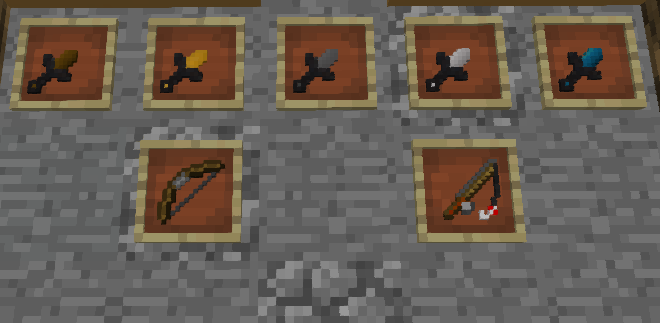
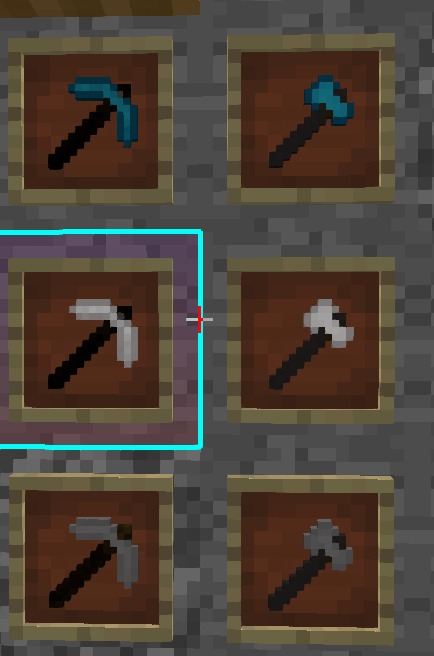
1.8 pack and maybe 1.7 first good pack edit swords armor fireball peral axes pickaxe and wool prety cool pack :) no sky tho still understanding optifine. made for pvp ight thats it
截图

介绍
1.8 / 1.7 PvP Pack Showcase,
I made this pack for Minecraft 1.8 and 1.7, mainly as a fun personal project while I work on improving my pixel art and texture-making skills. It’s definitely not perfect, and I’d consider it a mid-quality pack for now, but I’m still pretty happy with how it turned out.
This showcase only features Gapple PvP gameplay(https://medal.tv/games/minecraft/clips/nao2RzfUCAJ7IDcgN?invite=cr-MSxFTDMsNTM1MjU1NTcx) so you can get a general idea of how the pack looks and feels in-game. I put quite a lot of time into creating and editing the textures, and although the pack is far from finished, I wanted to share what I have so far.
What I Edited,
Swords,
Armor,
Utilities,
Wool,
No-sky textures,
I decided to keep the sky unchanged because, honestly, I still haven’t figured out how OptiFine custom skies work. That’s something I may look into improving in the future.
This pack was made for fun, so please don’t expect frequent updates or a strict development schedule. I’ll work on it whenever I feel like adding something new or improving the textures. My main goal with this project is to practice pixel art, experiment with different styles, and hopefully get better at making Minecraft textures over time.
There are still plenty of things I want to improve, and I may eventually continue working on the pack for newer Minecraft versions as well. For now, though, this is mainly a small side project that I’m making for fun.
If you have any feedback or suggestions, feel free to let me know. I’m always interested in hearing what could be improved, especially since I’m still learning and experimenting with pixel art.
Thanks for checking out the pack, and I hope you enjoy the showcase!
常见问题
toatser 支持哪些 Minecraft 版本?
toatser 支持 Minecraft Java 版 1.6.1–1.8.9,共 22 个版本。下载时注意选择和你游戏版本一致的文件。
toatser 怎么安装?
把下载的 .zip 文件(不用解压)放进游戏目录的 resourcepacks 文件夹,进游戏后在「选项 → 资源包」里把它移到右边启用。
评论
登录后评论和评分