
Spectrum Slots
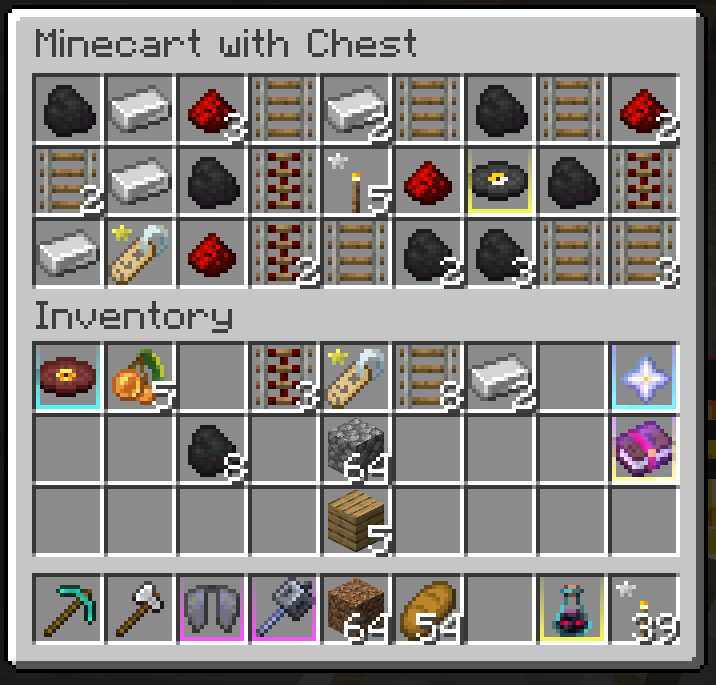
Clean colored underlines for rare and special items — instantly spot loot at a glance
截图
介绍
🎨 ColorCoded
A lightweight resource pack that adds colored underlines to special and rare items. Instantly recognize golden apples, dragon drops, skulls, and more while keeping Minecraft’s clean vanilla look.
✨ Features
- Category Highlights – Rare and unique items get a subtle colored underline.
- Vanilla-Friendly – Blends naturally with the default textures.
- Quick Recognition – Spot trophies, consumables, and loot at a glance.
- Inventory Clarity – Perfect for survival and PvP, where speed matters.
🖼️ Preview

🧩 Compatibility
This pack overrides the item models of select items (golden apples, skulls, dragon egg, etc.).
It will look out of place if combined with heavily stylized or non-vanilla packs.
✔ Compatible with 1.14 → 1.21.x
✖ Not supported on versions older than 1.14
📦 Installation
- Download the
.zipfile. - Place it in your
resourcepacksfolder. - Activate it in the Minecraft Resource Packs menu.
🔗 External Links
- 🌍 Modrinth Page
- 💬 Join our Discord – Ask questions, report bugs, or chat with the community.
Pack Icon Idea
For pack.png:
- Minimal style → just a colored underline bar on a dark background.
- More illustrative → a golden apple with the underline.
- Stylish → a rainbow underline bar fading across the bottom.
常见问题
Spectrum Slots 支持哪些 Minecraft 版本?
Spectrum Slots 支持 Minecraft Java 版 1.15–1.21.8,共 35 个版本。下载时注意选择和你游戏版本一致的文件。
Spectrum Slots 怎么安装?
把下载的 .zip 文件(不用解压)放进游戏目录的 resourcepacks 文件夹,进游戏后在「选项 → 资源包」里把它移到右边启用。
Byjechu 的其他作品
查看全部 →
Lanterns Enhanced
让灯笼、锁链和火把在你手中呈现3D效果!

Lanterns Enhanced – Head on Head
Lanterns on walls

RBY’s Clean Hud
A Clean Minimalistic HUD

Cute Totems
Replaces the boring totem with a cute, vanilla-friendly miniature Creeper plushie!
评论
登录后评论和评分