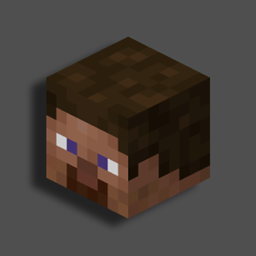
Skull (Portable) [Data Pack]
Obtain Custom and Player Heads in Survival! Now in Portable Mode!
截图
介绍
Obtain and Custoize Player Heads in Survival!


📥How to Install
- 1) Download the Datapack
- 2) Chose the world you want to install the Data Pack in and navigate to its “datapacks” folder
- 3) Copy the downloaded Data Pack file (Skull [Portable]) into this folder
- 4) Join the world and run
/reloadcommand
📖Features
Skull [Portable] allows you to Craft and Customize player heads using just a Book and Quill.
How to craft and customize a Player Head
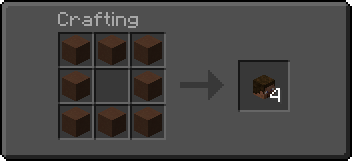
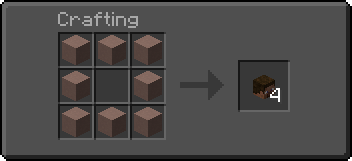
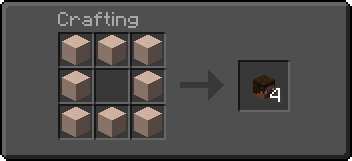
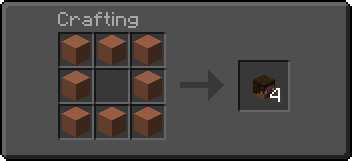
🎭Craft a Blank Player Head
A Blank Player Head can be crafted using any of the following materials:
|
 |
📓Customize a Player Head using a value
- 1) Go to Minecraft Heads
- 2) Choose a head and open its relative page; Then, scroll to the
For Developersand copy thevaluefield - 3) Paste the copied
valuein a Book and Quill - 4) Hold the desired number of player heads in your off-hand
- 5) Hold the book with the
valuein your main-hand - 6) Swap hands to customize the head (Default key to swap hands is
F)
🔖Customize a Player Head using a player name
- 1) Sign a Book and Quill with the name of the player
- 2) Put how many heads you want in your off-hand
- 3) Hold the signed book in your main-hand
- 4) Swap hands to customize the head (Default key to swap hands is
F)
YouTube Showcase
Settings
You can access the settings upon reloading by clicking on the [Config] button or by running the following command -> /function skull_portable:config
The settings menu includes the following:
- [Player head] Replace signed book after use: (defaults to
True) - [Custom Head] Erase book pages after use: (defaults to
True)
📤Uninstall the DataPack
To uninstall the Data Pack run the command /function skull_portable:uninstall. When the uninstallation process is completed a confirmation message will be sent in the chat.
常见问题
Skull (Portable) [Data Pack] 支持哪些 Minecraft 版本?
Skull (Portable) [Data Pack] 支持 Minecraft Java 版 1.19–26.2,共 27 个版本。下载时注意选择和你游戏版本一致的文件。
Skull (Portable) [Data Pack] 怎么安装?
把下载的 .zip 文件(不用解压)放进游戏目录的 resourcepacks 文件夹,进游戏后在「选项 → 资源包」里把它移到右边启用。
Nico4play 的其他作品
查看全部 →
Better Lanterns
改进灯笼和锁链模型,增强3D外观,带来更沉浸的体验。

3D Ladders
更改并改进了梯子的模型,使其变为3D!
Nico’s 3D Ladders
将梯子的模型改为3D。

MasterCutter
石切机现在比以往更加实用,新增超过 500 个配方,包括木材加工、增强基础石材切割、回收和“拆解合成”。
评论
登录后评论和评分