
Singapore MRT PIDs
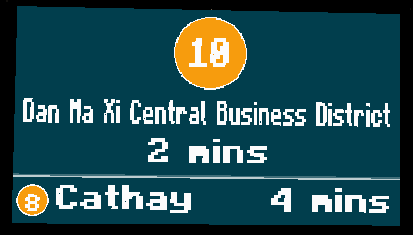
A series of Platform Information Display presets created within Minecraft Transport Railways Mod and Joban's Client Mod for Singapore MRT Train System.
截图



介绍
A series of platform information displays inspired by Singapore’s MRT System
Content:
PIDs based on Singapore MRT PIDs with semi-Minecraft style
Currently in the Mod:
- Downtown Line
- 2013 Arrival
- 2013 Idle
- 2013 Auto-toggles
- Circle Line
- 2026 Arrival (v1)
- 2026 Idle (v1)
- 2026 Auto-toggles (v1)
- Thomson-East Coast Line
- 2019 Arrival
- 2019 Idle
- 2019 Auto-toggles
- 2019 Platform Closed
more will be released in future versions
Resource Pack Prerequisites
Minecraft Transit Railways (MTR4)
Joban Client Mod (v2.2)
In-game Usage
Under the Joban Client Mod PIDs tab select your preferred PID and place it in Minecraft
Use a MTR Mod brush to right-click the PID
Click “PID Preset” and scroll down to “Custom Preset” to find this resource pack’s PID, and click select to pick it. Alternatively, use the search bar after clicking “PID Preset” and search for your preferred preset (Do note that the search is case sensitive!)
Escape the PID edit menu and voila! Now you have your very own custom PID!
Do note that all PID presets in this resource pack cycle between Chinese (Traditional) and English text. English only text coming soon!
Specific PID Preset Settings
Downtown Line 2013 Arrival, Idle & Auto-toggles
Change route number to change cicle contents (Destination number)
Circle Line 2026 Arrival (v1)
If there is no clockwise state and route variation name contains “clockwise”, the clockwise termination graphic will be shown, the arrival will use the route variation name will have the with terminating station as the subtitle
If there is no clockwise state and route variation name contains “anticlockwise” or “anti-clockwise”, the anticlockwise termination graphic will be shown, the arrival will use the route variation name will have the with terminating station as the subtitle.
If circular state is set to clockwise, the clockwise loop graphic will be shown, the arrival will have text “Clockwise Loop” with the next station as the subtitle
If circular state is set to anticlockwise, the anticlockwise graphic will be shown, the arrival will have text “Anticlockwise Loop” with the next station as the subtitle
If no clockwise state is given for the next arrival, a big caplet will be rendered with the route number in the centre, with the arrival using the route variation name and the terminating station will be the subtitle
For the subsequent arrival, same as above except no graphic or station will be displayed.
Circle Line 2026 Idle (v1)
Displays next 2 arrivals
If there is a circular state, the circular state (Clockwise Loop/Anticlockwise Loop) will be shown as the main text with the following station as the subtitle
If there is no circular state, the route variation will be shown as the main text with the terminating station as the subtitle
Circle Line 2026 Auto-toggles (v1)
Refer to above for “Circle Line 2026 Arrival” and “Circle Line 2026 Idle” settings
Thomson-East Coast Line 2019 Arrival, Idle & Auto-toggles
Change route number to change caplet contents (Termination station code)
常见问题
Singapore MRT PIDs 支持哪些 Minecraft 版本?
Singapore MRT PIDs 支持 Minecraft Java 版 1.20–1.20.4,共 3 个版本。下载时注意选择和你游戏版本一致的文件。
Singapore MRT PIDs 怎么安装?
把下载的 .zip 文件(不用解压)放进游戏目录的 resourcepacks 文件夹,进游戏后在「选项 → 资源包」里把它移到右边启用。
评论
登录后评论和评分