
Sincerelyuq’s OLED Theme
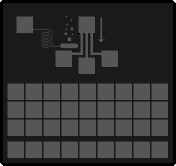
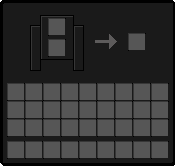
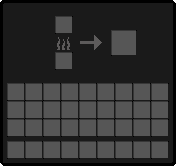
Sincerelyuq's OLED Theme.. Tired of the same old, eye-straining gray vanilla menus? Say less. Sincerelyuq's OLED Theme is a standalone resource pack designed to completely overhaul your Minecraft UI into a sleek, pitch-black, true OLED experience.
截图

介绍
🖤 Sincerelyuq’s OLED Theme
Tired of the same old, eye-straining gray vanilla menus? Say less. Sincerelyuq’s OLED Theme is a standalone resource pack designed to completely overhaul your Minecraft UI into a sleek, pitch-black, true OLED experience.
Whether you’re running an actual OLED monitor and want those infinite contrast levels, or you just love a clean, minimalist dark mode that won’t blind you during 3 AM gaming sessions, this pack is exactly what you need.
✨ Key Features:
True Pitch-Black UI: Replaces the standard vanilla gray backgrounds with a gorgeous, crisp #000000 OLED black.
Eye-Friendly Design: Perfect for night owls. No more flashbangs when you press E or open a chest in a dark room.
Maximum Contrast: Item sprites and text pop out beautifully against the deep black background, making inventory management feel incredibly smooth.
100% Standalone: Built completely separate from my other projects, meaning you can stack this on top of any other texture pack or modpack without breaking a thing.
Vanilla-Friendly: Keeps all the classic icons and layouts you’re used to — just wraps them in a premium dark aesthetic.
🚀 Join the Community!
This pack is officially a part of the Sincerelyuq Minecraft Community ecosystem! For instant updates on this resource pack, bug reporting, or a sneak peek at all my future data packs and overhauls, jump into our Discord!
Credits:
Sincerelyuq (Me)
常见问题
Sincerelyuq’s OLED Theme 支持哪些 Minecraft 版本?
Sincerelyuq’s OLED Theme 支持 Minecraft Java 版 1.20–26.3,共 24 个版本。下载时注意选择和你游戏版本一致的文件。
Sincerelyuq’s OLED Theme 怎么安装?
把下载的 .zip 文件(不用解压)放进游戏目录的 resourcepacks 文件夹,进游戏后在「选项 → 资源包」里把它移到右边启用。
sincerelyuq 的其他作品
查看全部 →
Sincerelyuq’s Overhaul
Sincerelyuq's Overhaul V3.1 — Summary 23 new structures, a legacy build for 1.19, and mod jars for every loader. V3.1 nearly doubles the pack: 33 structures become 56, spread across the Overworld, the Nether and the End. The new additions lean

Sincerelyuq’s Pantry
Sincerelyuq's Pantry is a NeoForge 1.21.8 content mod that expands food-related generation and crafting. It adds strawberries as a new crop, generated in the world as a strawberry bush, along with recipes for strawberry cake and strawberry milk.
评论
登录后评论和评分