截图

介绍
Rubycraft
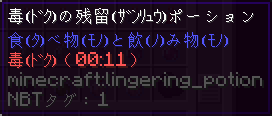
This is a resource pack that adds a new Japanese language option to the game settings – identical to the regular language pack, only with added readings for all of the characters.
How do I use this?
- Install the resource pack
- Enable the resource pack
- Go to
Options→Language - Select
日本語 (読み方付) (日本)
Who is this for?
If you’re learning Japanese, you will most likely want to play Minecraft in it. The problem is that a significant part of the vocabulary used in the game is rather advanced, and you are quite limited in regard to methods of looking up the terms you don’t know (being essentially limited to either handwriting or OCR).
Well, wouldn’t it be so much easier if could just know how to type the word?
A word of caution
As the reading-insertion process is automated, complete accuracy cannot be guaranteed. It is possible that some readings may be wrong, so please be wary of that.
常见问题
Rubycraft 支持哪些 Minecraft 版本?
Rubycraft 支持 Minecraft Java 版 1.20.3–1.21.4,共 3 个版本。下载时注意选择和你游戏版本一致的文件。
Rubycraft 怎么安装?
把下载的 .zip 文件(不用解压)放进游戏目录的 resourcepacks 文件夹,进游戏后在「选项 → 资源包」里把它移到右边启用。
评论
登录后评论和评分