Realistic Engine Sound
Ever felt like Ice Boat Racing was a bit too silent? Well, no more!
截图

介绍

Ever felt like Ice Boat Racing was a bit too silent? Well, no more!
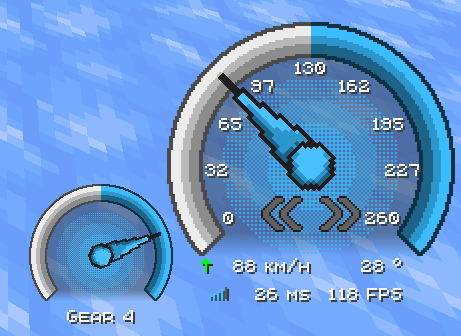
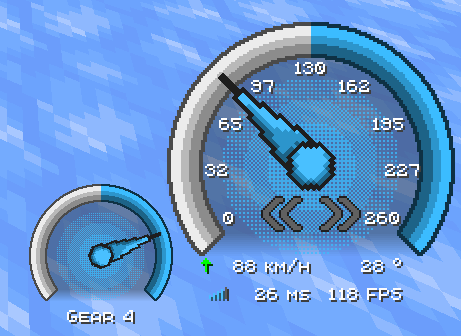
This is a texture pack that contains 3 BBBaotHud modules: an Engine Sound, an RMP HUD, and a Speed HUD.
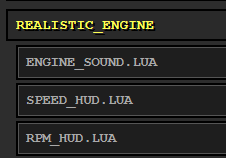
To enable them, type /bb_boat_hud. In the web panel, you can add the 3 modules under the realistic_engine section.
None of the modules depend on the others. They can be used independently, with their separate configs.
The Modules
- Engine Sound: features a sound that is the
Trackmania 11004RPM Throttle Engineand 3 types of gear shift sounds, also taken from Trackmania 2020. - Speed HUD: features an animated speedometer with the speed indicator (km/h) and other miscellaneous elements.
- RMP HUD: features an animated tachometer with the gear indicator.
Customization
Config Menu
Adding More BBBoatHud mod will also give you access to the config menu, where you can more easily change the config for the Modules.
The resource pack will still work without the mod.

Change sounds
To change the gear or engine sound, you can make another resource pack with the name that you want, with this folder/file structure:
Resource Pack Name/
├── assets
│   └── realistic_engine
│       └── sounds
│           └── bb_boat_hud_modules
│               ├── engine_loop
│               ├── gear_shift_down
│               └── gear_shift_up
└── pack.mcmeta
Note: You need to apply this texture above the
Realistic Engine Sound pack, and the sounds need to have the same name as the original sound and have the.oggextension.
Settings
The settings used in the image and in the video are:
Speed HUD
Anchor Position: Bottom Right
X Offset: - 75
Y Offset: - 85
RMP HUD
Anchor Position: Bottom Right
X Offset: - 180
Y Offset: - 40
常见问题
Realistic Engine Sound 支持哪些 Minecraft 版本?
Realistic Engine Sound 支持 Minecraft Java 版 1.21.1–1.21.11,共 3 个版本。下载时注意选择和你游戏版本一致的文件。
Realistic Engine Sound 怎么安装?
把下载的 .zip 文件(不用解压)放进游戏目录的 resourcepacks 文件夹,进游戏后在「选项 → 资源包」里把它移到右边启用。
NapsterNPT 的其他作品
查看全部 →
Did You Mention Me?
No more worries about someone calling you when you are AFK.
More BBBoatHud
Addon for the mod BBBoatHud.

Racing Minimap
This is a Racing Minimap made for Ice Boat Racing
Per Boat Settings (PBS)
A mod for Minecraft 1.21.4 that automatically applies a custom settings profile when you ride a boat and restores your original settings when you dismount.
评论
登录后评论和评分