
Powr Visuals – GUI
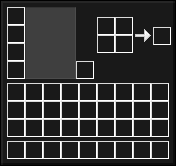
Powr Visuals - GUI seeks to create a graphical user interface that feels new and clean, ultimately making Minecraft more visually appealing.
截图


介绍
AI generated Icon
This is the GUI only Version.
Full Pack: Powr Visuals
Powr Visuals: Simple Elegance, Animated Detail
Experience Minecraft with a fresh perspective through Powr Visuals. This resource pack carefully balances simplicity and visual enhancement, offering a cohesive black, grey, and white theme that provides a clean and updated look without losing the familiar essence of vanilla Minecraft.
Key Features:
- Clean & Modern Aesthetic: Immerse yourself in a striking black, grey, and white color palette for a refined visual experience.
- Vanilla Inspired: Powr Visuals thoughtfully orients itself around Minecraft’s original textures, ensuring a familiar yet revitalized feel.
- Subtle Animations: Discover a new layer of dynamism with carefully integrated animations that bring various in-game elements to life.
- Enhanced Clarity: Enjoy a visually cleaner interface and world, allowing key details to stand out.
Powr Visuals aims to provide a subtle yet impactful visual upgrade for your Minecraft world. Enjoy the simplicity and the added touch of animation!
Supported Mods (1.5 and above):
- AppleSkin by squeek502
- Enchanting Infuser by Fuzs
- Iris Shaders by coderbot
- Mod Menu by Terraformers
- Shulkerbox Tooltip by MisterPeModder
- Trade Cycling by henkelmax
- Travelers Backpack by Tiviacz1337
- Trinkets by Emi
- Xaeros Minimap by thexaero
- Xaeros Worldmap by thexaero
Credits:
Vanilla Tweaks for the Item Stiching Fix, Unique Dyes, Lower Shield and Lower Fire:
Vanilla Tweaks
Additional Information:
All Versions that are listed below have been removed or not uploaded due to rendering and loading issues caused by some corrupted files.
- 0.2 – 0.5
- 0.7 – 1.2
- 1.3
- 1.4
I advise you to keep this resource pack updated at all times to avoid loading issues.
Thanks for viewing/downloading 🙂
常见问题
Powr Visuals – GUI 支持哪些 Minecraft 版本?
Powr Visuals – GUI 支持 Minecraft Java 版 1.20–1.21.9,共 17 个版本。下载时注意选择和你游戏版本一致的文件。
Powr Visuals – GUI 怎么安装?
把下载的 .zip 文件(不用解压)放进游戏目录的 resourcepacks 文件夹,进游戏后在「选项 → 资源包」里把它移到右边启用。
Vrse Visual Studios 的其他作品
查看全部 →
Project Astral
Project Astral is a Minecraft texture pack that focuses on giving the game a clean and modern look with custom animations. The goal of this pack is to provide a seamless and enjoyable experience that enhances the player's immersion.

Powr Visuals
Powr Visuals seeks to create a user experience that feels new and clean, ultimately making Minecraft more visually appealing. Just... powerful visuals...
Powr Visuals
Powr Visuals seeks to create a user experience that feels new and clean, ultimately making Minecraft more visually appealing. Just... powerful visuals...

Spotlight
Illuminate your Game.
评论
登录后评论和评分