
Potion Effect Indicators
Potions now show a visual indicator of whether the effect has been strengthened or extended through brewing in the bottom left! Great for PvP and casual gameplay!
截图


介绍
Potions now show the whether the effect has been strengthened or extended through brewing in the bottom left of the texture! This applies to all potions, including splash potions, lingering potions and ominous bottles. The pack includes a potion drinking animation too! Great for PvP and casual gameplay!
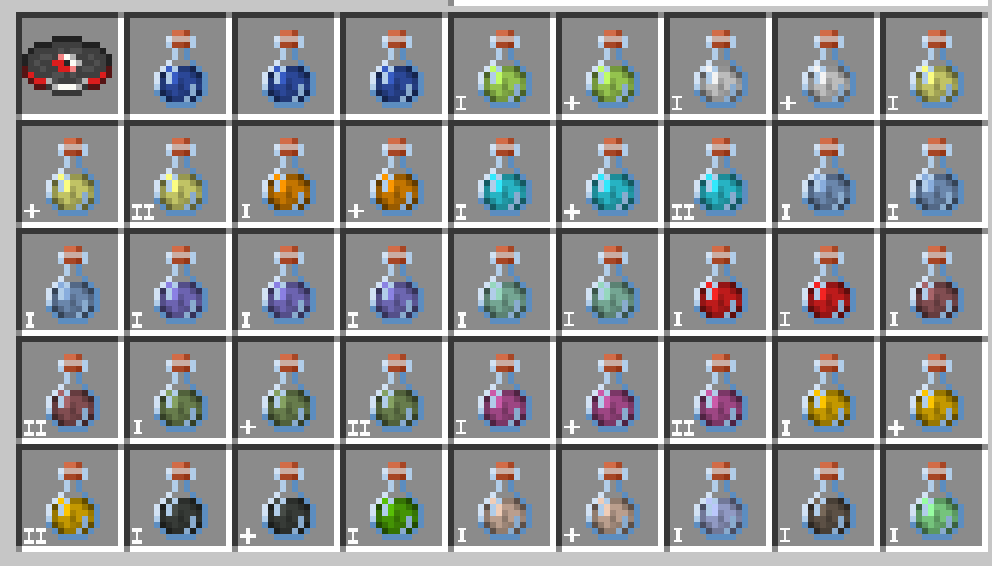
I means the potion effect is the default length (3 minutes) and the effect has not been strengthened or extended by brewing.
II means the potion effect has been strengthened by brewing the potion with a piece of glowstone dust (for example, Strength I becomes Strength II).
The + means the length of the potion effect has been extended by brewing the potion with a piece of redstone dust (for example, Strength I for 3 minutes becomes Strength II for 8 minutes).
Please report any bugs to me on discord
Thanks Bluebird for letting me include the potion drinking animation from their Eating Animation Resource Pack!
https://modrinth.com/user/Bluebird
https://modrinth.com/resourcepack/eating-animation-resource-pack
Made by MrNoodleStroodle
常见问题
Potion Effect Indicators 支持哪些 Minecraft 版本?
Potion Effect Indicators 支持 Minecraft Java 版 1.21.5–26.1.1,共 9 个版本。下载时注意选择和你游戏版本一致的文件。
Potion Effect Indicators 怎么安装?
把下载的 .zip 文件(不用解压)放进游戏目录的 resourcepacks 文件夹,进游戏后在「选项 → 资源包」里把它移到右边启用。
MrNoodleStroodle 的其他作品
查看全部 →
Firework Duration Indicators
Fireworks now show a visual indicator of the flight duration level in the bottom left of the texture! Great for PvP and casual gameplay!

White Block Break
Changes the block breaking animation from black to white, making the animation visible on darker blocks! Great for PvP and casual gameplay!

Quiet Farm Animals
Makes all farm animals/mobs (cows, chickens, pigs and sheep) 50% quieter!

Consistent Netherite Helmet
Changes the texture and model of the netherite helmet to be consistent with the other helmets in the game!
评论
登录后评论和评分