
Parrot’s Questlog
A revamp of the Questlog mod's textures to give it a more rustic and medieval feeling, as well as adding some custom quest pages for further customization themed around both vanilla and Create
截图


介绍
Parrot’s Questlog
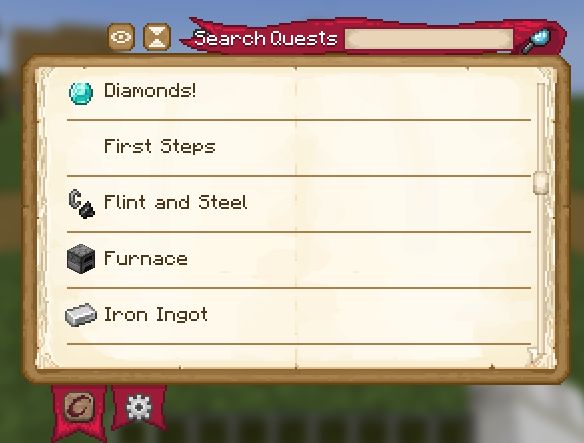
This resource pack is meant to serve as a revamp of the Questlog mod to give it a more rustic feeling. Specifically, it adds more textured quest pages, tabs, buttons, etc. It also has a set of custom quest pages for you to use as quest backgrounds.
A full list of the custom quest pages is below (and some in the gallery)!
I’ve also noted the locations of each texture file so that you can more easily set up your quests to use them. (see how on the Questlog Wiki specifically on the Quest Definition Page, look for background_texture)
Stone Quest Page
questlog:textures/gui/pages/stone.png

Copper Quest Page
questlog:textures/gui/pages/copper.png

Iron Quest Page
questlog:textures/gui/pages/iron.png

Steel Quest Page
questlog:textures/gui/pages/steel.png

Netherrack Quest Page
questlog:textures/gui/pages/netherrack.png

Diamond Quest Page
questlog:textures/gui/pages/diamond.png

Obsidian Quest Page
questlog:textures/gui/pages/obsidian.png

Andesite Quest Page
questlog:textures/gui/pages/andesite.png

Brass Quest Page
questlog:textures/gui/pages/brass.png

(The showcased quests here are from my modpack Cognata Remaster)
常见问题
Parrot’s Questlog 支持哪些 Minecraft 版本?
Parrot’s Questlog 支持 Minecraft Java 版 1.19–1.21.1,共 12 个版本。下载时注意选择和你游戏版本一致的文件。
Parrot’s Questlog 怎么安装?
把下载的 .zip 文件(不用解压)放进游戏目录的 resourcepacks 文件夹,进游戏后在「选项 → 资源包」里把它移到右边启用。
voxelparrot 的其他作品
查看全部 →
Simple Wooden Armor
Adds a wood armor set for each vanilla wood type to the game

Combat Roll Potions
Adds potion effects that upgrade your rolling from the Combat Roll mod

Parrot’s Plushies
Adds an assortment of craftable plushes to the game
Parrot’s Plushies
Adds an assortment of craftable plushes to the game
评论
登录后评论和评分