
截图


介绍
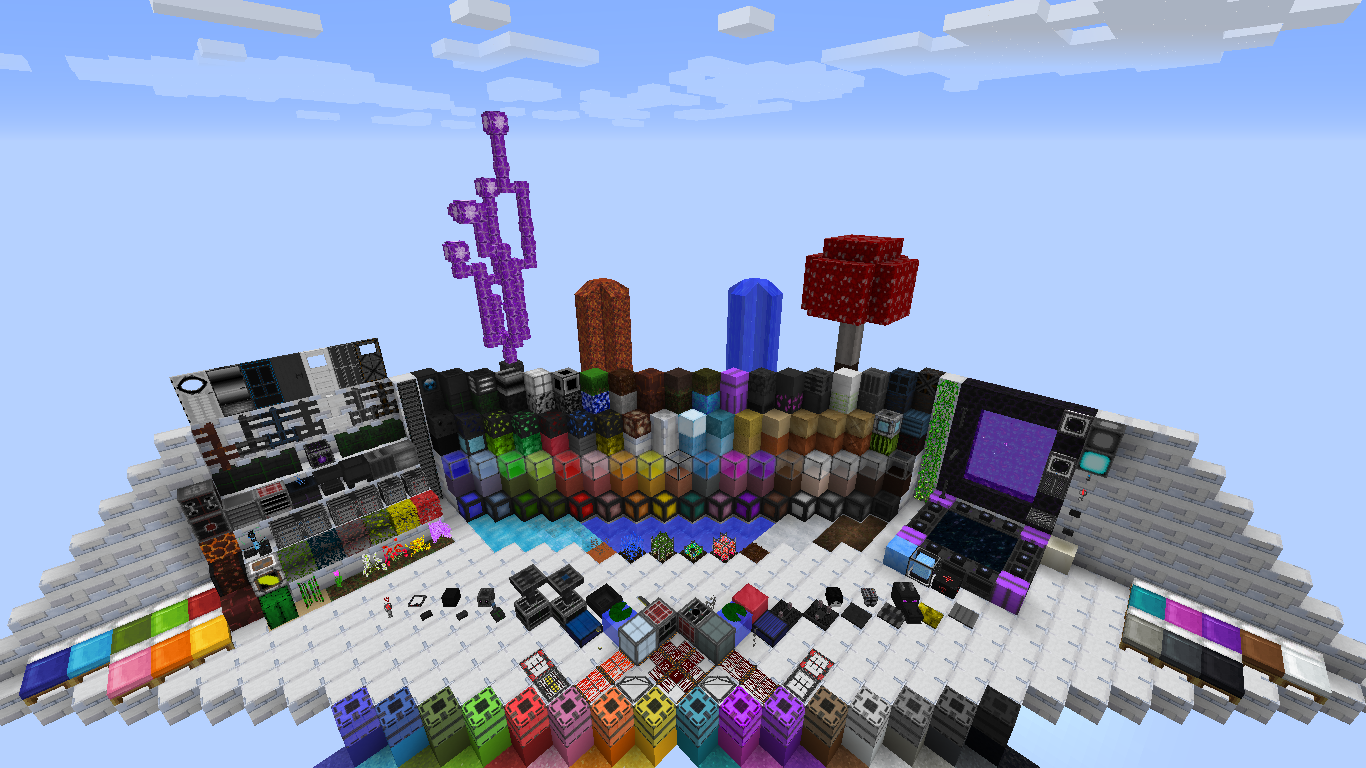
Hello everyone! Let me introduce you the Pademia – a colorful futuristic resourcepack.
First of all, let me tell you some important things:
- It’s not completely 64x. For example, all the items are 32x, and some creatures are even 128x.
- This is work-in-progress resourcepack, so lots of textures will be added.
- Yes, it has mod support, but again, there’re only a few mods that this resourcepack does support right now and not all of them are supported completely.
- Optifine and MCpatcher support.
MOD SUPPORT LIST
- Birds Nests (full)
- CustomNPC (partly)
- Cyclic (full)
- Iron Chests (full)
- Lots Of Things (partly)
- Lumberjack (full)
- Portable Craft Bench (full)
- jglrxavpok’s Uncrafting Table (full)
- Weapon Case Loot (full)
I hope you like it. Tell me, if anything is wrong with the resourcepack.
This resource pack has been published on CurseForge and PlanetMinecraft specifically, please do not distribute this pack to another site without my permission (or at least credit me – Ceterai – as the author).
SCREENSHOTS
Most of the screenshots were made using the Resource Pack Test Map by SlicNic24!
To view them fullsize, go to the Images section.


MOD TEXTURES SHOWCASE
Birds Nests

Cyclic


Iron Chests


Lumberjack
(on the screenshots below only 5 main lumber axe textures are shown, but the resourcepack has textures for all of 84 lumber axes)


Portable Craft Bench
Uncrafting Table
Weapon Case Loot
Latest updates:
– added support for the following mods:
Birds Nests
Iron Chests
Lumberjack
Portable Craft Bench
jglrxavpok’s Uncrafting Table
– added mod textures showcase
– updated textures for Cyclic Magic mod
– added some npc textures to CustomNPC mod
– added texture for leather strip from Uncrafting Table mod
– added the rest of block textures and some mob textures
If the resourcepack does not apply properly, try using Optifine/MCPatcher!
常见问题
Pademia 支持哪些 Minecraft 版本?
Pademia 支持 Minecraft Java 版 1.10–1.12,共 5 个版本。下载时注意选择和你游戏版本一致的文件。
Pademia 怎么安装?
把下载的 .zip 文件(不用解压)放进游戏目录的 resourcepacks 文件夹,进游戏后在「选项 → 资源包」里把它移到右边启用。

评论
登录后评论和评分