One Texture Color
Example pack for paletted permutations. Makes you able to apply palettes and colors to many stuff with few textures.
截图


介绍
ONE TEXTURE COLOR (example pack)
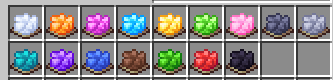
**CHECK THE GALLERY!! Everything works using only a few textures
btw, the textures are really ugly and rushed because this is purely an example pack for those who want to experiment with it, many things can be done with this and i havent seen no one making it**
This is a EXAMPLE Resource pack made really quick for the transmute palette function for Atlases in minecraft
This feature allow you to add textures in one singlecolor, so all blocks/items of this type uses the exact same texture (only one file) but applying different colors (in this pack, it is gray)


and all these textures will be “dyed” and applied to some specific blocks (in this pack, its terracotta, wool, concrete, concrete powder and beds)
To add more textures and blocks, you need to add the original texture to the item/block atlas depending on what it is
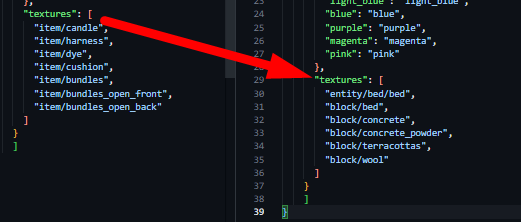
Then, youll need to change the item/block model, just to change its texture to “item_color” or “block_color” the original texture will be the prefix and the color will be the suffix for example, in the image there is “block/concrete” so the “red_concrete.json” in “models/block” will have to look like this
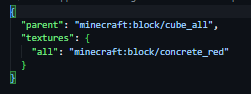
To control the colors, you have to add them in the atlas and a texture in the palette folder, the gray one used for the default textures is named “null.png” the others are vanilla colors. It is important that all the palette textures have the same resolution/amount of colors
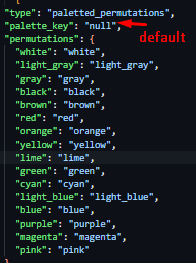

OBS: This pack also makes beds use the entity folder and the old format from before 26.3
Special thanks to @ioblackshaw [enchanted_games]
Check my other Packs:
- Click Interactions DATAPACK
- Glass Frames RESPACK
- Glass Frames DATAPACK
- MOB Items
- ENCHANTRAX
- Better Keys
- Better BATS
- Cluckin’ CHICKS RESPACK
- Cluckin’ CHICKS DATAPACK
- Amoozing COWS
- Golem Toys
- Iridescent Star
- Friendly Axolotls DATAPACK
• Pack made by itsMarkiS • @Markis_ArtS
常见问题
One Texture Color 支持哪些 Minecraft 版本?
One Texture Color 支持 Minecraft Java 版 1.21–26.3,共 17 个版本。下载时注意选择和你游戏版本一致的文件。
One Texture Color 怎么安装?
把下载的 .zip 文件(不用解压)放进游戏目录的 resourcepacks 文件夹,进游戏后在「选项 → 资源包」里把它移到右边启用。
MarkiS_Arts 的其他作品
查看全部 →
🦇 Better BATS 🦇
Makes bats pixelconsistent giving them a lot of new variants and custom animations. They may be cute, they could be scary, but theyre definetly better bats!

🔑 Better Keys 🗝
Makes Trial and Dungeon keys looks prettier and a little more ominous

🐟Friendly AxolotlS🐟
Axolotls wont kill your fishes anymore, they even have a new diet...

🐔Cluckin’ CHICKS🐤
Add new models and variants for chickens (1.3 Turkeys & Ducks)
评论
登录后评论和评分