截图
介绍

🌾a cluttered and studious texture for bookshelves🌾
1.19 / Resource Pack / 16x
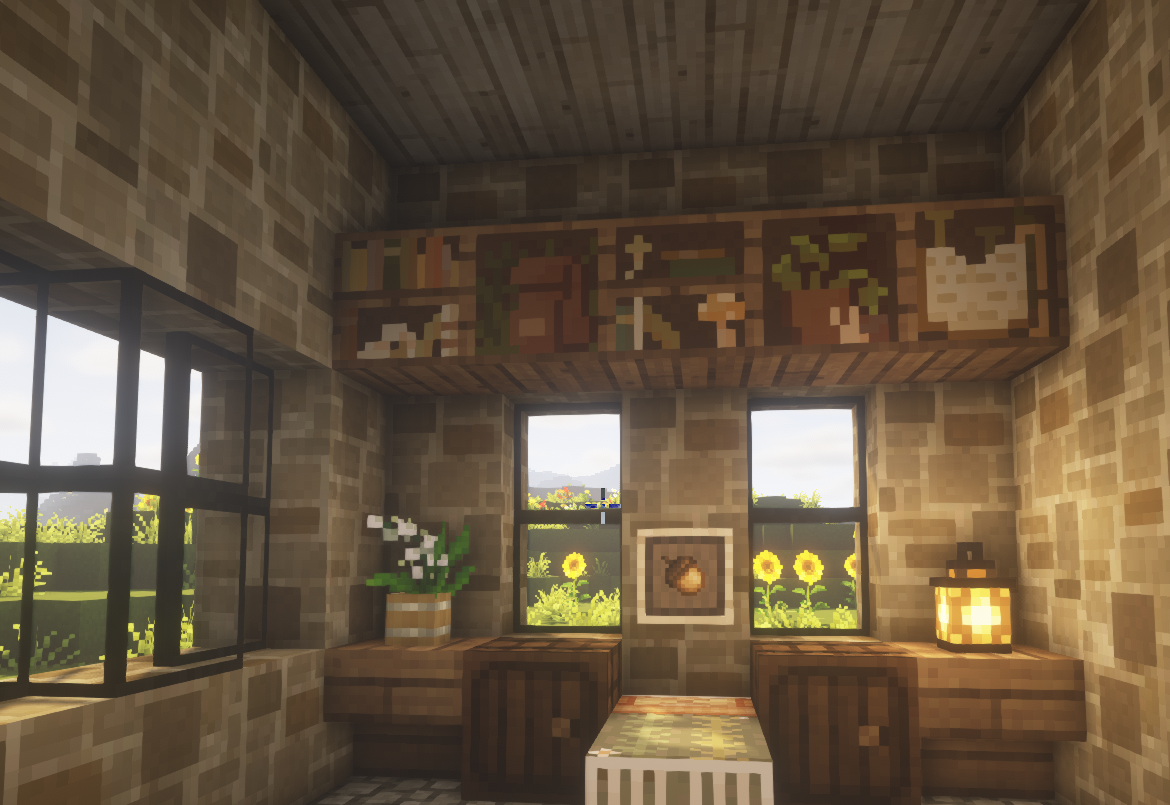
If you’re like me, you are desperate for a little more whimsy in survival Minecraft and with the oncoming addition of chiseled bookshelves… why keep the regular bookshelves full of books? These are stashed with plants, crystals, materials, and anything else to give your home more of a “lived in” feeling! This pack includes 15 variations, so hopefully you won’t have too many repeats.

🪴 find out information about this pack here🪴
Please ask before you redistribute this pack. If you want to port to PE or your own pack just message me!
I plan on keeping this texture pack updated on future versions, but this is a reminder that Minecraft is very forgiving on different resource versions! Most likely, this will work on any version since the code it uses has been around for years. If you have any problems…
I. Make sure the pack is on top of any other selected texture packs that edit the bookshelves. E.g. I use Mizuno’s 16 Craft and placed Nox’s Library above it in the selected resource packs so it overrides Mizuno’s bookshelf texture.
II. Optifine is not required for this pack, you can look up many tutorials on how to install basic texture packs if you need help!
III. I am not a machine and do this for fun to spread beauty into a game I love. Do not beg for support or uploads for a specific Minecraft version. If there is a major issue I will look into it, but most likely I will just update to future, not past installations. 🙂
🪵 support me and follow my artwork 🪵
I absolutely love illustrating, and if you like what I do I would love you to explore more of it. Below is some info about me and where you can find me <3 Thank you for all the love on my texture packs.

常见问题
Nox’s Library 支持哪些 Minecraft 版本?
Nox’s Library 支持 Minecraft Java 版 1.18–1.19.3,共 7 个版本。下载时注意选择和你游戏版本一致的文件。
Nox’s Library 怎么安装?
把下载的 .zip 文件(不用解压)放进游戏目录的 resourcepacks 文件夹,进游戏后在「选项 → 资源包」里把它移到右边启用。
评论
登录后评论和评分