
No Spyglass Overlay
No Spyglass Overlay makes Spyglass Overlay and glass Look clear and minimal
截图

介绍
No Spyglass Overlay
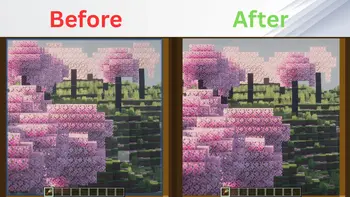
Tired of the restrictive, circular vignette when zooming in? No Spyglass Overlay removes the dark border completely, giving you a full, unobstructed view of your world while using the Spyglass in Minecraft!
This pack is lightweight, clean, and perfectly suited for both casual play and competitive survival.
🌟 Features
- Full Screen Zoom: Completely eliminates the square/circular dark overlay texture.
- Universal Compatibility: Works seamlessly alongside other resource packs and shader mods.
- Multi-Platform Support: Fully compatible with both Java Edition and Bedrock Edition.
- Performance Friendly: Zero impact on your game’s frame rate (FPS).
🛠️ Installation
For Java Edition:
- Download the
.zipfile for your Minecraft version. - Open Minecraft and navigate to
Options>Resource Packs>Open Pack Folder. - Drop the downloaded
.zipfile into the folder. - Activate the pack in-game and move it to the top of your active pack list.
For Bedrock Edition:
- Download the
.mcpackfile. - Double-click the file to automatically launch Minecraft and import the pack.
- Go to
Settings>Global Resources>My Packsand click Activate.
🌐 Availability
Java Edition
Available on Modrinth & CurseForge!
- Modrinth: Download Here
- CurseForge: Download Here
Bedrock Edition
Available on CurseForge!
- CurseForge: Download Here
💬 Support & Bug Reports
Found a bug or glitch, or need help with the resource pack?
Contact me on Discord: @legend242900
Feedback and bug reports are always appreciated! 🛠️
常见问题
No Spyglass Overlay 支持哪些 Minecraft 版本?
No Spyglass Overlay 支持 Minecraft Java 版 1.21.5–26.3,共 12 个版本。下载时注意选择和你游戏版本一致的文件。
No Spyglass Overlay 怎么安装?
把下载的 .zip 文件(不用解压)放进游戏目录的 resourcepacks 文件夹,进游戏后在「选项 → 资源包」里把它移到右边启用。
Legend242900 的其他作品
查看全部 →
Powdered Snow Highlighter
为细雪方块添加轮廓和高亮,避免你掉进陷阱或被冻住。

FlameFrags Essentials
简洁利落的 PvP 资源包,带有 FlameFrags 风格的暴击、横扫和动态图腾效果。

Visible Ores
Make ores easier to spot with subtle glowing highlights while keeping Minecraft's vanilla look!

Dark GUI
A sleek, minimalist dark mode overhaul for your game interfaces. Clean lines, High contrast, and easy on the eyes.
评论
登录后评论和评分