No Pumpkin Blur Pro
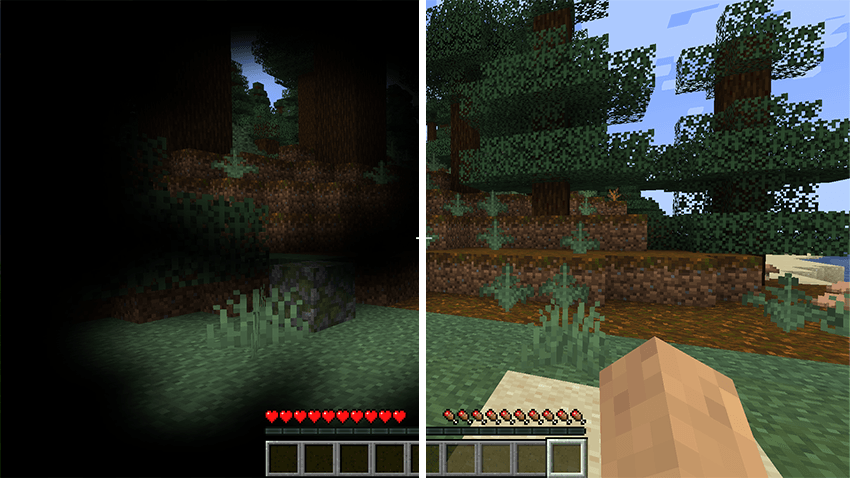
Removes the black pumpkin overlay (pumpkin blur) when wearing a carved pumpkin on your head.
介绍
No Pumpkin Blur
Removes the black pumpkin overlay (pumpkin blur) when wearing a carved pumpkin on your head.
Features:
– Fully removes the pumpkin blur effect
– Clear vision while wearing a carved pumpkin
– Compatible with other resource packs (put this pack at the top of your list)
How to install:
1. Download the file
2. Place it in your .minecraft/resourcepacks folder
3. Enable “No Pumpkin Blur” in Options → Resource Packs
4. Make sure it is above other packs
Simple. Clean. No more pumpkin blur.
常见问题
No Pumpkin Blur Pro 支持哪些 Minecraft 版本?
No Pumpkin Blur Pro 支持 Minecraft Java 版 1.15–26.2,共 42 个版本。下载时注意选择和你游戏版本一致的文件。
No Pumpkin Blur Pro 怎么安装?
把下载的 .zip 文件(不用解压)放进游戏目录的 resourcepacks 文件夹,进游戏后在「选项 → 资源包」里把它移到右边启用。
Zerw 的其他作品
查看全部 →
No Totem Pop Animation & Particles
图腾触发时保持屏幕清爽。适合PvP、硬核模式和追求干净画面的创作者。

Better Nether Portals
可以建造任意形状或朝向的下界传送门,封闭的黑曜石框架,用打火石点燃,然后走进去。

No Rain & Particles
此资源包会移除雨天画面效果,并彻底静音雨声。

One Money Block
One Money Block 是一款围绕单个方块展开的模组,带来独特有趣的游戏体验,并以金钱和升级为核心打造全新的成长系统。
评论
登录后评论和评分