
Min4craft 4×4
Small Minecraft 4x4 slightly lighter more FPS because of small textures. For people who enjoy small Minecraft
截图


介绍
What to expect
What it does
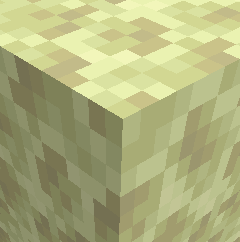
Min4craft is a tiny simplified 4 pixel style resource pack that shrinks Minecraft’s textures down to a super minimal look. It keeps the game recognizable while giving it a bold, clean, low detail style.
Why you might want it
You might want to try Min4craft if you like low resoulution or just want Minecraft to look simple and lightweight It doesn’t change gameplay,
Other information
Pack is not fully finished there is still A few bugs
| Category | 16×16 Minecraft | 4×4 Min4craft |
| — | — | — |
| Detail | High detail, clear shapes | Extremely simplified, minimal shapes |
| Color Variation | Many shades per block | Very few shades, flat colors |
| Block Recognition | Easy to identify | Some blocks look similar due to low detail |
| Item Clarity | Items have defined outlines | Items may lose detail or hard to identify |
| Performance | Normal performance | Slightly lighter due to tiny textures |
| Style | Classic Minecraft look | Minimalistic, experimental |
This part was added to tell you what to expect and what changes, so you know what changes before using the pack.
Don’t waste time
What wasn’t changed Fire, Lava, Chest, Ender Chest, Entities
| Texture | Status |
| — | — |
| Fire | Not changed due to A error while changing texture |
| Lava | Not changed due to A error while changing texture |
| Chest | Didn’t get changed even when edited texture |
| Ender Chest | Didn’t get changed even when edited texture |
| Entities | Didn’t change |
This part was made to show you what wasn’t changed so you don’t waste time fixing something that was never edited, so don’t waste time checking if your the on wrong version.
常见问题
Min4craft 4×4 支持哪些 Minecraft 版本?
Min4craft 4×4 支持 Minecraft Java 版 1.11–1.21.11,共 14 个版本。下载时注意选择和你游戏版本一致的文件。
Min4craft 4×4 怎么安装?
把下载的 .zip 文件(不用解压)放进游戏目录的 resourcepacks 文件夹,进游戏后在「选项 → 资源包」里把它移到右边启用。
CubeGuy41268 的其他作品
查看全部 → Min4craft 4×4
Small Minecraft 4x4 slightly lighter more FPS because of small textures. For people who enjoy small Minecraft

Lavender Mangrove Swamp
transforms the entire mangrove biome into a purple‑themed variant, giving it a fresh, mystical, and visually unique identity. Mangrove wood, leaves, roots, mud, and related textures are recolored or redesigned to match a lavendar

The Disc Expansion
This project adds tons of music discs to your world making your experience better!
End UI Overhaul
A fully custom End‑themed UI overhaul
评论
登录后评论和评分