
截图

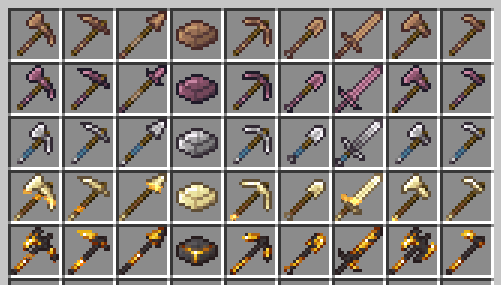
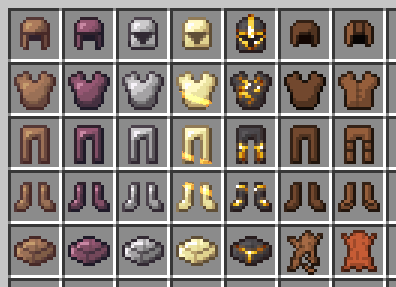
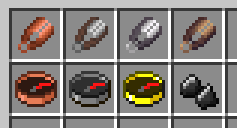
介绍
Matcha Programmer Art remakes many textures from klei_wright’s Matcha Flavoured in the style of Programmer Art.
This resource pack is a work in progress! Matcha Flavoured has many textures, so I would really appreciate any help you can give. If you’d like to contribute, you can create a pull request or just write an issue with attached files. Problem reports and suggestions are also appreciated.
Recommended load order
From top to bottom:
- (This pack) Matcha Programmer Art
- (Highly recommended) Programmer Art Continuation Project (PACP) is the most compatible with this pack and the best in my opinion, but Programmer Art Fix is also a good option
- (Built-in) Programmer Art
- (Built-in) Default

Water colors
Matcha Flavoured data pack overrides water colors in all biomes with a pale gray-ish color, which doesn’t look too good with vanilla or programmer art textures.
This resource pack overrides water colors back to vanilla values, but it requires Polytone mod for the overrides to actually be applied. Unfortunately, resource packs cannot do that in vanilla.
If you want old water with vibrant blue color, add Old Water Texture on top of this pack (ignore incompatibility warning, it works fine). You would still need Polytone though, otherwise the color will be incorrect.
Old HUD
If you want your HUD to look like this (no experience bar, the armor bar is in place of the hunger bar):

Then you should do the following:
- Install Melancholic Hunger & HUD mod
- Put the following config into the config file config/melancholic_hunger.json5 (this will make the mod to only do visual HUD changes and not do anything related to game mechanincs):
{
    clientOptions: {
        hide_hunger_bar: true,
        hide_experience_bar: true,
        show_experience_in_inventory: false,
        show_experience_on_screens: false,
        show_experience_on_gain: false,
        hide_locator_bar: false
    },
    serverOptions: {
        disable_hunger: false,
        hunger_effect: "VANILLA",
        use_custom_food_stack_sizes: false,
        sprinting: "VANILLA",
        instant_eating: false
    }
}
Also you can optionally install Raised to move the whole HUD up by a few pixels
常见问题
Matcha Programmer Art 支持哪些 Minecraft 版本?
Matcha Programmer Art 支持 Minecraft Java 版 26.2。下载时注意选择和你游戏版本一致的文件。
Matcha Programmer Art 怎么安装?
把下载的 .zip 文件(不用解压)放进游戏目录的 resourcepacks 文件夹,进游戏后在「选项 → 资源包」里把它移到右边启用。
antigers 的其他作品
查看全部 →
Melancholic Hunger & HUD
Brings back classic no-hunger health regeneration and simple HUD from old beta versions of the game

Taste of Matcha
Out-of-the-box experience for playing Matcha Flavoured with several improvements

Melancholic Beds
Removes insomnia, makes phantoms spawn in swamps as regular enemies, also changes how beds are crafted making it a little bit harder. All features are optional
评论
登录后评论和评分