Low on Fire By PeakMC6725
Lower Minecraft’s first-person fire overlay to keep more of your screen visible during PvP and survival. A lightweight, client-side resource pack for Java Edition 1.21.11+ and 1.8.9. Also check out PeakMC6725’s Ultimate PvP Utilities.
截图
介绍
🔥 Low on Fire By PeakMC6725
See more. Even when you’re on fire.
Getting burned in Minecraft is annoying enough. Having flames cover half your screen while you’re trying to fight makes it even worse! 💀🔥
You’re in the middle of a PvP fight, trying to track your opponent, or simply exploring your Survival world when suddenly, fire fills a huge part of your first-person view. It becomes harder to see what’s happening around you, and those flames can get in the way at the worst possible moment.
That’s where Low on Fire By PeakMC6725 comes in!
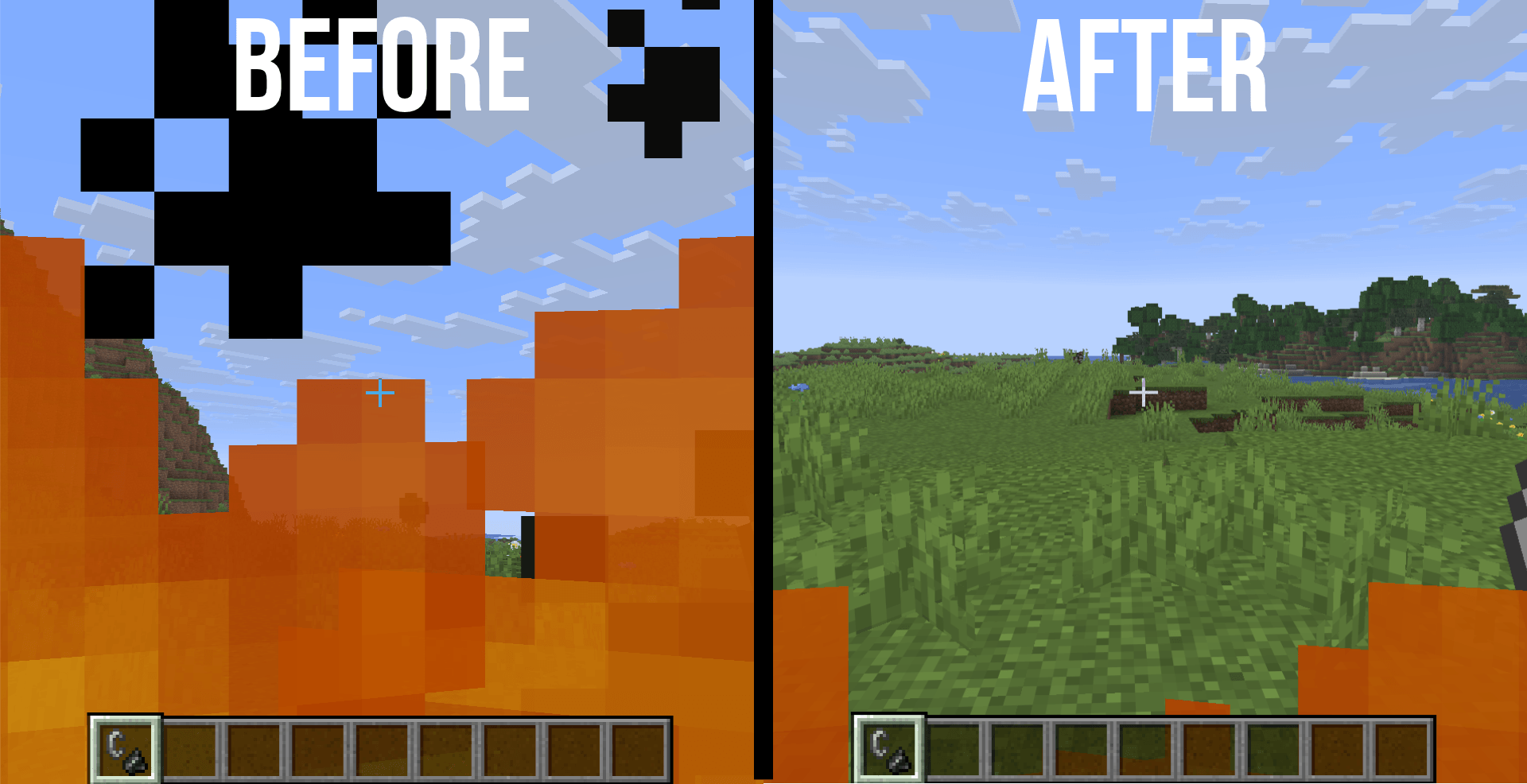
This resource pack lowers the first-person fire overlay so the flames cover only the bottom part of your screen. You can still tell that you’re burning, but more of your surroundings remain visible while you fight, explore, and play.
Whether you’re playing competitive PvP, surviving against hostile mobs, exploring dangerous areas, or simply going about your Minecraft day, Low on Fire helps keep your view less obstructed without changing the familiar look of Minecraft.
Less screen clutter. Better visibility. Same vanilla gameplay.
🔥 Features
👁️ Lower Fire Overlay
The vanilla fire overlay can cover a significant part of your screen when you’re burning. This pack moves the visible flames down toward the bottom of your first-person view, helping you see more of what’s happening around you.
🎨 Vanilla-Style Appearance
Don’t want your Minecraft visuals to look completely different? No problem!
Low on Fire retains Minecraft’s familiar flame textures and normal fire animation, focusing on changing the overlay’s position rather than introducing a completely different visual style.
⚔️ Better Visibility During PvP
When you’re fighting another player, being able to see your surroundings matters. Lowering the fire overlay helps reduce the amount of your screen covered by flames, making it easier to keep track of opponents and nearby terrain while burning.
It’s a small visual improvement that can make the first-person view feel less cluttered during combat.
🌍 Useful for Everyday Survival
This pack isn’t just for PvP! Fire can get in the way during ordinary Survival gameplay, too.
Whether you’re exploring caves, fighting hostile mobs, travelling through dangerous areas, or dealing with accidental burns, the lower overlay helps keep more of your surroundings visible.
📦 Two Version Options
Low on Fire is available for two Minecraft Java Edition version ranges:
-
Minecraft 1.21.11 and newer
-
Minecraft 1.8.9
Make sure you download the file that matches your Minecraft version. These versions are provided separately to accommodate different Minecraft resource-pack formats.
💻 Client-Side Resource Pack
Low on Fire is a client-side resource pack. You don’t need to install it on a server, and other players don’t need to download it for you to use it.
Simply enable the pack on your own Minecraft client and enjoy the visual change.
⚡ Lightweight Design
The pack uses resource-pack changes and is designed to have minimal performance impact. Its purpose is to adjust the appearance of the fire overlay without introducing unnecessary gameplay systems.
🎮 Visual Changes Only
Low on Fire changes how the first-person fire overlay appears, not how fire works.
-
Fire damage remains unchanged.
-
Burning mechanics remain unchanged.
-
Fire continues to behave normally.
-
The pack does not provide fire resistance or immunity.
You still need to deal with fire just as you would in vanilla Minecraft!
🎚️ FOV-Dependent Appearance
The exact amount of fire visible on your screen depends on your field-of-view (FOV) setting. Depending on your configuration, the flames may appear to occupy a different amount of your view.
Important note: Burning mobs and players viewed from the outside may look slightly different because some fire textures are shared with the first-person overlay.
🎮 Compatibility
-
Edition: Minecraft Java Edition
-
Supported versions: 1.21.11 and newer, and 1.8.9
-
Type: Client-side resource pack
-
Installation: Minecraft’s Resource Packs menu
Download the file that matches your Minecraft version. Other versions are not officially supported, and compatibility is not guaranteed.
📦 Part of PeakMC6725’s PvP Utilities
Low on Fire By PeakMC6725 is the standalone version of the Low Fire feature from PeakMC6725’s Ultimate PvP Utilities.
You don’t need to install the complete collection if all you want is a lower fire overlay. This standalone pack lets you use that individual feature without the other visual changes.
Looking for more ways to reduce visual distractions? Check out the other projects in the collection!
-
🛡️ Lower Shields By PeakMC6725 — Moves the shield lower in first-person view. Available for Minecraft 1.21.11+.
-
⚔️ Lower Sword Blocks By PeakMC6725 — Moves the sword lower in first-person view while blocking. Available for Minecraft 1.8.9.
-
🎃 No Carved Pumpkin Blur By PeakMC6725 — Removes the obstructive carved pumpkin overlay.
-
💚 Smaller Totem Pops By PeakMC6725 — Reduces the size of the Totem of Undying activation animation and its particles. Available for Minecraft 1.21.11+.
-
🔥 PeakMC6725’s Ultimate PvP Utilities — Combines the available visual improvements into one resource pack.
Search for these project names on my CurseForge profile to find their individual downloads.
Prefer one specific feature? Use the standalone pack.
Want multiple visual improvements together? Check out the combined Ultimate PvP Utilities pack.
🛠️ Installation Instructions
Follow these steps to install Low on Fire:
-
Download the correct file: Choose the
.zipfile that matches your Minecraft version. -
Keep the file zipped: Do not unzip or extract it.
-
Open Minecraft: Launch Minecraft Java Edition.
-
Open Resource Packs: Navigate to
Options → Resource Packs. -
Open the pack folder: Click
Open Pack Folder. -
Install the pack: Place the downloaded
.zipfile inside the folder that opens. -
Enable the pack: Return to Minecraft and move Low on Fire from Available to Selected.
-
Apply the changes: Click
Doneand let Minecraft load the resources.
Once enabled, the lower fire overlay should be active when you are burning.
⚙️ Using Other Resource Packs
If the flames don’t look right, another resource pack may be overriding the same files.
Try the following:
-
Move Low on Fire above other resource packs that modify the same fire textures or overlay files.
-
Check that the pack is enabled in the Resource Packs menu.
-
Press F3 + T to reload resources if the appearance doesn’t update correctly.
Remember that resource-pack priority can affect which textures Minecraft displays.
🐞 Bugs and Feedback
Found a problem, noticed an unexpected visual effect, or have an idea for improving Low on Fire?
Leave a comment on the project page!
When reporting a problem, please include:
-
Minecraft version: 1.21.x or 1.8.9.
-
FOV setting: This is especially useful for fire-overlay issues.
-
Other resource packs: Mention any packs that modify fire textures or overlays.
-
Screenshot: If possible, include one showing the issue.
This information can make it easier to understand what’s happening and investigate potential compatibility problems.
Suggestions, feedback, and bug reports are always welcome!
👤 Created By
PeakMC6725
A Minecraft creator making resource packs and datapacks for the community.
Thanks for checking out Low on Fire By PeakMC6725! Whether you’re using it for PvP, Survival, or everyday gameplay, I hope it helps keep your view clearer when the flames start rising.
See more. React faster. Fight cleaner. 🔥⚔️
常见问题
Low on Fire By PeakMC6725 支持哪些 Minecraft 版本?
Low on Fire By PeakMC6725 支持 Minecraft Java 版 1.8.9–26.3,共 7 个版本。下载时注意选择和你游戏版本一致的文件。
Low on Fire By PeakMC6725 怎么安装?
把下载的 .zip 文件(不用解压)放进游戏目录的 resourcepacks 文件夹,进游戏后在「选项 → 资源包」里把它移到右边启用。
PeakMC6725 的其他作品
查看全部 →
Falling Tree – OneChop (Tree Vein Miner) By PeakMC6725
使用 Falling Tree – OneChop,让砍树更轻松!砍下一根原木,就能立刻砍倒树上相连的原木。支持 12 种木材和所有原版斧头,助你更快收集木材,把时间留给建造和探索!
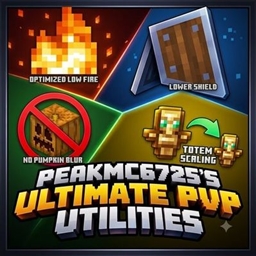
PeakMC6725’s Ultimate PvP Utilities (Low on Fire, Lower Shields, No Carved Pumpkin Blur, Smaller Totem Pops, Lower Sword Block)
用 PeakMC6725 的终极 PvP 实用工具提升你的 Minecraft PvP 体验!为 1.21+ 提供低火焰、低盾牌、无南瓜模糊和更小的图腾弹出效果,并为 1.8.9 提供低火焰、无南瓜模糊和更低的剑格挡。更清晰、更流畅的战斗。

SkyBlock by PeakMC6725
从一座只有一棵树和一个箱子的小浮岛开始。生存、收集资源,从几乎一无所有中建造。搭桥前往沙岛获取黑曜石,探索虚空下界中的5x5萤石岛,征服要塞并击败末影龙!

Smooth Flaps By PeakMC6725 (Smooth Doors, Trapdoors and Fence Gates)
Smooth, client-side open and close animations for doors, trapdoors and fence gates..
评论
登录后评论和评分