
截图

介绍
中文介绍正在准备中,下面暂时显示原文。
About
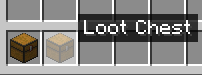
Changes Lootr’s chest models to use the models from Nostalgic Tweaks.
Nostalgic Tweaks and Lootr are required for the resource pack to work.
Setup
- Install both Nostalgic Tweaks and Lootr
- Once both mods are installed open Nostalgic Tweaks’ config
- Click on Config Menu then Eye Candy
- Search for “Old Modded Chests” and click Edit List
- Click the Add button and add all 3 Loot Chests


常见问题
Lootr Nostalgic Chests 支持哪些 Minecraft 版本?
Lootr Nostalgic Chests 支持 Minecraft Java 版 1.20–26.1.2,共 22 个版本。下载时注意选择和你游戏版本一致的文件。
Lootr Nostalgic Chests 怎么安装?
把下载的 .zip 文件(不用解压)放进游戏目录的 resourcepacks 文件夹,进游戏后在「选项 → 资源包」里把它移到右边启用。
Identity-Theft 的其他作品
查看全部 →
No XP Anvils
by Identity-Theft
Removes the XP cost from anvils
7.1万
4 个月前
Modrinth

Armour Sound Tweak Updated
by Nut Lovers Inc.
Plays the respective equip sound when unequipping armour in a menu.
6,239
1 年前
Modrinth
Armour Sound Tweak Updated
by Nut Lovers Inc.
Plays the respective equip sound when unequipping armour in a menu.
6,239
1 年前
Modrinth
Lootr Nostalgic Chests
by Identity-Theft
Makes Lootr's chests use the model from Nostalgic Tweaks
2,480
1 年前
Modrinth
评论
登录后评论和评分