截图
介绍
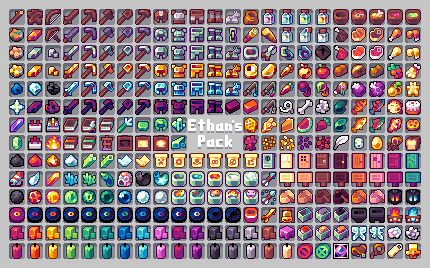
Say goodbye to grainy default textures or disconcerting attempts at hyperrealism! Lithograph offers vibrant, cartoon-like textures using a curated color palette. Items, entities, blocks, particles, paintings and GUI have all been modified to give Minecraft’s graphics a fun, whimsical yet solid feel befitting its gameplay.
Right now the pack is just for 1.18, I’ll be working on and releasing a 1.19 version within the next few weeks. I’ve been doing my best to keep up with the new versions–I’ve been working on this pack for over two years now, and in that time Mojang has released four huge content updates! This is the first resource pack I’ve ever made, and I can’t express how proud I am to be finally able to share it. Please feel free to comment any issues, missing textures, etc.
Note: Some features, such as custom colors for banners, tool health bars and other things only work if Optifine is installed. However Optifine is not required to use this pack.
常见问题
Lithograph 支持哪些 Minecraft 版本?
Lithograph 支持 Minecraft Java 版 1.18–1.19.1,共 5 个版本。下载时注意选择和你游戏版本一致的文件。
Lithograph 怎么安装?
把下载的 .zip 文件(不用解压)放进游戏目录的 resourcepacks 文件夹,进游戏后在「选项 → 资源包」里把它移到右边启用。
评论
登录后评论和评分