
截图
介绍
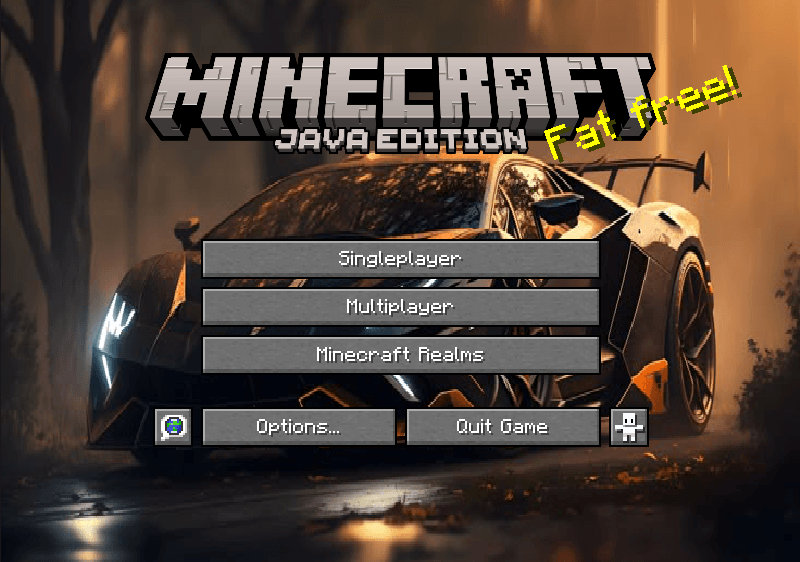
Give your Minecraft experience a unique touch with this Custom GUI Resource Pack! This pack features a completely redesigned interface with LAMBORGHINI panorama overlay integrated into the UI. Whether you’re looking for a fresh new look or just want to add some personal flair to your game, this pack is perfect for you.
🔹 How to Install:
-
Download the .zip file.
-
Place it in the resourcepacks folder (.minecraft/resourcepacks).
-
Select the pack in Minecraft’s resource pack settings.
-
Enjoy your custom GUI!
💡 Compatible with both Vanilla and modded Minecraft!
🔗 If you enjoy this pack, don’t forget to leave a review! 😊
常见问题
L-GUI 支持哪些 Minecraft 版本?
L-GUI 支持 Minecraft Java 版 1.21.1–1.21.5,共 4 个版本。下载时注意选择和你游戏版本一致的文件。
L-GUI 怎么安装?
把下载的 .zip 文件(不用解压)放进游戏目录的 resourcepacks 文件夹,进游戏后在「选项 → 资源包」里把它移到右边启用。
Faentum 的其他作品
查看全部 →
Faentum’s Deep Sea Expansion
深海不再安全,敢于直面深渊吗?
Techno Gamerz Hardcore World
Techno Gamerz 极限生存世界的终极复刻。你能活下来吗?

DMS
氛围感十足、黑暗恐怖风格的光影

HeroBrine SMP
完整复刻 Herobrine SMP 服务器世界!
评论
登录后评论和评分