
Japanese Crimson Katana UI
Transform your Minecraft interface with Japanese-inspired crimson elegance, golden details, and beautifully crafted katana-themed GUI textures. ⚔️
截图
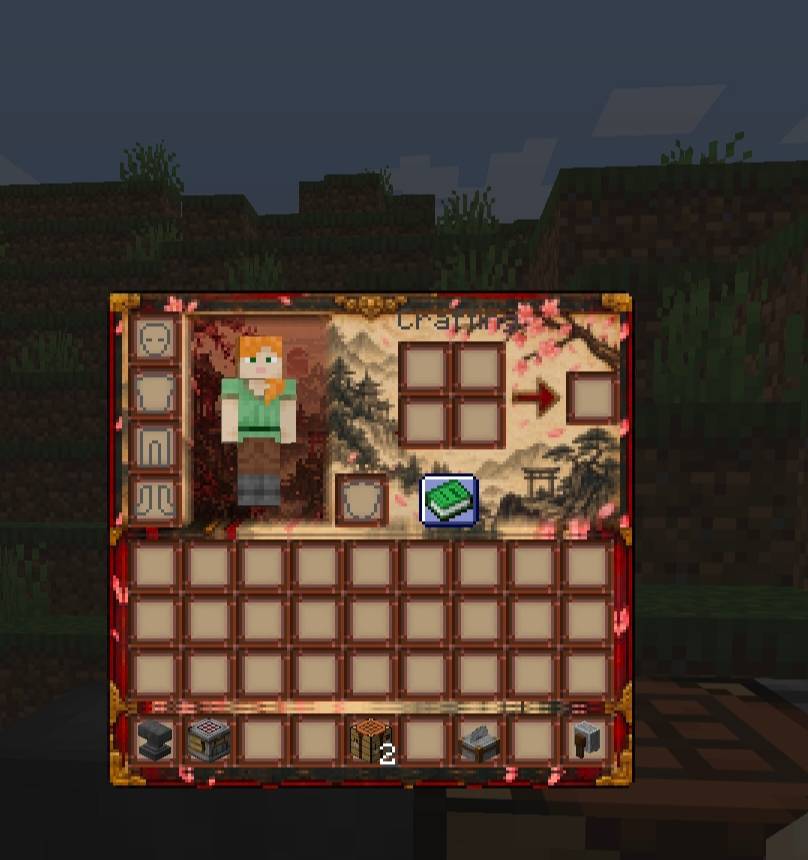
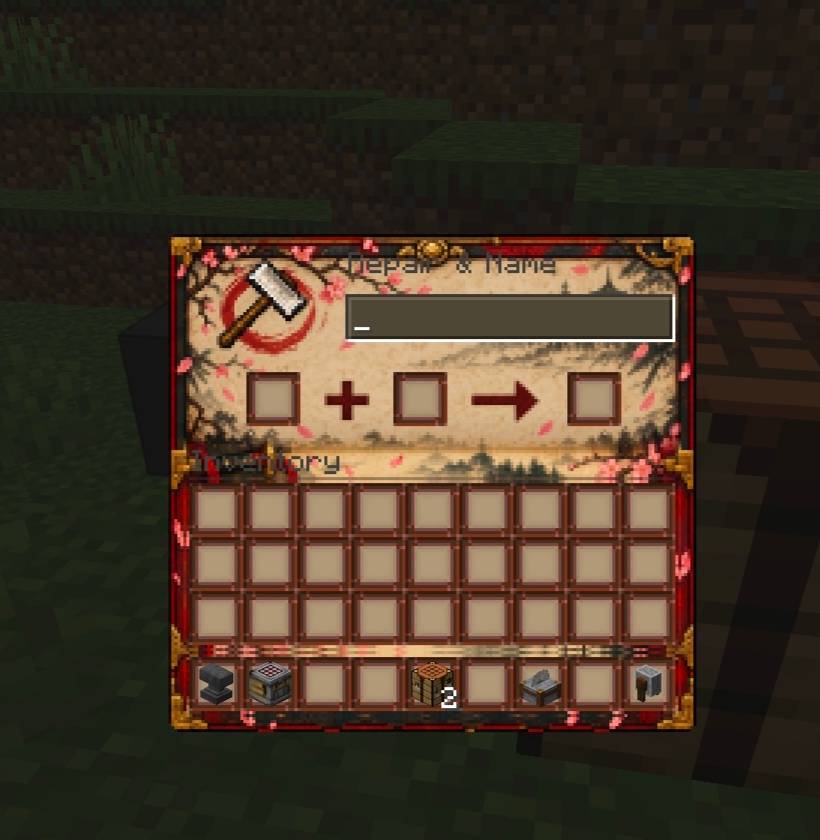
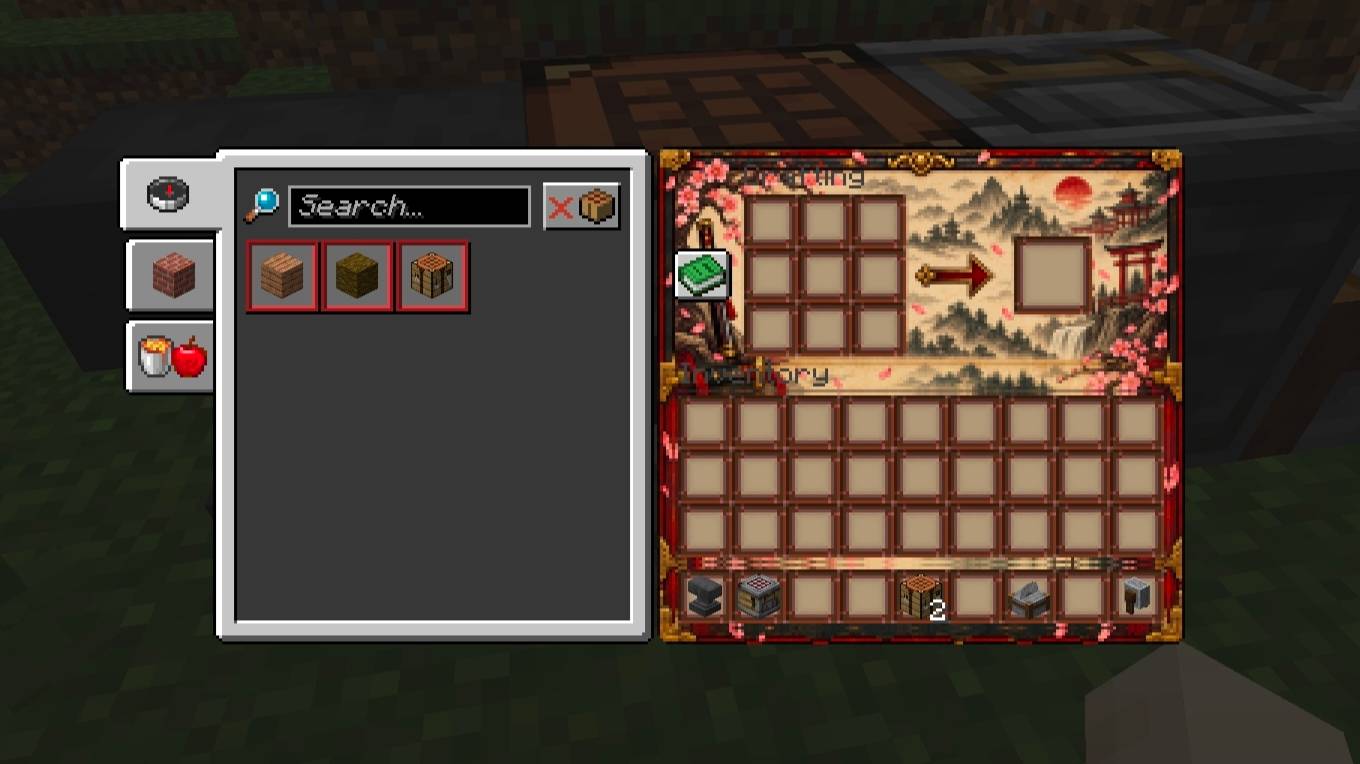
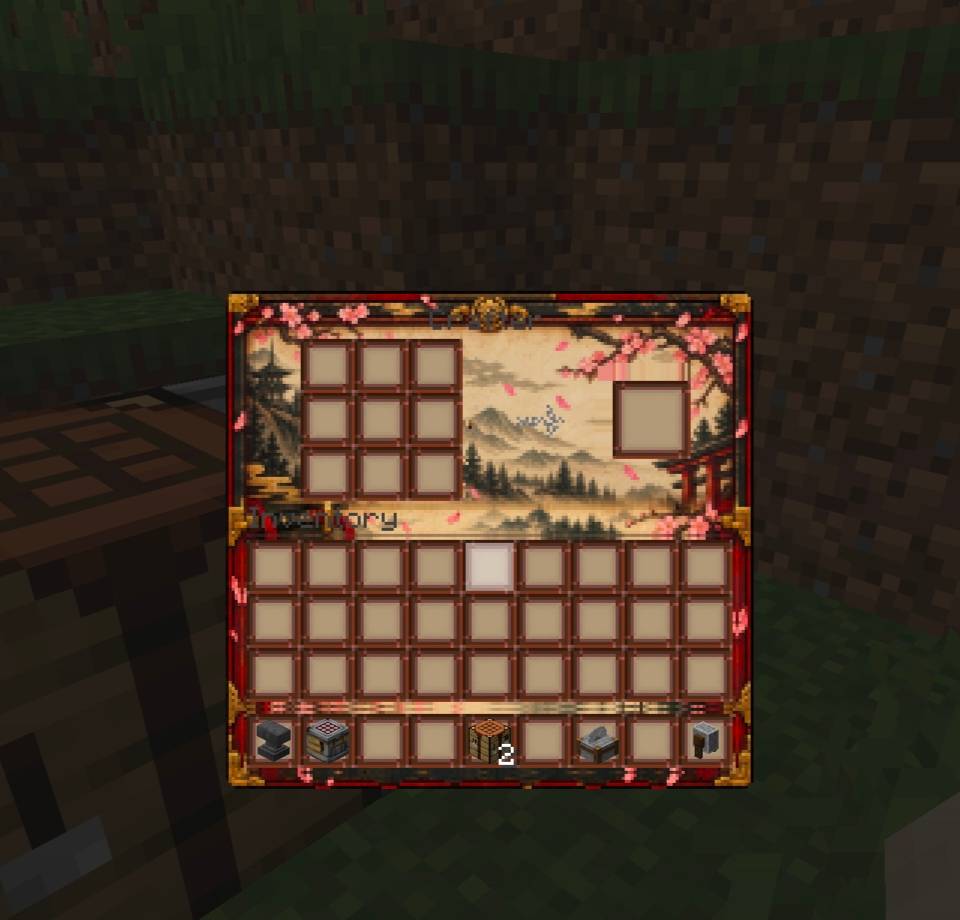
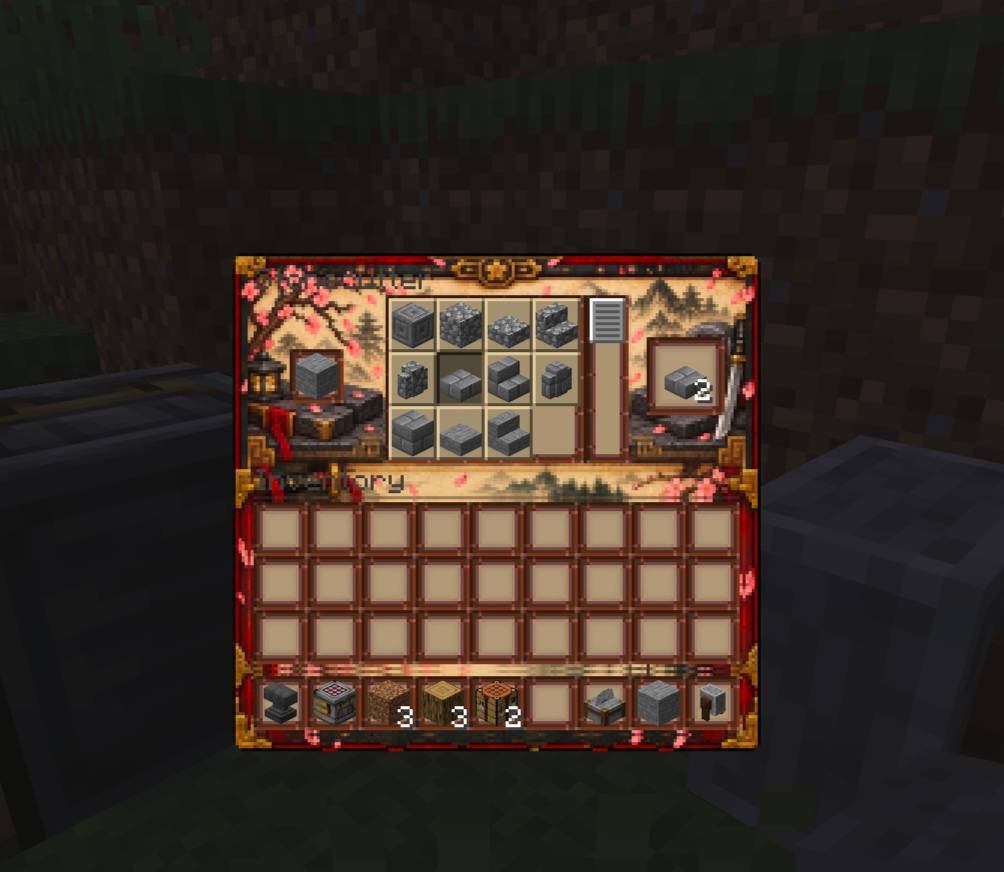
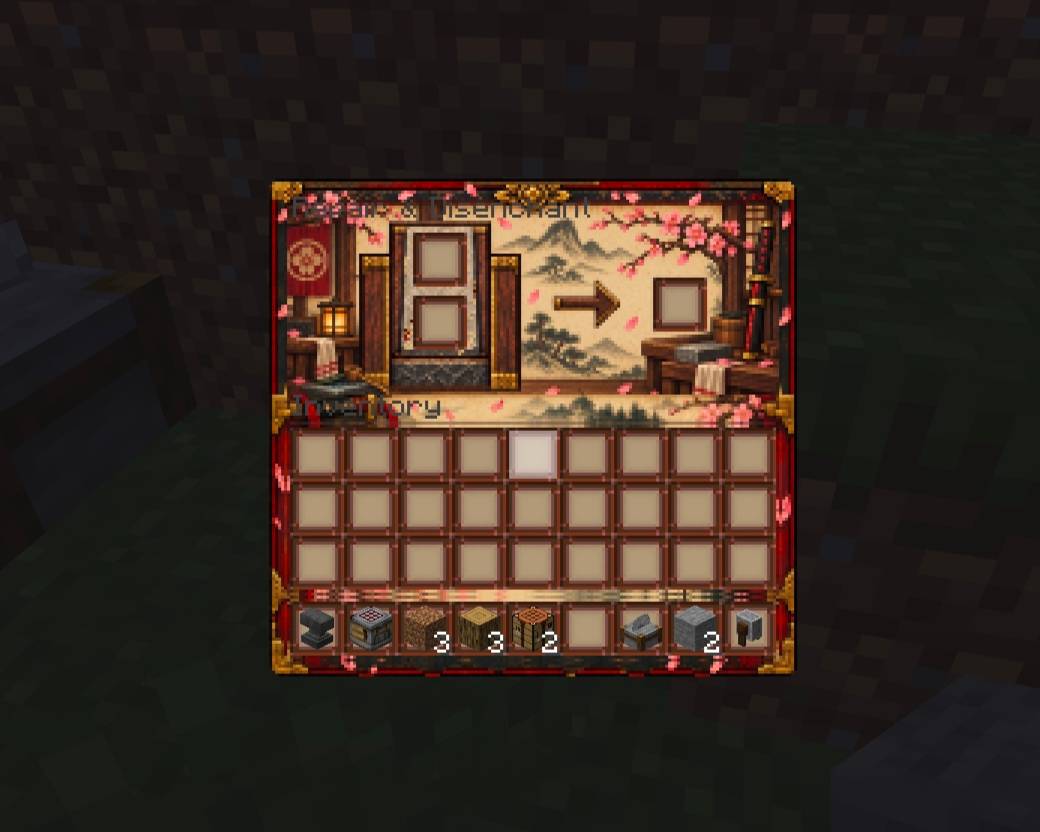
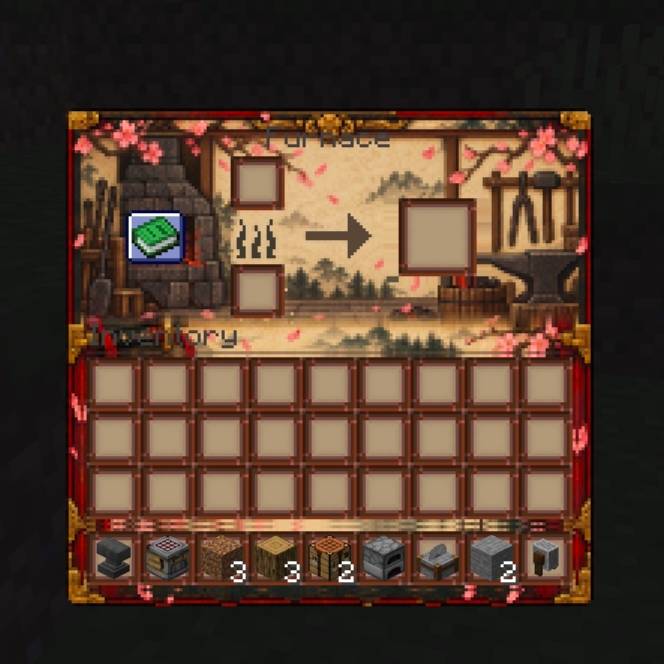
介绍
01 — ABOUT PRABHATCORE: ULTIMATE SURVIVAL
PrabhatCore: Ultimate Survival is a premium all-in-one Minecraft Bedrock survival addon created to improve everyday gameplay while keeping the original Minecraft survival experience familiar, balanced, and enjoyable.
The project brings multiple useful survival utilities together under one organized system. Instead of installing many separate addons for different quality-of-life features, PrabhatCore is designed to provide a unified experience with a consistent interface, settings system, and visual identity.
⚡ Make Survival Better — Without Ruining Survival.
PrabhatCore focuses on convenience, organization, storage, transportation, combat utilities, effects, resource management, and other useful systems that make long-term survival worlds more enjoyable.
- 🏠 Homes & Waypoints
- 🎒 Backpack System
- 📦 Advanced Storage
- 🔥 Auto-Smelt
- ⛏️ Mining Rewards
- ⚔️ Combat Utilities
- ✨ Effects System
- ⚙️ Advanced Settings
- 🏆 Achievement-Friendly Mode
- 🎨 Premium Custom UI
Whether you are beginning a new survival adventure or continuing an established world, PrabhatCore aims to make everyday activities more convenient and organized.
02 — PREMIUM EXPERIENCE
PrabhatCore is designed not only around functionality, but also around presentation. Every system is intended to feel like part of one complete survival toolkit rather than a collection of unrelated features.
💎 Premium Interface
A dedicated interface keeps the major PrabhatCore utilities organized and easy to access. Players can navigate between supported systems without having to remember complicated commands.
⚙️ Centralized Settings
Supported systems can be enabled or disabled through the PrabhatCore settings interface, giving players more control over how the addon behaves in their world.
🎨 Consistent Design
Menus, buttons, notifications, and supported utilities follow a consistent visual identity so the addon feels like one complete product.
🔊 Interactive Feedback
Supported interactions can provide visual and audio feedback, helping players understand when important actions have been triggered.
03 — PROFESSIONAL DESIGN
PrabhatCore has been structured with a strong focus on organization, usability, and future expansion.
- ✨ Clean and organized feature structure
- ✨ Dedicated systems for different utilities
- ✨ Consistent interface design
- ✨ Player-friendly controls
- ✨ Centralized configuration
- ✨ Expandable architecture
- ✨ Professional project branding
The objective is to provide a polished experience that feels reliable during everyday survival gameplay. Each supported feature is intended to work as part of the larger PrabhatCore ecosystem.
04 — SURVIVAL FRIENDLY
PrabhatCore is designed around normal Minecraft survival gameplay. The addon is intended to reduce repetitive tasks and improve convenience without completely removing the survival experience.
Build your base, explore the world, gather resources, travel between locations, organize your items, and continue your survival journey while using the utilities provided by PrabhatCore.
- 🏡 Build and expand your base
- 🌲 Explore forests and natural environments
- ⛏️ Gather and manage resources
- 🗺️ Travel between important locations
- 📦 Organize large inventories
- ⚔️ Improve everyday combat utility
- 🌍 Continue normal survival progression
The focus is on convenience and customization. Players can choose the supported utilities that suit their preferred survival style.
05 — ACHIEVEMENT-FRIENDLY MODE
PrabhatCore includes an Achievement-Friendly Mode designed for players who want to keep their survival experience focused on a more achievement-conscious setup.
The mode provides a dedicated setting that can control supported PrabhatCore features according to the project’s achievement-friendly configuration.
🏆 Play your survival world your way.
Important: This mode is not a guarantee that Minecraft achievements will remain enabled. Bedrock achievement eligibility depends on Minecraft’s own world settings and restrictions. Always check your world’s achievement status before enabling addons or changing world settings.
06 — HOMES & WAYPOINTS
Keep important locations organized with the PrabhatCore location systems.
- 🏠 Create useful home locations.
- 📍 Keep track of important destinations.
- 🗺️ Organize locations for your survival adventures.
- 🌍 Make returning to familiar places more convenient.
Homes and waypoints are designed to help players organize their journeys, remember important areas, and manage their exploration more effectively. The exact available controls depend on the installed version.
07 — BACKPACK SYSTEM
Inventory management becomes increasingly important as your survival world grows. The PrabhatCore Backpack System is designed to provide an additional way to organize and manage your carried resources.
- 🎒 Dedicated backpack utility.
- 📦 Additional organization options.
- 🪵 Convenient resource management.
- ⛏️ Useful during mining and exploration.
Whether you are collecting materials, exploring distant areas, or working on a large building project, the backpack utility is intended to make supported inventory management more convenient.
08 — ADVANCED STORAGE
Organizing resources is a major part of long-term survival. Advanced Storage brings additional storage-related utilities into the PrabhatCore ecosystem.
- 📦 Improved resource organization.
- 🧱 Support for managing collected materials.
- 💎 Better organization for long-term worlds.
- 🏡 Useful for established survival bases.
The goal is to make storage management easier while maintaining the familiar feeling of Minecraft resource collection and progression.
09 — AUTO-SMELT & MINING REWARDS
🔥 Auto-Smelt
The Auto-Smelt utility is designed to improve supported resource-processing activities. It provides a convenient option for players who spend considerable time gathering and processing materials.
⛏️ Mining Rewards
Mining Rewards adds a dedicated reward-related system to the addon. It is designed to provide additional feedback and incentives around supported mining activities.
These utilities are intended to complement resource gathering rather than replace the overall survival experience.
10 — COMBAT UTILITIES & EFFECTS
⚔️ Combat Utilities
PrabhatCore includes a combat utility system intended to make supported combat-related interactions more convenient. It forms part of the wider survival toolkit and is designed around the normal Minecraft gameplay environment.
✨ Effects System
The Effects System provides a dedicated place for supported effect-related utilities. Its purpose is to bring additional customization and convenience to the player’s survival experience.
11 — ADVANCED SETTINGS & CUSTOMIZATION
Different players enjoy different survival experiences. That is why PrabhatCore includes a centralized settings system for supported utilities.
- ⚙️ Manage available addon settings.
- 🔧 Customize supported system behavior.
- 🎛️ Enable or disable supported features.
- 🎨 Access the organized custom interface.
The settings system is designed to make the addon easier to configure without requiring players to edit multiple unrelated files manually.
12 — MINECRAFT VERSION & COMPATIBILITY
Edition: Minecraft Bedrock Edition
Main File Version: 26.50
Project Game Versions: 26.50, 26.40, 26.30, 26.20, 26.13, and additional versions listed on the CurseForge project page.
Project Type: Bedrock Addon
Author: PrabhatPie
Always select the download that matches your Minecraft installation. Compatibility can differ between individual addon releases, even when the project supports multiple game versions.
IMPORTANT VERSION WARNING: Minecraft may display a message saying that this pack was made for a lower or higher version of Minecraft. Such a warning can occur because of differences in pack metadata or version support. Do not automatically ignore a genuine compatibility warning. First confirm that your installed Minecraft version is listed as supported, use the correct addon release, and keep a backup of your world. If compatibility is confirmed and the warning is only a harmless metadata notice, you may proceed at your own discretion.
13 — INSTALLATION GUIDE: ANDROID
- Download the PrabhatCore addon file from CurseForge.
- Open your Android Downloads folder.
- Find the downloaded .mcaddon or .mcpack file.
- Tap the file and select Minecraft as the application to open it.
- Wait for Minecraft to display the import process.
- Wait until the import confirmation appears.
- Open Minecraft and navigate to your selected world.
- Open the world settings and locate the Behavior Packs section.
- Activate PrabhatCore in the available packs list.
- Activate any required resource pack if the release includes one separately.
- Review the world settings and experimental options, if required by that particular release.
- Enter your world and check that the addon loads correctly.
If Android does not recognize the downloaded file, check its extension and use a file manager’s Open With option to select Minecraft. Do not rename an unrelated file to .mcaddon.
14 — INSTALLATION GUIDE: WINDOWS
- Download the addon file using your browser.
- Open File Explorer and navigate to Downloads.
- Locate the downloaded .mcaddon or .mcpack file.
- Double-click the file or use Open With and choose Minecraft for Windows.
- Allow Minecraft to import the addon.
- Wait for the successful import notification.
- Open the world you want to configure or create a new world.
- Open the world settings and select Behavior Packs.
- Find PrabhatCore under available packs and activate it.
- Activate the required resource pack if supplied separately.
- Check any version-specific world requirements.
- Start the world and verify that the addon functions correctly.
If the file opens in an archive application instead, make sure Minecraft for Windows is installed and select the correct application manually.
15 — INSTALLATION GUIDE: iOS & iPAD
- Download the addon using Safari or another supported browser.
- Open the Files application on your device.
- Navigate to Downloads or the folder where the addon was saved.
- Find the .mcaddon or .mcpack file.
- Tap the file and use the Share or Open In option.
- Select Minecraft when it appears in the application list.
- Allow Minecraft to import the addon.
- Wait for the import completion message.
- Open your Minecraft world settings.
- Activate PrabhatCore in Behavior Packs.
- Activate its required resource pack, if applicable.
- Check the world configuration and start playing.
If Minecraft does not appear in the sharing menu, verify that Minecraft is installed and that the downloaded file is a supported Bedrock addon package.
16 — INSTALLATION GUIDE: XBOX, PLAYSTATION & NINTENDO SWITCH
Console installation works differently from Android, iOS, and Windows. Consoles generally do not offer the same direct file-import workflow for arbitrary downloaded Bedrock addons.
If you have access to Minecraft on a supported Windows or mobile device, one possible approach is to import the addon on that device, configure a compatible world, and use a Minecraft Realm to make the world available to your console account.
- Import PrabhatCore on a supported mobile or Windows device.
- Create or configure a world with the addon enabled.
- Verify that the world works correctly on the importing device.
- Upload or replace the world on a compatible Minecraft Realm, if your subscription and platform support it.
- Sign into the same Microsoft account on your console.
- Open the Realm and join the configured world.
Console access to custom addons can vary by platform, Minecraft edition, account, and Realm support. This method is not a guarantee that every custom addon will work on every console.
17 — FIRST-TIME WORLD SETUP
After installing PrabhatCore, take a moment to review the available settings before beginning a long survival adventure.
- Check that the correct behavior pack is active.
- Activate the required resource pack if provided.
- Review the addon settings and supported options.
- Check any version-specific requirements.
- Test the utilities in a separate world before using them in an important existing world.
For the best experience, start with a backup of your existing survival world. This gives you a safe way to restore your progress if an addon conflict or compatibility issue occurs.
18 — TROUBLESHOOTING & COMMON ISSUES
Addon not importing?
Check that the downloaded file is complete, that Minecraft supports its file format, and that the file is being opened with Minecraft rather than an unrelated application.
PrabhatCore not appearing?
Check the Behavior Packs list in your world settings. Make sure the addon imported successfully and that you are looking at the correct world configuration.
Interface or features not working?
Verify that the correct release is installed, any required resource pack is active, and the installed Minecraft version is supported.
World behaving unexpectedly?
Make a backup before testing changes. Disable conflicting addons in a test world and check whether the issue remains.
Still having problems?
Visit the CurseForge project page and provide the Minecraft version, device, addon release, and a clear description of the issue when requesting support.
19 — CREDITS & AUTHOR INFORMATION
Project: PrabhatCore: Ultimate Survival
Author / Developer: PrabhatPie
Platform: Minecraft Bedrock Edition
Project Category: Addons, Survival, Technology, Miscellaneous
PrabhatCore is developed as a unified survival utility project with an emphasis on organization, usability, and a consistent player experience.
Thank you to everyone who downloads, tests, supports, and provides feedback on the project. Community feedback helps identify problems, improve usability, and guide future development.
20 — FINAL MESSAGE
PrabhatCore: Ultimate Survival is built for players who want a more organized and convenient Minecraft survival experience without losing the familiar atmosphere of the original game.
From homes and waypoints to backpack management, advanced storage, mining utilities, combat features, effects, and centralized settings, the project brings a variety of useful systems together under one identity.
🌍 YOUR WORLD. YOUR SURVIVAL. YOUR RULES.
常见问题
Japanese Crimson Katana UI 支持哪些 Minecraft 版本?
Japanese Crimson Katana UI 支持 Minecraft Java 版 26.1–26.3,共 5 个版本。下载时注意选择和你游戏版本一致的文件。
Japanese Crimson Katana UI 怎么安装?
把下载的 .zip 文件(不用解压)放进游戏目录的 resourcepacks 文件夹,进游戏后在「选项 → 资源包」里把它移到右边启用。
PrabhatPie 的其他作品
查看全部 →
Prabhat’s Full Grass
完整草地更好看,立即下载!
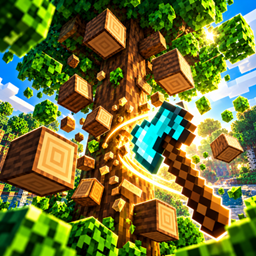
Better Tree Harvester
🌲 Chop smarter, not harder! Tree Harvester instantly brings down connected trees with a single chop, while keeping vanilla-style drops, tool durability, and survival gameplay intact. Lightweight, configurable, and built for smooth Minecraft survival. 🪓✨
Prabhat’s Better Caves
Let's make your caves brighter that help to find diamonds and better fight in night.

Prabhat’s Full Grass+
Full Grass Looks Better Download Now!
评论
登录后评论和评分