
InvisiLeafs
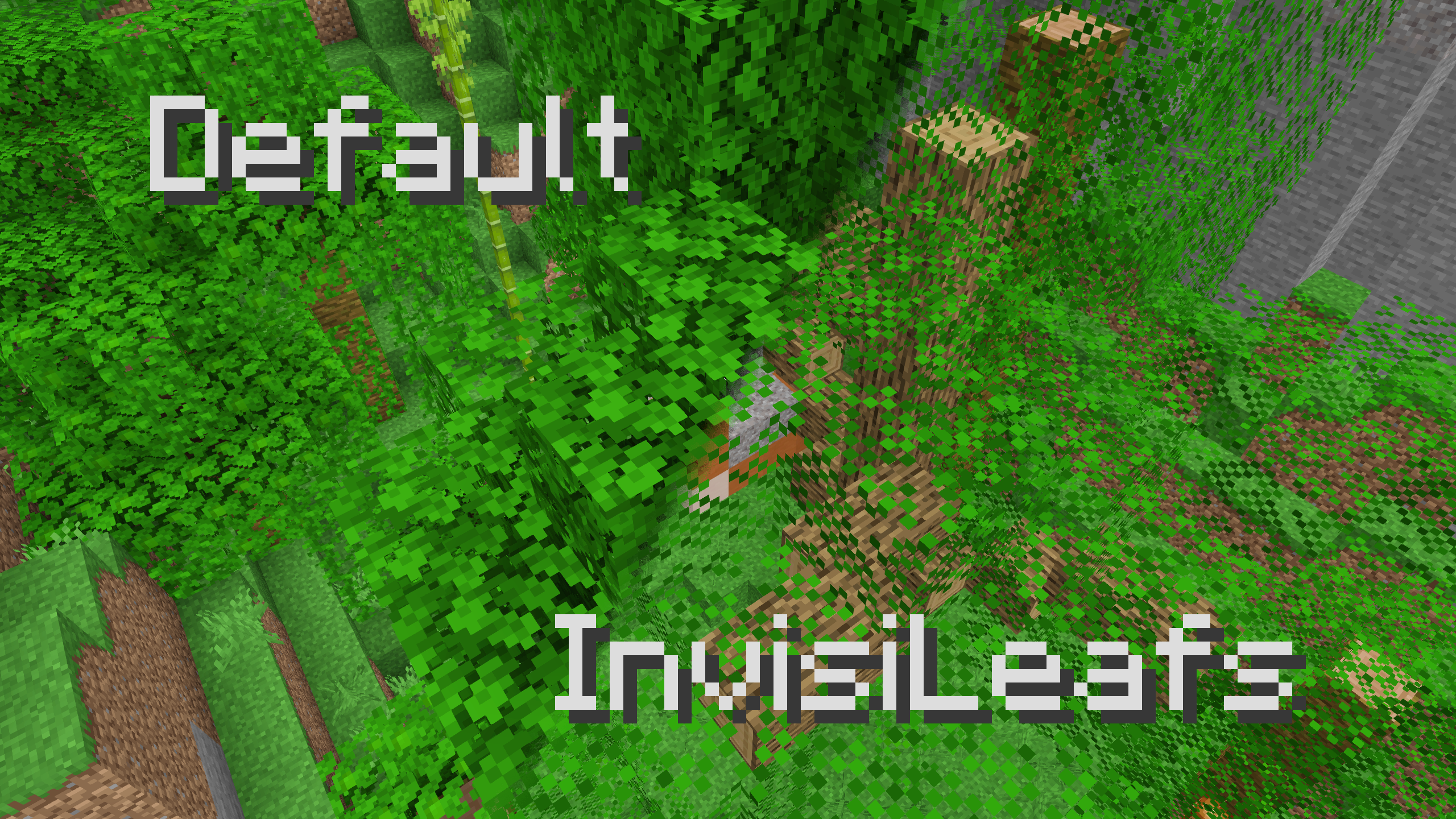
Makes leaves easier to see through (more invisible) to help you find stuff like trail ruins easier :)
截图


介绍
InvisiLeafs!
A small resource pack that deletes 50% of the pixels of leaf textures, which makes them easier to see through, or: more invisible leaves leafs!
Use Cases
This has a few uses:
- It can be easier to navigate through forests and jungles without getting lost and easier to understand your surroundings because you can see more of it since the trees don’t block as much of your view.
- If you built a wall out of leaves for some reason and want to more easily make sure people can’t see stuff through it that they’re not supposed to.
- It’s easier to spot structures (like jungle temples or trail ruins, or maybe player-built bases) when flying above in the sky looking down.
- It’s easier to spot all the logs inside trees to get rid of them when cutting them down.
Culling
Unfortunately, in vanilla leaf block faces are rendered (not culled) inside other leaf blocks and that can’t be disabled with a resource pack (at least not as far as I know). That effectively stacks the leaf texture multiple times for multiple-block-thick blobs of leaves (like trees), and so on its own this pack only helps a little bit. For the best experience, use a mod that culls those faces, such as:
- Cull Less Leaves with a depth of 1
- Cull Leaves
- OptiFine’s Smart Leaves
Smart Lighting
Because the inside of trees is somewhat dark and there’s non-air blocks (leaves) surrounding the logs, they actually get rendered in shadow from smooth lighting. This can look a bit strange and can make it a bit trickier to see through the leaves, particularly for jungle shrubs (those clumps of leaves on the grounds in jungles). If this bothers you, you can turn smooth lighting off and they won’t get rendered in shadow anymore (instead it will only rely on block light levels to determine shading, which are only slightly darker).
常见问题
InvisiLeafs 支持哪些 Minecraft 版本?
InvisiLeafs 支持 Minecraft Java 版 1.13–1.20.1,共 29 个版本。下载时注意选择和你游戏版本一致的文件。
InvisiLeafs 怎么安装?
把下载的 .zip 文件(不用解压)放进游戏目录的 resourcepacks 文件夹,进游戏后在「选项 → 资源包」里把它移到右边启用。
Purrrpley 的其他作品
查看全部 → InvisiLeafs
Makes leaves easier to see through (more invisible) to help you find stuff like trail ruins easier :)

Rainbow Lamps
Makes redstone lamps change colour!
Rainbow Lamps
Makes redstone lamps change colour!
评论
登录后评论和评分