
截图
介绍
Inventory Armor Trims
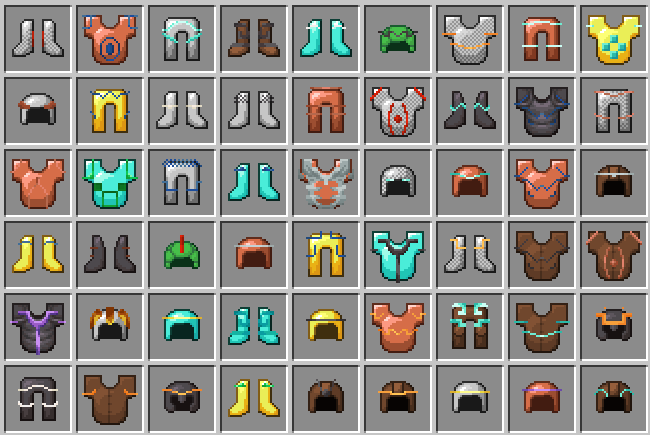
Inventory Armor Trims makes armor trim items in your inventory look as detailed as they do everywhere else.
In vanilla Minecraft, trimmed armor item icons are mostly separated by armor material and trim material. That means different trim patterns can look the same in your inventory, even though they are visually distinct on the armor model. This resource pack fixes that by giving every armor trim pattern its own inventory overlay.
Features
- Adds distinct inventory item visuals for every vanilla armor trim pattern.
- Supports all armor pieces covered by the pack, including leather, chainmail, iron, golden, diamond, netherite, copper, and turtle helmet variants.
- Supports vanilla trim materials, including resin.
- Keeps the vanilla item style and palette system.
Why This Exists
Armor trims are already fully visible on worn armor and in other rendered contexts, but inventory item icons lose part of that identity. This pack brings the missing pattern detail back to the item itself, so a Coast trim, a Wayfinder trim, and a Silence trim no longer collapse into the same generic trimmed armor icon.
Compatibility
This pack targets modern Minecraft versions using item model definitions and item components. Check the listed supported game versions on the version page before downloading.
It should work with other packs that do not replace the same armor item definitions or trim item textures. Packs that heavily modify armor item icons may conflict.
Installation
- Download the correct version of the pack.
- Open Minecraft and go to Options → Resource Packs.
- Select Open Pack Folder and place the downloaded
.zipfile inside. - Return to Minecraft and move Inventory-Armor-Trims into the selected packs list.
Credits
Support the creators
Enjoying the pack? You can help support its creators:
- EclairDeFeu360: Buy Me a Coffee
- Goldawn: Join on YouTube or subscribe on Twitch
常见问题
Inventory Armor Trims 支持哪些 Minecraft 版本?
Inventory Armor Trims 支持 Minecraft Java 版 1.21.11–26.3,共 6 个版本。下载时注意选择和你游戏版本一致的文件。
Inventory Armor Trims 怎么安装?
把下载的 .zip 文件(不用解压)放进游戏目录的 resourcepacks 文件夹,进游戏后在「选项 → 资源包」里把它移到右边启用。
EclairDeFeu360 的其他作品
查看全部 →
All Tropical Fish Collection
This resource pack works with the All TropicalFish Datapack, which allows you to collect all tropical fish species.

All Tropical Fish Datapack
This datapack allows you to collect all 3072 tropical fish variants in Minecraft with a "fishdex" on advancements gui.

Colourful Tropical Fish
See tropical fish real texture in your inventory

Vanilla Advancement Precisions
This data pack stores all the information about your progress!
评论
登录后评论和评分