Infested Block Highlighter
Highlights infested blocks in strongholds so you don't accidentally mine it!
截图
介绍
Infested Block Highlighter
Never get ambushed by unexpected Silverfish again! Infested Block Highlighter is a lightweight, client-side utility resource pack designed to instantly distinguish dangerous infested blocks from standard stone variants in Minecraft.
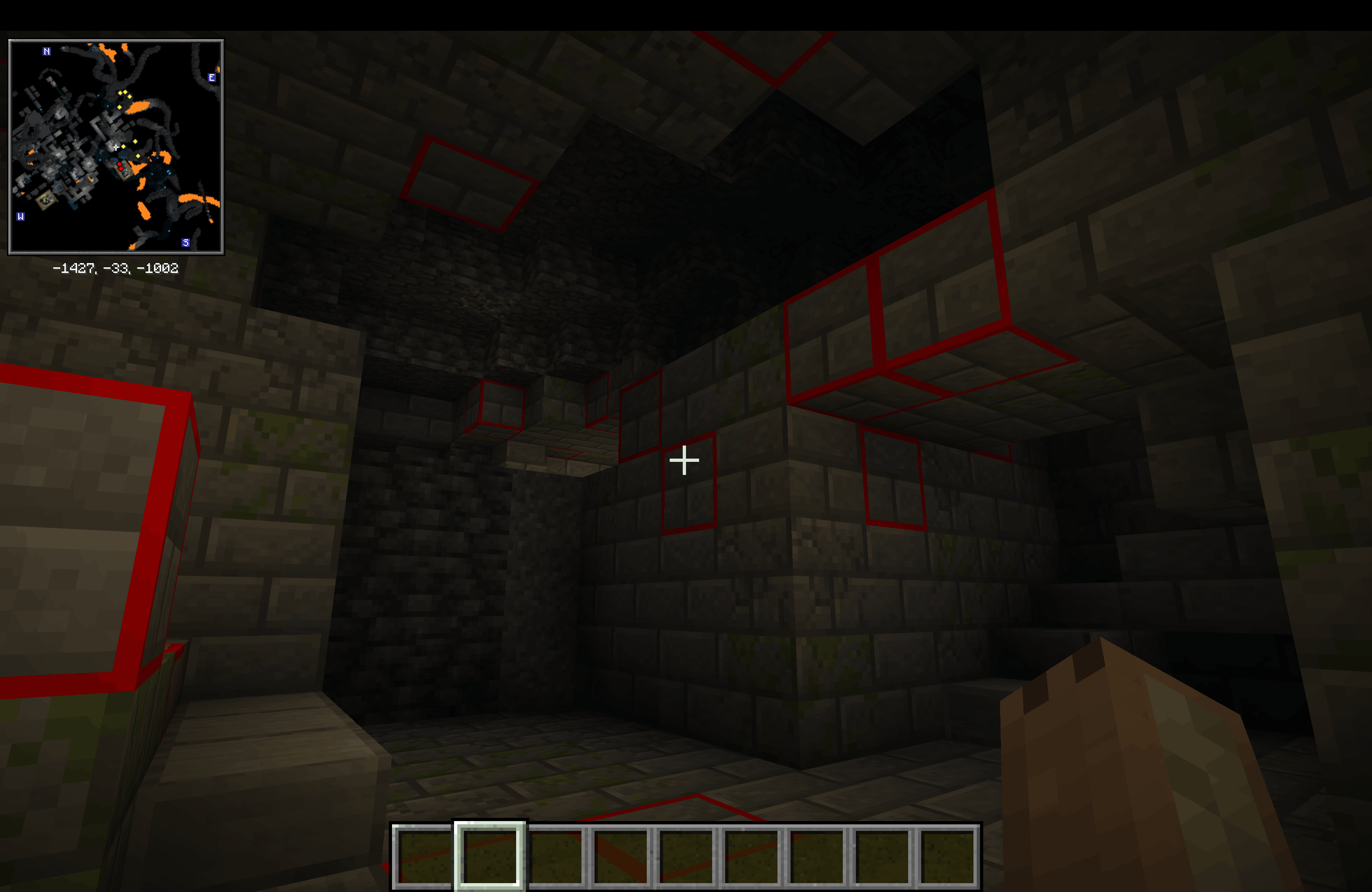
In vanilla Minecraft, infested blocks use the exact same textures as normal stone, cobblestone, stone bricks, and deepslate—making them completely indistinguishable until mined. This pack applies high-contrast, bright red warning borders directly to silverfish-infested blocks, allowing you to navigate Strongholds, Deep Dark corridors, and extreme hills without triggering unwanted mob swarms.
Key Features
-
Instant Visual Distinction: Adds vivid, unmistakable red outlines around all infested block variants while leaving standard building blocks completely untouched.
Full Infested Coverage: Outlines every silverfish block in the game:
- Infested Stone
- Infested Cobblestone
- Infested Stone Bricks
- Infested Mossy Stone Bricks
- Infested Cracked Stone Bricks
- Infested Chiseled Stone Bricks
- Infested Deepslate (Side & Top textures)
- Zero Mods Required: Works entirely through native vanilla
blockstatesandmodels—no OptiFine, Continuity, or Fabric/Forge mods needed. - 100% Vanilla Friendly & Fair: Purely visual client-side resource pack; won’t disable achievements or trigger anti-cheat plugins on multiplayer servers.
- Wide Version Support: Built with forward and backward format compatibility so it works seamlessly across a broad range of Minecraft updates.
Complete Your Survival Setup
Looking for a full cave-exploration kit? Pair this pack with my Ore Highlight Page to spot diamonds, ancient debris, and valuable minerals just as easily in dark caverns!
Installation Instructions
-
Download the
.zipfile from the Files tab. -
Open Minecraft and navigate to Options > Resource Packs.
-
Click Open Pack Folder at the bottom left.
-
Drop
InfestedBlockHighlighter.zipinto the folder window. -
Move the pack over to the right-hand column in-game and click Done!
常见问题
Infested Block Highlighter 支持哪些 Minecraft 版本?
Infested Block Highlighter 支持 Minecraft Java 版 1.13–26.3,共 51 个版本。下载时注意选择和你游戏版本一致的文件。
Infested Block Highlighter 怎么安装?
把下载的 .zip 文件(不用解压)放进游戏目录的 resourcepacks 文件夹,进游戏后在「选项 → 资源包」里把它移到右边启用。
BoarTheSecond 的其他作品
查看全部 →
Ore Highlight
让洞穴中的矿石瞬间显现!速度提升 10 倍!下载量达到 100 后,我还会为下界制作一个版本!还能提升 FPS!

Highlighted Ores
让矿石在洞穴中瞬间显现!快 10 倍!

Bruh Mace
这是一个专为自定义锤子音频而设计的 Minecraft 音效资源包。更改锤子的“空中重击”和“地面重击”音效,提供更沉浸、更个性化的战斗体验。

PvP Crosshair Pack
这个包拥有你唯一需要下载的准星。
评论
登录后评论和评分