
Immersive Engineering, Pam’s Harvestcraft 2 – Garden Cloche Integration
作者:Rymdskora
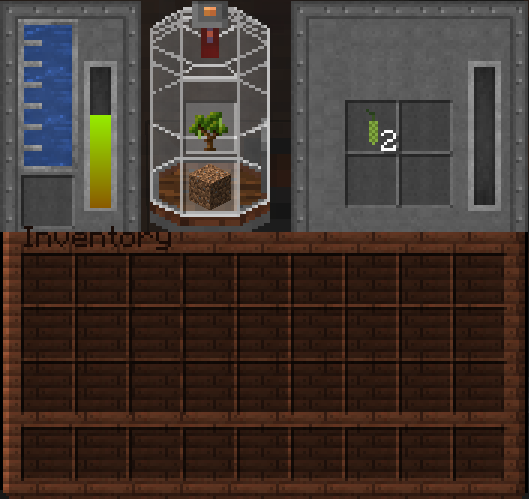
Integrates Pam's Harvest craft trees & seeds into Immersive Engineering's garden cloche recipe list, allowing Pam's crops and trees to be grown faster than usual.
截图
介绍
中文介绍正在准备中,下面暂时显示原文。
Immersive Engineering Pam’s Harvestcraft 2 Garden Cloche Integration
Trees – Fully Integrated.
- Use Pam’s tree saplings to grow fruits and nuts (It doesn’t duplicate the sapling, however hilarious that’d be.)
- Sapling’s grow 2 fruits or nuts per minute, I’m undecided if this overpowered as I’ve yet to test it.
Plants – Soon (Aka, It’s not implemented.)
- Use Pam’s seeds to grow seeds into.. FOODS (Crazy Dave would like a word.)
- Seed’s grow X amount of food per X. (Again, this isn’t implemented yet.)
Installation – Steps (Singleplayer.)
- Navigate to .Minecraft (This can be different if you’re using something like MultiMC, in which case navigate to that installation.)
- Open Saves folder.
- Open your world.
- Open datapacks.
- Unzip the zipped file into datapacks.
- You are done. Congratulate yourself, however, not too much.
Installation – Steps (Multiplayer.)
- Navigate to your server directory.
- Find your world file, usually named “world” and open it.
- Find “datapacks” in your world file.
- Unzip the datapack into your server.
- Type /reload in your server, or restart the server.
- You are done. Congratulate yourself, however, not too much.
Current Issues
- Lemon Sapling is broken, and will not produce anything. This is fixed in an unreleased version, and will be pushed with the addition of seeds.
Versions – List
- This is wholly for 1.18.2+ If you’re looking for 1.16.5 crops (not trees) I direct you to Kimiru’s integration which can be found HERE.
常见问题
Immersive Engineering, Pam’s Harvestcraft 2 – Garden Cloche Integration 支持哪些 Minecraft 版本?
Immersive Engineering, Pam’s Harvestcraft 2 – Garden Cloche Integration 支持 Minecraft Java 版 1.18.2。下载时注意选择和你游戏版本一致的文件。
Immersive Engineering, Pam’s Harvestcraft 2 – Garden Cloche Integration 怎么安装?
把下载的 .zip 文件(不用解压)放进游戏目录的 resourcepacks 文件夹,进游戏后在「选项 → 资源包」里把它移到右边启用。
评论
登录后评论和评分