
截图

介绍
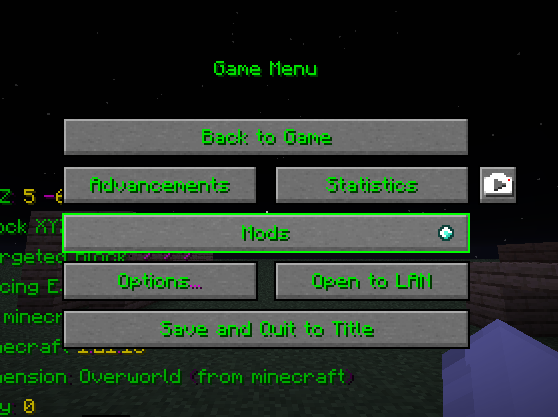
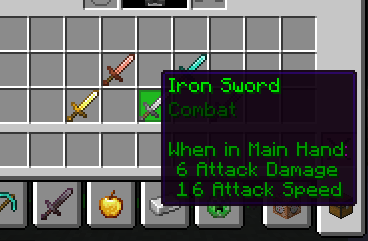
This resource pack is focused on making Minecraft’s UI easier to read and nicer to use by adding subtle colors to text and GUI selections. Nothing flashy or overdone — just clean highlights that help important things stand out while keeping the vanilla feel.
Text across menus and interfaces has been recolored to improve contrast and visibility. Important text is easier to notice, while less important labels stay simple and readable. The idea is to reduce eye strain and make menus feel less flat without changing how the game actually works.
One of the main changes is how inventory selections are highlighted. When you hover over or select a slot, it becomes clearly visible (green and other soft accent colors depending on the screen). This makes it much easier to tell what you’re interacting with, especially in fast gameplay like PvP or BedWars where quick reactions matter.
GUI elements such as buttons, search bars, menus, and selectable options now use color to show what’s active or selectable. Instead of everything looking the same, you get clear visual feedback when navigating menus, crafting, or managing your inventory.
The pack is designed to feel natural and vanilla-friendly. It doesn’t try to redesign the UI or add unnecessary effects. Everything is kept simple so it looks like it belongs in the game, not like a heavily modded texture pack.
This resource pack is fully client-side and lightweight, so it won’t affect performance. It works on servers and is compatible with most setups, including vanilla, OptiFine, Sodium, and other performance mods.
If you want a Minecraft UI that’s clearer, more readable, and just feels better to use without changing the core look of the game, this pack does exactly that. Small changes, but they make a real difference once you start playing with it.
常见问题
Highlighted MC 支持哪些 Minecraft 版本?
Highlighted MC 支持 Minecraft Java 版 1.21–1.21.11,共 12 个版本。下载时注意选择和你游戏版本一致的文件。
Highlighted MC 怎么安装?
把下载的 .zip 文件(不用解压)放进游戏目录的 resourcepacks 文件夹,进游戏后在「选项 → 资源包」里把它移到右边启用。
mcwarriorxd 的其他作品
查看全部 →
Optimized Speedrun
This Modpack Adds Speedrun Utilities like timer etc

Youtubers Essentials
optimization and utility mods. Now Avalable For 1.21.x and 1.20.x! MUST HAVE FOR YOUTUBERS

Bedwars Essentials
Improvment and Utility Mods And Texturepack for bedwars! 1.16.5 Only

Mcwarriorxd Pack 16x
A Clean 16x PvP Pack That Also Works With Bedwars
评论
登录后评论和评分