
HardcoreAbsorptionFix
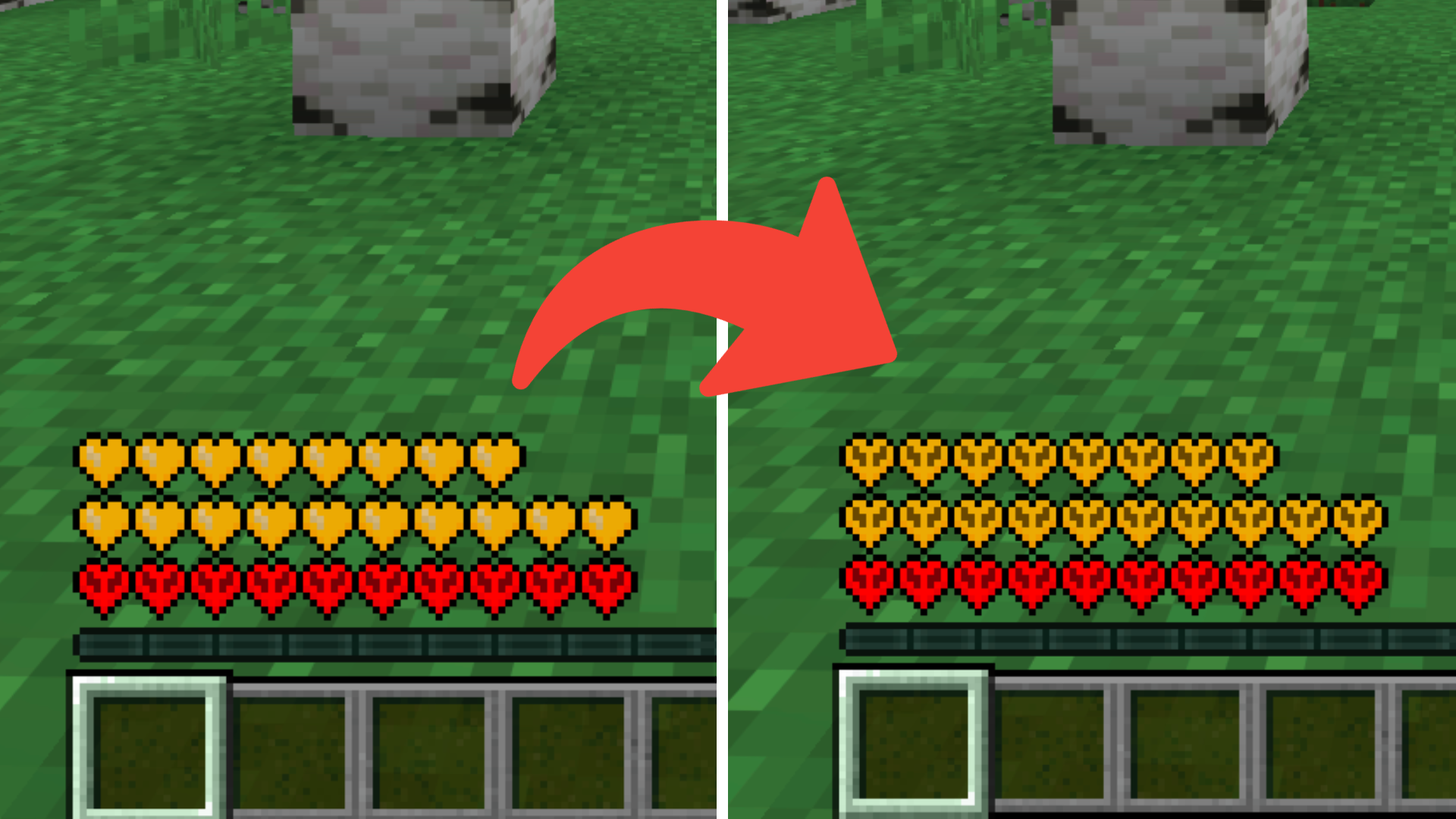
HAF changes absorption hearts to the hardcore heart style, making the heart icon fit better with the red hardcore hearts. Perfect for players who play Minecraft Hardcore often.
截图
介绍
HAF: HardcoreAbsorptionFix is a lightweight, client-side resource pack that transforms Minecraft’s absorption hearts into the hardcore heart style. Players who enjoy hardcore survival know that every heart counts, and this pack makes your absorption hearts visually consistent with the iconic red hardcore hearts, giving your health bar a more intense, immersive look. Whether you’re braving mobs, exploring dangerous terrain, or just want a cleaner UI, HAF makes your extra hearts feel like they truly belong in hardcore mode.
Key Features:
Hardcore Heart Style: Converts all absorption hearts into the classic hardcore red hearts for a unified, polished look.
Minimal & Lightweight: Only modifies the absorption hearts; all other textures remain untouched.
Compatible with Any Pack: Works alongside your favorite texture pack without conflicts.
Survival & Hardcore Friendly: Perfect for hardcore players or anyone who wants their health bar to look sharper and more cohesive.
Installation Instructions:
- Download the HAF: HardcoreAbsorptionFix zip.
- Move the HAF: HardcoreAbsorptionFix folder into your Minecraft resourcepacks directory.
- Windows: %appdata%\.minecraft\resourcepacks
- macOS: ~/Library/Application Support/minecraft/resourcepacks
- Launch Minecraft, go to Options → Resource Packs, and enable HAF: HardcoreAbsorptionFix.
Layer it on top of any other resource pack if desired.
Notes:
Fully client-side; no server mods required.
Works on all supported Minecraft versions (1.20+ recommended).
Ideal for hardcore survival, PvP servers, or just giving your health bar a clean, cohesive look.
常见问题
HardcoreAbsorptionFix 支持哪些 Minecraft 版本?
HardcoreAbsorptionFix 支持 Minecraft Java 版 1.20–1.21.11,共 19 个版本。下载时注意选择和你游戏版本一致的文件。
HardcoreAbsorptionFix 怎么安装?
把下载的 .zip 文件(不用解压)放进游戏目录的 resourcepacks 文件夹,进游戏后在「选项 → 资源包」里把它移到右边启用。
qlttqb 的其他作品
查看全部 →
QuieterEating
QuieterEating reduces the amount of noise made by the player eating food by ~80%.
Amethyst Pickaxes
Adds the Amethyst Pickaxe that lets you mine a 3x3 area with a single swing of your pickaxe, inspired by Donut SMP.

Tiny Shields and Totems
A simple, performance-friendly resource pack that shrinks the totem of undying and shield in first-person view, giving you cleaner visibility without changing vanilla textures.

Infinite Lunge
Completely removes the cooldown on spears with the lunge enchantment! Go flying!
评论
登录后评论和评分