
Gerudoku Faithful for Appleskin
Unofficial textures to make Appleskin work on Gerudoku Faithful.
截图


介绍
中文介绍正在准备中,下面暂时显示原文。
Unofficial textures for the Appleskin mod to fit with the Gerudoku Faithful texture pack.
Versions:
- Default
- _Uses original Appleskin colours_
- High Contrast
- _Colour blind suitable_
- _Ease of Use_
Installation:
- Download appropriate version.
- Move .zip to minecraft ‘resourcepacks’ folder.
- Activate in client above Gerudoku Faithful.
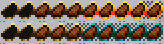
Art is my own work, published within this pack under MIT license. Art is inspired by Gerudoku Faithful resource pack and Appleskin mod textures.
常见问题
Gerudoku Faithful for Appleskin 支持哪些 Minecraft 版本?
Gerudoku Faithful for Appleskin 支持 Minecraft Java 版 1.16–1.20.6,共 23 个版本。下载时注意选择和你游戏版本一致的文件。
Gerudoku Faithful for Appleskin 怎么安装?
把下载的 .zip 文件(不用解压)放进游戏目录的 resourcepacks 文件夹,进游戏后在「选项 → 资源包」里把它移到右边启用。
评论
登录后评论和评分