
Fresh Vanilla Plus
Fresh Vanilla Plus improves vanilla Minecraft with cleaner textures, smoother visuals, and a low-end friendly experience.
截图


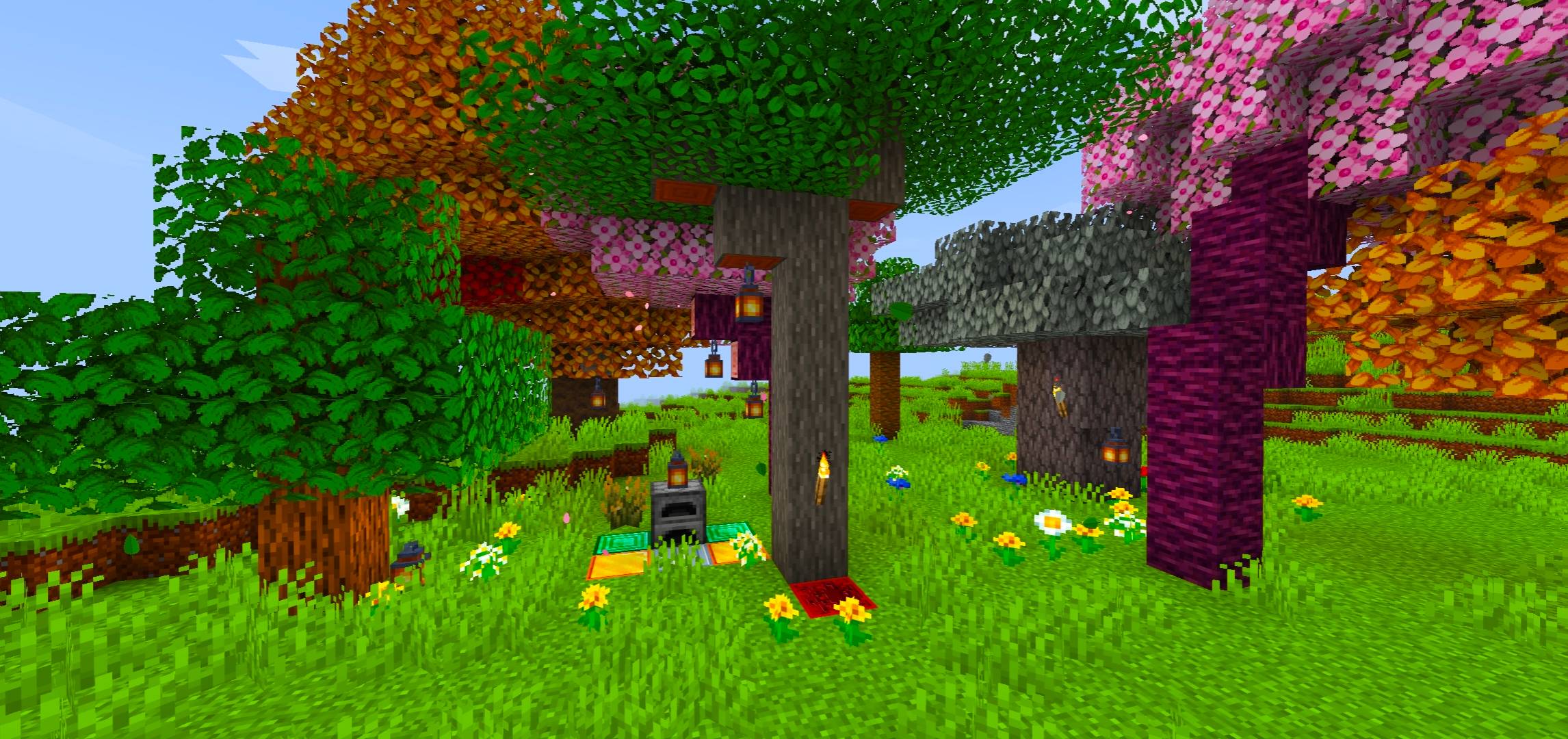
介绍
✨ Fresh Vanilla Plus — A Lightweight Vanilla+ Experience
A simple, lightweight Vanilla+ resource pack that enhances Minecraft with vibrant biomes, realistic celestial textures, cleaner visuals, and a refreshed interface — all while preserving the classic Minecraft atmosphere.
✨ Core Features
- 🌍 Vibrant Biomes: Custom grass and foliage colormaps bring brighter, richer, and more lively colors to the world.
- 🌞 Realistic Sun & Moon: Replaces the default square celestial bodies with detailed, round HD textures for a more immersive sky.
- 🌳 Enhanced Environment: Features HD 64x block textures, 3D-style rails, and dense, bushy leaves for a more detailed world.
- 🎃 Clean Pumpkin View: Removes the distracting pumpkin overlay for a clearer view while wearing a carved pumpkin.
🔤 Modern UI Font: Adds a smoother, modern-looking font for a cleaner and more readable interface.
- 🌙 Refined GUI: Includes subtle menu adjustments for a fresher look while retaining Minecraft’s familiar style.
⚙️ Compatibility & Requirements
- 🎮 Supported Versions: Minecraft Java Edition 1.21.8–1.21.11, 26.1.x, 26.2, and 26.3, as listed on the project page.
⚡ Performance: Designed to remain lightweight and minimize FPS impact.
🧩 Recommended Mods:
- Fabric API
- Sodium
- Iris Shaders
These mods are recommended for the intended visual experience and custom font compatibility. Ensure that the versions you install are compatible with your Minecraft version.
- 🎨 Vanilla+ Style: Enhances Minecraft’s visuals without losing its recognizable vanilla aesthetic.
💚 A Fresh Look. A Lightweight Experience.
Explore vibrant landscapes, enjoy improved environmental details, and experience a cleaner interface with Fresh Vanilla Plus.
Keep Minecraft vanilla. Make it feel fresh! ✨
常见问题
Fresh Vanilla Plus 支持哪些 Minecraft 版本?
Fresh Vanilla Plus 支持 Minecraft Java 版 1.21.8–26.3,共 9 个版本。下载时注意选择和你游戏版本一致的文件。
Fresh Vanilla Plus 怎么安装?
把下载的 .zip 文件(不用解压)放进游戏目录的 resourcepacks 文件夹,进游戏后在「选项 → 资源包」里把它移到右边启用。
评论
登录后评论和评分