
截图
介绍

Module of Vanilla Expansion Collection
Description:
A vanilla+ custom font to allow to see helpful things like ingredient material , item rarity and warden stages
All feature implemented:
Goat Horns: An updated port from Goat Utils
– All horns have a custom icon that can define the rarity


Subtitles: An updated port from Warden Gadgets
– Shrieker Subtitles show how many shrieker left after the spawn of warden and some warden stages

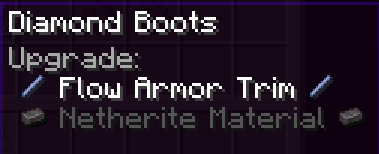
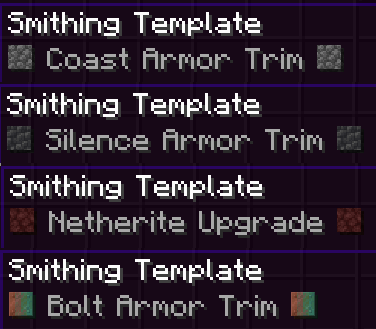
Smithing Template:
– A custom font to allow to see ingredient materials and ingredient of trimming


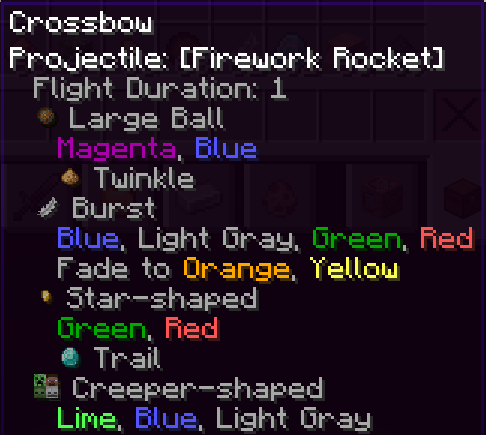
Firework ingredients:
– A custom font to allow to see ingredient materials and colors

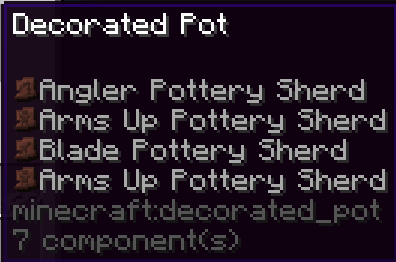
Pottery Sherd on Decorative Pots
– A custom font to allow to see shards used as item icon

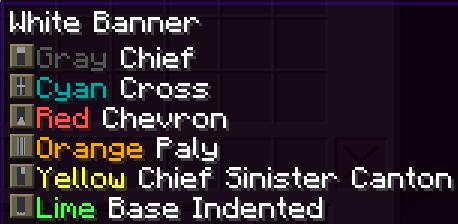
Banner Pattern icons
– A custom font to allow to see colors and pattern used on ANY banner

Falling Block Damage
– A custom font to allow to see the damage (anvil was multiplied on block height)

Poison Damage
– A custom font to see the damage of poison

More intuitive Tooltips
– Custom font to allow a view more intuitive on any armor

Absorption and Regen Hearts
– A custom font to see hearts from absorption and regeneration effects from consumable items

Enchantments Overhal
– Any enchantment now show with all valid items to be applied

– All enchantments with levels now show with “max level” tip before the level
– All enchantments levels are now colored

常见问题
Font Trim 支持哪些 Minecraft 版本?
Font Trim 支持 Minecraft Java 版 1.20–1.21.3,共 11 个版本。下载时注意选择和你游戏版本一致的文件。
Font Trim 怎么安装?
把下载的 .zip 文件(不用解压)放进游戏目录的 resourcepacks 文件夹,进游戏后在「选项 → 资源包」里把它移到右边启用。
DevDyna 的其他作品
查看全部 →
Chipped Express
Mod addon for Chipped to allow to craft ANY recipe with stonecutter

Just Dyna Things (Just Dire Things addon)
Mod addon for JustDireThings that add machines and QoL

Pretty X Smart Pipez Mekanism Edition
让Pipez模组更美观,与通用机械风格相契合,现在更智能!

MekaGenJei (Mekanism Generator addon)
More JEI categories to help new players on Mekanism
评论
登录后评论和评分