
Clean Hotbar
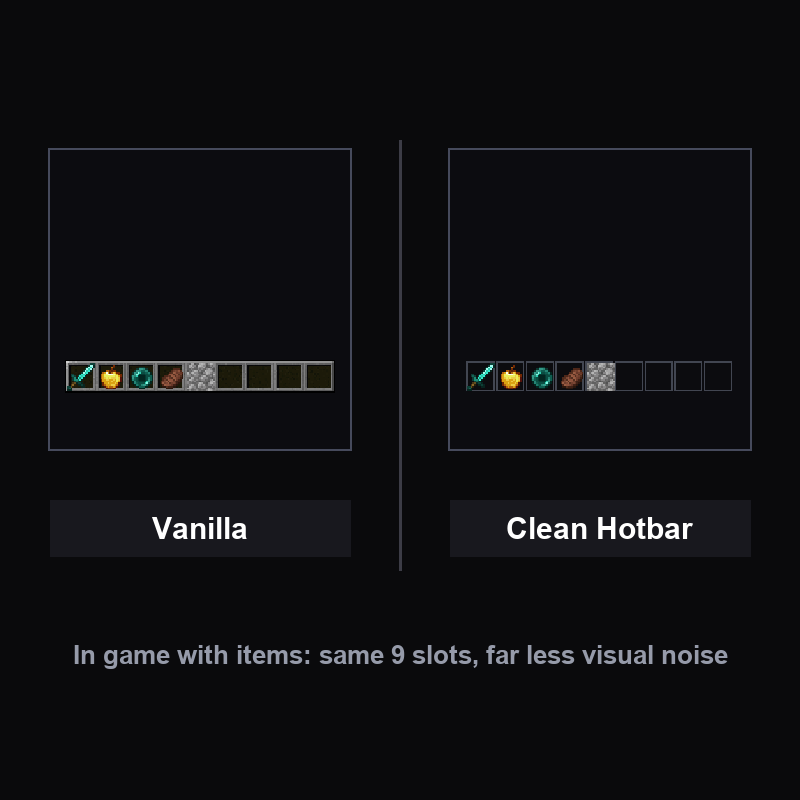
Replaces the vanilla hotbar and XP bar with a flat design that is easier to read at a glance.
截图

介绍
Clean Hotbar – Flat Minimal HUD is a client-side resource pack for Minecraft Java Edition. It changes one specific thing about the vanilla look, and nothing else.
What it changes
- The hotbar is redrawn as flat dark slots with a thin outline – all 9 slots kept
- The slot selector is a clean white frame instead of the vanilla arrow marker
- The XP bar gets a dark track and a bright green fill
Why players use it
- Less visual noise on the bottom of your screen while keeping every vanilla function
- Easier to read your XP level and your items quickly during a fight
Install
- Download the
.zipfile from this page (do not unzip it). - Drop it into
.minecraft/resourcepacks– or use the CurseForge app. - Enable it in Options → Resource Packs and move it to the top of the list.
Works on Minecraft 1.21.x (Java Edition) and on most launchers. Client-side only: it works on any server, and no one else needs it.
Get the whole set
This is part of the PvP Essentials family – the all-in-one pack with crosshair, visible ores, short sword, low fire and clear pumpkin: PvP Essentials
Liked it? You can support the work on Ko-fi.
常见问题
Clean Hotbar 支持哪些 Minecraft 版本?
Clean Hotbar 支持 Minecraft Java 版 1.21.3–1.21.8,共 6 个版本。下载时注意选择和你游戏版本一致的文件。
Clean Hotbar 怎么安装?
把下载的 .zip 文件(不用解压)放进游戏目录的 resourcepacks 文件夹,进游戏后在「选项 → 资源包」里把它移到右边启用。
Fliflightmc 的其他作品
查看全部 →
Dot Crosshair – CrossX Better Crosshair
为 PvP 或生存模式打造的更好用的准星!

CrossX – CROSSX Better Crosshair !
适用于 PvP 或生存模式的更好用准星!
Low Fire – Lowered Flame
降低火焰覆盖层(世界内和GUI中)的高度,使其不再遮挡视野——火焰效果完整、动画完整,只是更矮了。

Visible Ores (all versions+) and netherite
这个模组能让你在洞穴中更清楚地看到矿物,也会让下界合金在下界更加显眼。与 OptiFine 配合良好,搭配 Complementary Shader 效果最佳。
评论
登录后评论和评分