
FeelTrue_so_Plenty
FeelTrue_so_Plenty is an aesthetic refinement for Biomes O’ Plenty that lets you dive fully into the mod’s new visual atmosphere.
截图


介绍
PREMISE: this work was born from the author’s desire to create his own version of a realistic texture pack for Minecraft. The author has not used any copyrighted material (see the licenses inside each file for details).
English:
_**FeelTrue is made for those who love to enjoy the game and the adventure, without any fuss.**_
Have you found treasures and mysterious traces of ancient civilizations and other worlds? Yes!? Ok, now will be more painfull… Not yet!? Ok, now will be more… will be more… Plenty!
… and there will be more light in the distance also…
_If you enjoyed the texture pack but feel the need for higher definition… add one of the x64 MostlyTrue packs, designed to stay playable without significant performance drops. Try it, it’s free!_
Español:
_**FeelTrue está hecho para quienes disfrutan del juego y de la aventura, sin complicaciones.**_
Has encontrado tesoros y huellas misteriosas de civilizaciones antiguas y otros mundos? Que sì? Sale, ahora pronto te iras a sufrir mas… Todavia no!? Bueno, ahora irà a ser mas… a ser mas… Abundante!
… y hay mas luzes allá al fondo tambièn…
_Si te gustó el paquete de texturas pero sientes que necesitas más definición… agrega uno de los paquetes x64 de MostlyTrue, diseñados para seguir siendo jugables sin caídas importantes de rendimiento. ¡Pruébalo, es gratis!_
ITALIANO:
_**FeelTrue è fatto per chi ama godersi il gioco e l’avventura, senza fronzoli.**_
Hai trovato tesori e tracce misteriose di civiltà antiche e di altri mondi? Sì!? Bene, ora sarà più doloroso di prima!… Non ancora!? Ottimo, ora diventerà più… diventerà più… Esagerato!
… e ci saranno pure più luci là in fondo…
_Se il pacchetto di texture ti è piaciuto ma senti la necessità di aumentare la definizione… aggiungi uno dei pacchetti x64 MostlyTrue, studiato per rimanere giocabile senza troppi cali di prestazioni. Provalo, è gratis!_
NOTE:
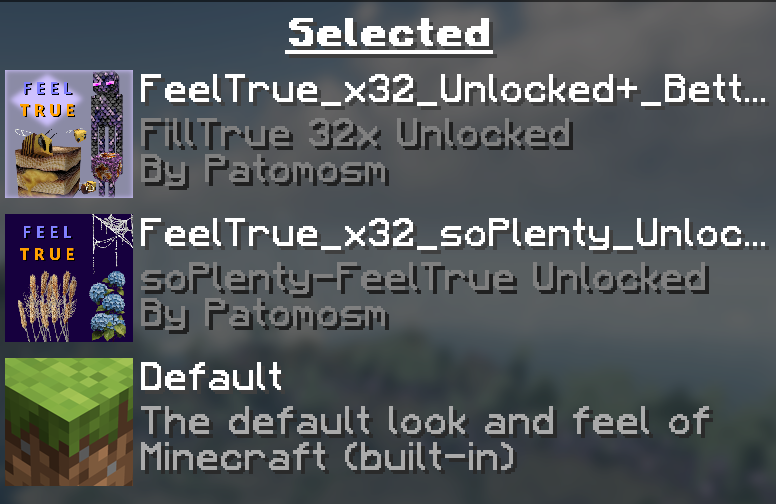
EN: If you want to see the corrupted Enderman, put the pack at the top of the list!
ES: Si quieres ver al Enderman corrupto, pon el paquete hasta arriba de la lista.
IT: Se vuoi vedere l’Enderman corrotto metti il pacchetto in cima alla lista!
Below is a summary of the key information you need to get the best experience when using Minecraft with my texture packs:
_1 ESSENTIAL MODS FOR USE WITH FABRIC/IRIS SHADERS:
- _continuity_ – adds large scale texture tiling and randomization tiling feature to make a realistic gameplay experience
- _entity_model_feature_fabric (EMF)_ – adds customizable entity model feature, like hands for villagers
- _entity_texture_feature_fabric (ETF)_ – adds customizable entity texture feature, like zombie variations
- _fabric-api_ – adds customization and shader supports
- _fabric-language-kotlin_ – required to interpret certain Mod codes
- _indium_ – ESSENTIAL by fabric up to version 1.20.6, not for later ones! ESSENTIAL to avoid font issues in Minecraft title window!
- _iris-fabric_ – required by fabric
- _lithium_ – required by sodium
- _sodium-fabric_ – required by fabric
_2 ESSENTIAL MODS TO ADD FOR USE WITH “BIOMES O’ PLENTY” MOD:
- _BiomesOPlenty_ – adds biomes and materials; WARNING! This mod permanently alters your Minecraft world, so add it BEFORE creating a new world!
- _GlitchCore_ – required by BiomesOPlenty Mod
- _TerraBlender_ – required by BiomesOPlenty Mod
_3 ESSENTIAL MODS TO ADD FOR USE WITH “BETTER NETHER” AND “BETTER END” MODS:
- _BetterNether_ – adds biomes and materials to Nether; WARNING! This mod permanently alters your Minecraft world, so add it BEFORE creating a new world!
- _BetterEnd_ – adds biomes and materials to End; WARNING! This mod permanently alters your Minecraft world, so add it BEFORE creating a new world!
- _Bclib_ – required by Better Nether and Better End Mods
- _Worldweaver_ – required by Better Nether and Better End Mods
- _Wunderlib_ – required by Better Nether and Better End Mods
_4 For those USING THE OFFICIAL MICROSOFT LAUNCHER, the correct installation procedure is:
- Do not start the launcher.
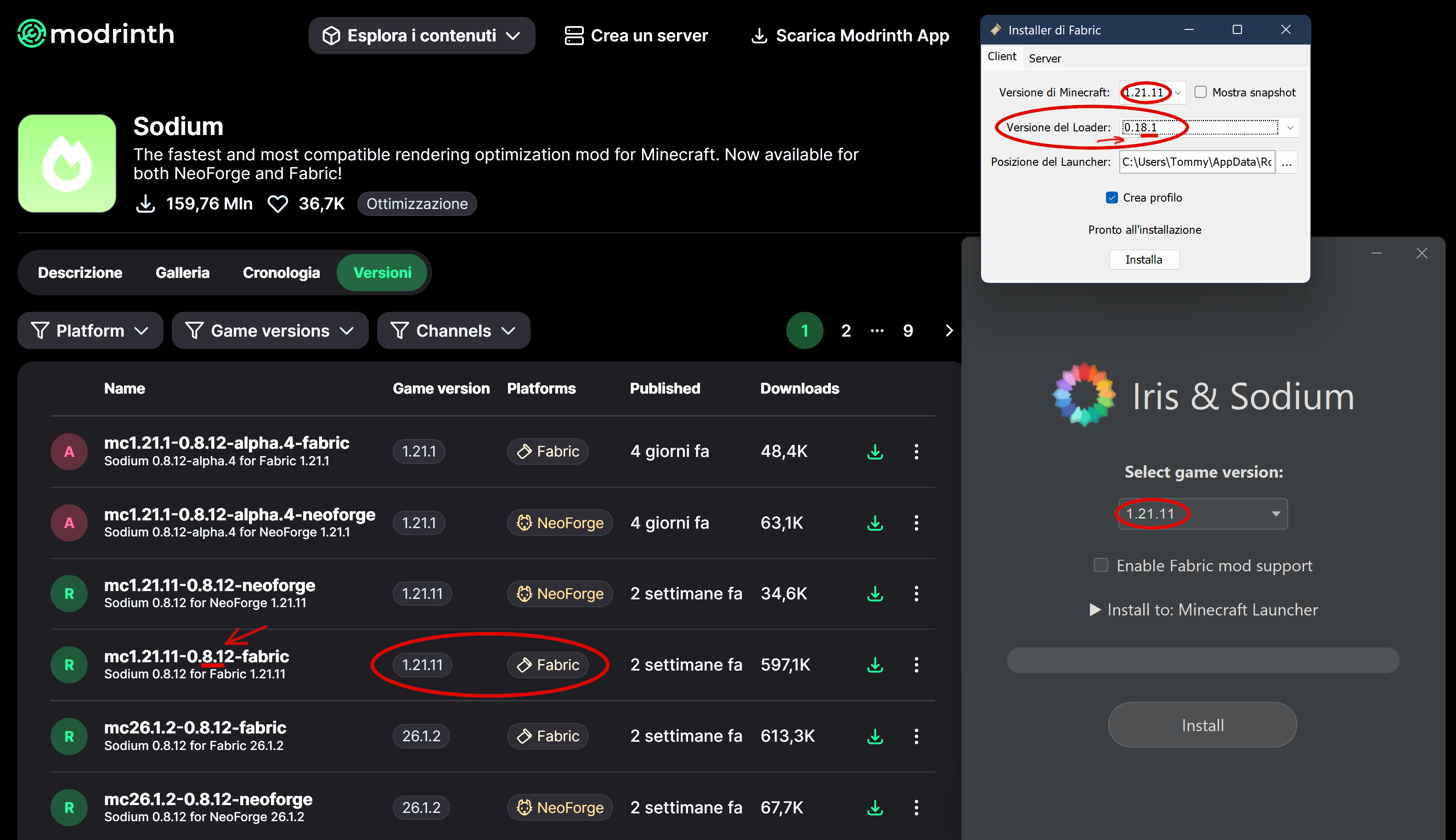
- First download and run fabric-installer, then iris-installer; choose 1.21.11 VERSION, for example.
**_See below how to choose loader version, matching Sodium version. In this example, the most significant digit is the first one, namely the 8, which must match.
NOTE: Recently (in 2026) the latest Fabric Loaders (from 0.19.5) have fixed several bugs and now work even with older Sodium versions, but this is yet on testing._**
- After that, check the path (usually C:\Users\ [username] \AppData\Roaming\ .minecraft) and make sure the folder “iris-reserved” and version subfolder “1.21.11” has been created; if they’re missing, create them manually.
- Paste all the mods listed above into the VERSION subfolder.
- Now start the launcher and make sure a new installation has been created with a name like “iris-fabric-loader-0.18.6-1.21.11”. If it’s not there, something went wrong and you need to repeat the procedure.
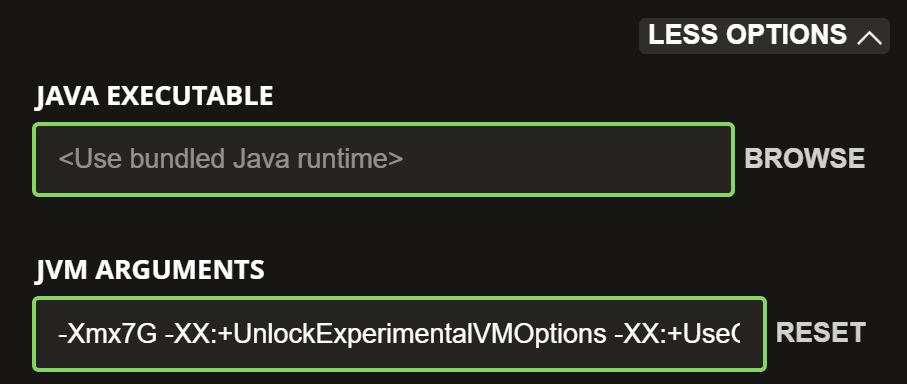
- Before launching the game, I recommend checking how much memory is allocated. Go to the Installations menu and edit the profile you just created. At the bottom, in the JVM Arguments field, change the first string “-Xmx2G” to “-Xmx4G” if you have up to 16 GB of RAM, or to “-Xmx7G” if you have up to 32 GB.
- Now launch the game… if the mods are compatible with each other, everything will work fine; otherwise, you’ll need to check which mod has the wrong VERSION.
- REMEMBER: only the group of mods listed above is guaranteed not to conflict. If you add other mods, you may experience crashes.
- NOTE: Unfortunately, for quite some time now the fabric‑installer has no longer been able to perform installations using the requested loader, and this results in corrupted installations. For example, if you try to install Fabric for version 26.3 with loader 0.19.5, you will instead get the old loader 0.14.24, which will not work. I managed to fix it by explicitly selecting loader 0.14.24, and magically I ended up with loader 0.19.5.
常见问题
FeelTrue_so_Plenty 支持哪些 Minecraft 版本?
FeelTrue_so_Plenty 支持 Minecraft Java 版 1.20–26.3,共 24 个版本。下载时注意选择和你游戏版本一致的文件。
FeelTrue_so_Plenty 怎么安装?
把下载的 .zip 文件(不用解压)放进游戏目录的 resourcepacks 文件夹,进游戏后在「选项 → 资源包」里把它移到右边启用。
patomosm 的其他作品
查看全部 →
FeelTrue
Free realism. A next‑generation x32 PBR texture pack designed to immerse you completely. Sensations are better than ultra‑high resolution being passed off as “hyper‑realism”... this is Minecraft!

MostlyTrue_so_Plenty
MostlyTrue so Plenty is an aesthetic refinement for those who play with the Biomes O' Plenty mod, to enhance the graphic quality of his news.
FeelTrue_so_Plenty
FeelTrue_so_Plenty is an aesthetic refinement for Biomes O’ Plenty that lets you dive fully into the mod’s new visual atmosphere.

MostlyTrue
MOSTLY TRUE wants to bring true realism to the world of Minecraft but without sacrificing playability. FOR THOSE WHO LIKE TO ENJOY EVERY STep...
评论
登录后评论和评分