
截图



介绍
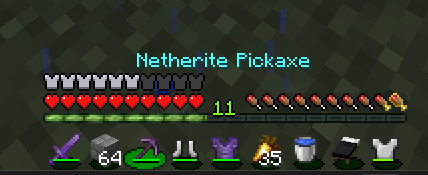
This texture pack is a small visual change made purely for style. It replaces the default Minecraft hotbar with a custom lilypad-themed design that looks cleaner, softer, and a bit more fancy than vanilla. If you like subtle UI tweaks that don’t mess with gameplay, this pack is made exactly for that.
The idea behind the lilypad hotbar is simple: keep Minecraft’s original feel, but add a calm and aesthetic touch to the screen. The hotbar slots are designed to resemble lilypads floating on water, using smooth shapes, natural green tones, and gentle shading. It doesn’t try to be flashy or distracting — it just makes the UI feel nicer to look at during normal gameplay.
This pack only changes the hotbar, nothing else. No blocks, no items, no sounds. Because of that, it’s very lightweight and performance-friendly. You can use it on low-end PCs, with shaders, or alongside other texture packs without worrying about lag or compatibility issues. It also works well when stacked with other resource packs, since it focuses on just one small part of the UI.
The design keeps visibility and readability in mind. Item slots are still clear, and you won’t struggle to see what you’re holding while fighting, mining, or building. It’s meant to feel natural — like something that could exist in the game, just with a bit more personality.
This texture pack is great for casual players who want a nicer interface, as well as content creators who want their gameplay to look a bit more unique in screenshots or videos. It’s a tiny change, but one you’ll notice every time you play.
If you’re someone who enjoys aesthetic details and clean UI design, this lilypad hotbar is a simple way to make Minecraft feel more personal without changing how the game works at all.
常见问题
Fancy Hotbar 支持哪些 Minecraft 版本?
Fancy Hotbar 支持 Minecraft Java 版 1.21–1.21.11,共 12 个版本。下载时注意选择和你游戏版本一致的文件。
Fancy Hotbar 怎么安装?
把下载的 .zip 文件(不用解压)放进游戏目录的 resourcepacks 文件夹,进游戏后在「选项 → 资源包」里把它移到右边启用。
mcwarriorxd 的其他作品
查看全部 →
Optimized Speedrun
This Modpack Adds Speedrun Utilities like timer etc

Youtubers Essentials
optimization and utility mods. Now Avalable For 1.21.x and 1.20.x! MUST HAVE FOR YOUTUBERS

Bedwars Essentials
Improvment and Utility Mods And Texturepack for bedwars! 1.16.5 Only

Mcwarriorxd Pack 16x
A Clean 16x PvP Pack That Also Works With Bedwars
评论
登录后评论和评分