
EmojiChat – High-Quality In-Game Emoji!
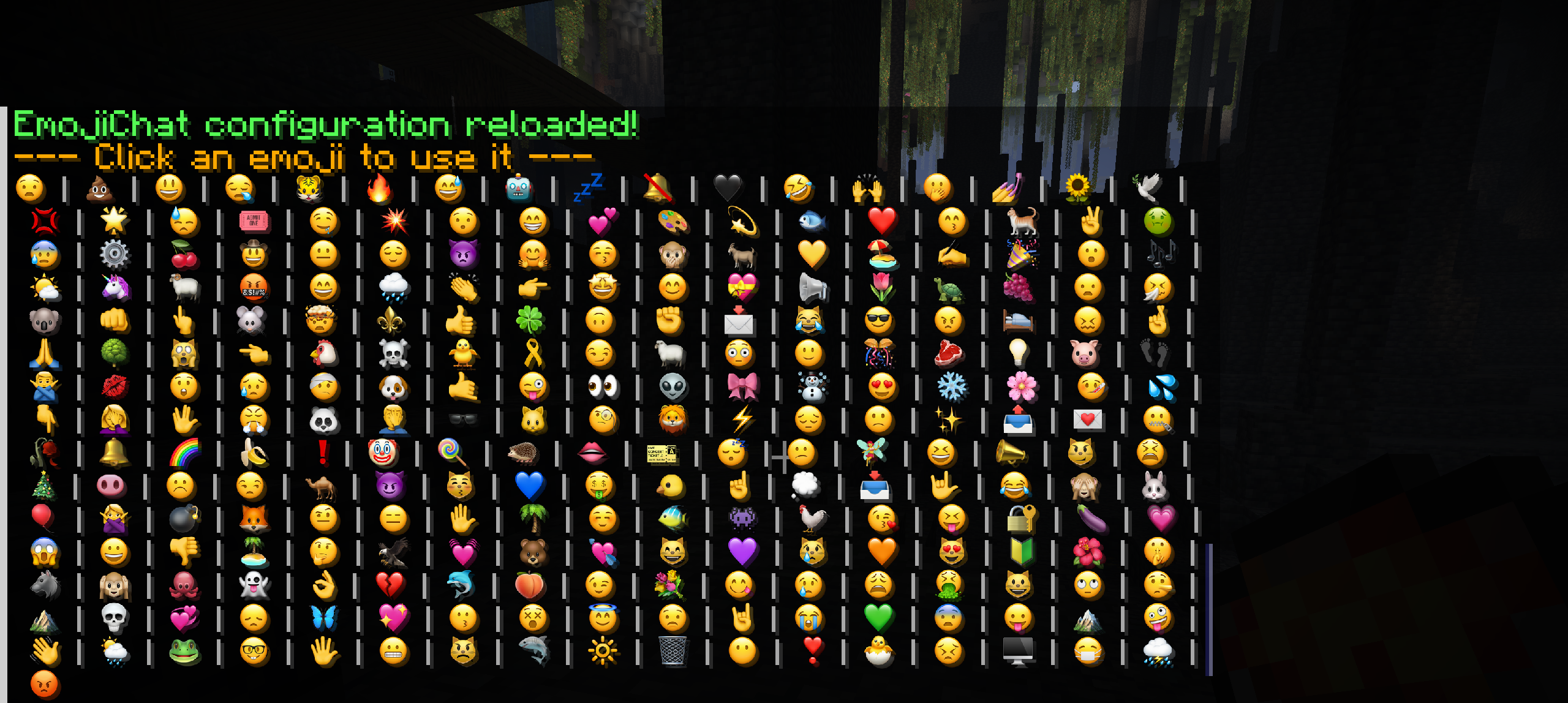
Bring your server's chat to life with EmojiChat! A high-quality, plugin-dependent resource pack that adds hundreds of custom emojis you can use by simply typing codes like :smile:
截图


介绍
Tired of plain old text? The EmojiChat Resource Pack is designed to work exclusively with our companion plugin to integrate a massive collection of high-resolution (64×64) emojis directly into your Minecraft chat.
This pack makes communication with your friends more fun and expressive, but it requires a server running the EmojiChat plugin to function.
We’re building a unique community experience and need your help to test it. Our server features a custom-managed system called BoringGroups, which unlocks cool perks for everyone:
✨ Emojis for All: Use emojis directly in chat to bring your messages to life! 🛡️ Supporter & Staff Badges: Get exclusive emoji badges next to your name to show your status.
Join our testing phase and help shape the future of our community. Your feedback is crucial!
Server IP: 51.222.244.227
✨ Features
-
Huge Emoji Library: Over 250+ high-quality emojis to express yourself!
-
HD Quality: Crisp, clean 64×64 textures that look great even on high-resolution screens.
-
Easy to Use: Simply type the code (e.g.,
:smile:,:heart:,:pog:) and the emoji appears. -
Fully Customizable: Add, remove, or edit emojis to create the perfect pack for your server!
✅ Requirement & Installation
This resource pack will not work on its own or in single-player. It is designed to work exclusively with the companion plugin.
-
Install the Plugin: Download and install the EmojiChat Spigot Plugin or Download are group manager/permissions HERE plugin on your Spigot/Paper server.
-
Server Setup: For the best experience, set up the resource pack to be sent to players automatically in your
server.propertiesfile. -
Enjoy! Players who join your server will get the pack and be able to use the emojis instantly!
常见问题
EmojiChat – High-Quality In-Game Emoji! 支持哪些 Minecraft 版本?
EmojiChat – High-Quality In-Game Emoji! 支持 Minecraft Java 版 1.21.8。下载时注意选择和你游戏版本一致的文件。
EmojiChat – High-Quality In-Game Emoji! 怎么安装?
把下载的 .zip 文件(不用解压)放进游戏目录的 resourcepacks 文件夹,进游戏后在「选项 → 资源包」里把它移到右边启用。
评论
登录后评论和评分